RDS Encryption: Does Encrypting Your Database Add Cost?

Updated May 6, 2026
20 min read
RDS Encryption: Does Encrypting Your Database Add Cost?
On this page

Encrypting an RDS database at rest costs almost nothing in direct fees. Using the default AWS-managed KMS key is free. Using a customer-managed KMS key (CMK) costs $1/month per key, plus approximately $0.03 per 10,000 API calls made against the key. For a single RDS instance encrypted with one CMK, the annual encryption cost is $12. For a fleet of 20 instances sharing one CMK, it is still $12/year. The encryption mechanism runs at the EBS storage layer, not the database engine layer, which keeps performance impact under 3% for most workloads.

The real risk of RDS encryption is not the cost. It is the inaccessible-encryption-credentials error state: a condition where your KMS key has been deleted, disabled, or had its key policy modified to exclude the RDS service role. When this happens, your RDS instance becomes inaccessible and continues billing at its full hourly rate while you cannot use it. Recovery requires restoring from a snapshot taken before the key became unavailable. For large databases, that means hours of restore time and potential data loss equal to the period between the last snapshot and the key becoming unavailable.

What Exactly Does RDS Encryption Cover?

When you enable RDS encryption at rest, every piece of data associated with the instance is encrypted using AES-256. The coverage is comprehensive (verify at docs.aws.amazon.com/AmazonRDS/latest/UserGuide/Overview.Encryption.html — features may change).

Component Encrypted? Encryption Layer Key Used Notes
Database storage (EBS volume) Yes EBS storage driver (hardware-level) KMS key specified at creation Transparent to the database engine
Automated backups Yes (automatically) Same layer as storage Same key as instance Inherits encryption from source instance
Manual snapshots Yes (automatically) Same layer Same key as instance Cannot create unencrypted snapshot of encrypted instance
Read replicas Yes (mandatory) Same layer Same key or different CMK Cannot create unencrypted replica from encrypted source
Transaction logs (PITR) Yes Storage layer Same key as instance Automatically encrypted with the database
Cross-region snapshot copies Yes Storage layer in destination region CMK in destination region (required) Cannot use default AWS key for cross-region copies of encrypted snapshots
Data in transit (application to DB) Optional (SSL/TLS) Network layer (TLS 1.2+) TLS certificates (managed by AWS) Separate from at-rest encryption; no KMS cost
Data in transit (Multi-AZ replication) Yes (automatic) Network layer AWS-managed (no customer action) No additional cost


Also read: Understanding Savings Plan Amortized Cost in AWS Cost Explorer


What Is the Complete Cost Breakdown for RDS Encryption?

Here is every line item that RDS encryption can add to your bill, with exact rates as of May 2026 (verify at aws.amazon.com/kms/pricing — rates change).

Cost Component AWS-Managed Key Customer-Managed Key (CMK) Annual Cost Example Notes
KMS key storage $0.00 (free) $1.00/key/month $0 or $12/year per key CMK cost is flat regardless of how many instances use it
KMS API calls (GenerateDataKey) $0.03/10K requests $0.03/10K requests ~$0.001/instance/month typical Called on start/stop/reboot; charged equally for both key types
KMS API calls (Decrypt) $0.03/10K requests $0.03/10K requests Negligible for typical RDS usage EBS caches the data key; not called per read
Key rotation (annual automatic) Automatic and free (AWS rotates annually) Free if automatic rotation enabled $0 for automatic rotation Manual on-demand rotation: same $0.03/10K for extra API calls
Cross-account snapshot copy (CMK policy update) Not applicable (cannot share default key) Key policy update required — no extra fee $0 for policy change; extra CMK in target account if needed Target account may need its own CMK to re-encrypt
Cross-region snapshot copy Cannot use AWS-managed key for cross-region CMK in destination region + $0.02/GB transfer $12/year CMK + data transfer cost Requires separate CMK in each destination region
Encryption migration (snapshot/restore) No extra KMS cost No extra KMS cost $0 KMS; compute and storage during restore billed normally Migration cost is compute + storage time, not KMS

The most important insight from this table: sharing one CMK across multiple RDS instances costs the same $12/year as one CMK for one instance. Unless you have a security or compliance reason to use separate CMKs per instance or per team, one CMK per region per account is the most cost-efficient approach.

What Is the Performance Impact of RDS Encryption?

RDS encryption at rest uses AES-256 encryption at the EBS volume driver level. This means encryption and decryption happen in the storage layer between the database engine and the physical disk, without any awareness at the MySQL, PostgreSQL, Oracle, or SQL Server layer.

The performance impact depends on three factors: I/O intensity of the workload, instance type and generation, and whether the workload is read-heavy or write-heavy.

Measured Performance Impact

For most production RDS workloads, the encryption overhead is 1-3% on throughput and latency metrics. AWS uses AES-NI hardware acceleration on all current-generation instance types (m5, r5, m7g, r7g, and newer), which performs AES-256 encryption in hardware at line speed with minimal CPU overhead. The encryption overhead is measurable with synthetic benchmarks (sysbench, pgbench) but is within normal day-to-day variance for most production workloads.

For extremely I/O-intensive workloads such as large-scale OLAP scans, bulk data loading, or high-throughput transactional databases pushing above 30,000 IOPS, the overhead can approach 3-5%. Even at 5%, the cost implication is zero: you are not charged more for encryption overhead. The performance overhead may require an instance size larger than what an unencrypted workload would need, but in practice this is rarely a measurable driver of right-sizing decisions.

CPU Overhead

On Graviton3-based instances (m7g, r7g) and current-generation x86 instances, AES-NI hardware acceleration offloads encryption from the main CPU cores. CPU utilization from encryption is typically under 1-2% for normal workloads. On very old instance generations that predate widespread AES-NI availability, the overhead was higher, but all current RDS-supported instance types support AES-NI hardware acceleration.

CloudWatch metrics comparison for an encrypted RDS db.r8g.xlarge MySQL instance showing CPUUtilization ranging between 25-40% and WriteIOPS around 8,000-12,000 over a 30-day period, with a tooltip annotation highlighting that encryption overhead contributes approximately 1-2 percentage points to CPU utilization based on comparison with unencrypted baseline measurements from the same instance family

What Is the Inaccessible Encryption Credentials RDS Error and How Expensive Is It?

The inaccessible-encryption-credentials RDS error is the most costly operational incident that encryption can cause. It occurs when the KMS key used to encrypt your RDS instance becomes unavailable: the key is deleted, disabled, the key policy is modified to exclude the RDS service role, or the key ARN no longer resolves.

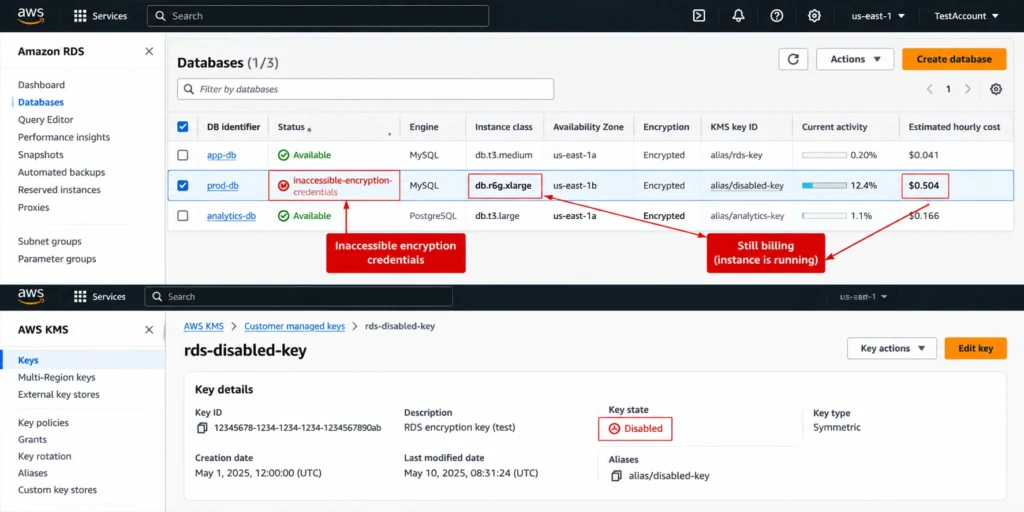
When this happens, the RDS instance enters the inaccessible-encryption-credentials state. AWS cannot perform I/O operations because it cannot decrypt the EBS volume. Your database becomes completely unavailable — no reads, no writes, no connections. The instance status shows as ‘inaccessible-encryption-credentials’ in the RDS console. Critically: the instance continues billing at its full hourly rate while in this state.

Recoverable vs Non-Recoverable States

There are two sub-states within the inaccessible-encryption-credentials condition, and the search term ‘inaccessible-encryption-credentials-recoverable’ refers to the state where recovery without data loss is still possible:

Recoverable (inaccessible-encryption-credentials-recoverable): The KMS key was disabled or the key policy was modified. Re-enabling the key or restoring the policy allows the instance to recover automatically. AWS typically detects the corrected key availability within 30 minutes and resumes normal operations. No data loss occurs. This state is recoverable if you act before the automated backup retention period expires.

Non-recoverable: The KMS key was deleted. KMS keys have a mandatory 7-30 day pending deletion period before permanent deletion. During this window, you can cancel the deletion and recover the instance. Once the key is permanently deleted (after the pending period expires), the encrypted data is cryptographically destroyed and permanently unrecoverable. No restore, no snapshot, no AWS support can recover data encrypted with a permanently deleted key.

The cost of the non-recoverable state: you have lost your database permanently and continue billing for the inaccessible instance until you delete it. Recovery means building the database from scratch, which can involve weeks of engineering effort, data re-ingestion, and potential business impact.

Amazon RDS console DB Instances list with one instance highlighted showing Status as inaccessible-encryption-credentials in red text, with the instance details panel below showing the Events tab with the encryption credentials error message timestamp, and a side panel showing the linked KMS key ARN with the key status shown as Disabled in AWS KMS console

How Do You Prevent the Inaccessible Encryption Credentials Error?

Never Delete KMS Keys Used by Active RDS Instances

Before deleting any KMS key, run an AWS Config rule or a manual check: aws kms list-resource-tags –key-id [KEY_ID] and search for RDS-related tags. More reliably, use AWS Config managed rule KMS_KEY_DELETION_AUDIT to alert when a scheduled deletion is requested for a key that is tagged as being used by RDS or that appears in the RDS encryption configuration.

Use Separate CMKs for Production vs Non-Production

Sharing a single CMK across production and non-production RDS instances means a key deletion triggered by a developer cleaning up a dev environment could affect production instances. Separate CMKs for each environment (production, staging, development) cost $1/month each and prevent cross-environment key management accidents.

Enable Key Rotation and Never Disable Keys Without Checking Dependents

Enable automatic annual key rotation for all CMKs used with RDS. Automatic rotation generates a new cryptographic material annually while keeping the same key ID and ARN, ensuring continuity without any action required. Before disabling or modifying the policy of any CMK, query AWS KMS and RDS to verify no active instances depend on it.

Monitor Key Status with CloudWatch Events

AWS KMS publishes events to CloudWatch Events when key state changes. Configure a CloudWatch Events rule to alert your operations team when a CMK enters Pending Deletion, Disabled, or Unavailable status. The alert gives you the 7-30 day window to cancel a deletion or re-enable a disabled key before the instance becomes permanently inaccessible.


Also read: RDS Reserved Instances: Engine-by-Engine Pricing and Commitment Guide 


How Do You Encrypt an Existing Unencrypted RDS Database?

RDS encryption cannot be enabled on an existing unencrypted instance. The encryption option is set at instance creation and cannot be changed afterward. To encrypt an existing unencrypted database, you must follow a snapshot-based migration process.

The Snapshot-Based Encryption Migration Process

Step 1: Create a manual snapshot of the unencrypted RDS instance. Duration: minutes to hours depending on instance size. Cost: the snapshot storage charges apply from this point.

Step 2: Copy the snapshot with encryption enabled. Use the RDS console or CLI: aws rds copy-db-snapshot –source-db-snapshot-identifier [snapshot-id] –target-db-snapshot-identifier [encrypted-snapshot-id] –kms-key-id [key-arn]. This creates a new encrypted copy of the snapshot. Duration: minutes to hours. Cost: $0.02/GB for data transfer if copying across regions, plus storage charges for the new encrypted snapshot.

Step 3: Restore a new RDS instance from the encrypted snapshot. Duration: minutes to hours depending on instance size. Cost: normal RDS instance charges apply from restore time.

Step 4: Update your application connection strings to point to the new encrypted instance endpoint. Test thoroughly.

Step 5: Delete the old unencrypted instance and the unencrypted source snapshot.

Total migration time for a 500 GB database: typically 2-6 hours from first snapshot to application cutover. During this window, you are paying for both the old unencrypted instance (until deletion) and the new encrypted instance (from restore time). Plan the migration during a low-traffic window to minimize the overlap duration and any potential data divergence between the two instances.

Amazon RDS console Copy DB Snapshot interface with the destination snapshot identifier field filled in, the Enable Encryption checkbox selected, and a KMS key dropdown showing a customer-managed key ARN selected for encrypting the snapshot copy, illustrating the snapshot-copy method used to encrypt an existing unencrypted RDS database

What Is the Difference Between RDS Encryption and SQL Server TDE?

For SQL Server on RDS, there are two encryption mechanisms. Understanding rds encryption vs tde is particularly relevant for teams migrating from on-premises SQL Server.

RDS Native Encryption (KMS-Based)

RDS native encryption uses AWS KMS to encrypt the underlying EBS volumes. It operates at the storage layer, below the SQL Server engine. All data written to disk is automatically encrypted regardless of the table, column, or schema. The SQL Server engine has no awareness of the encryption. Configuration is done once at instance creation and applies to all data uniformly. No SQL Server configuration, certificates, or database keys are involved.

Transparent Data Encryption (TDE) on SQL Server

SQL Server TDE (Transparent Data Encryption) is a SQL Server-level encryption mechanism that encrypts data at the database file level. TDE is managed within SQL Server using certificates stored in the master database. When a database is TDE-encrypted, SQL Server encrypts data pages before writing them to disk and decrypts them when reading.

On RDS for SQL Server, Microsoft supports TDE for SQL Server Standard Edition 2 and Enterprise Edition. AWS RDS supports TDE as an opt-in option group, configured separately from native RDS encryption.

Side-by-Side Comparison

Factor RDS Native Encryption (KMS) SQL Server TDE Cost Difference Best For
Encryption layer EBS storage driver (below DB engine) SQL Server database file layer None (both free to operate) Native: simpler management
Configuration Set at instance creation, automatic Per-database, SQL Server certificates Native: no ongoing management TDE: per-database granularity
Key management AWS KMS ($1/month CMK) SQL Server certificates in master DB Native: $1/month; TDE: no extra cost Native: centralized KMS management
Performance impact 1-3% (hardware AES-NI) 1-5% (SQL engine overhead) Native slightly lower overhead Similar for most workloads
Applies to backups/snapshots Yes (automatically) Yes (TDE-encrypted backups) Equal Both protect backup data
Can combine both? Yes Yes Additive cost: $1/month extra Defense-in-depth for compliance


Also read: RDS Reserved Instances: 1-Year vs 3-Year Break-Even Across All Engines


How Does Encryption Affect Reserved Instance Optimization?

RDS encryption has no impact on reserved instance purchasing, eligibility, or savings. Whether an instance is encrypted or not, the reserved instance discount applies based on the engine, instance family, deployment type (Single-AZ or Multi-AZ), and region. An encrypted db.r8g.xlarge PostgreSQL Multi-AZ and an unencrypted db.r8g.xlarge PostgreSQL Multi-AZ are treated identically for reserved instance matching purposes.

The only indirect interaction between encryption and reserved instances is the risk profile: a team running encrypted instances with poorly managed CMKs faces a potential total instance loss scenario (inaccessible-encryption-credentials, non-recoverable). If an instance becomes permanently inaccessible and must be deleted, any reserved instance covering it continues billing until the term expires. The reserved instance does not know or care that the underlying data was lost.

If you are evaluating reserved instances for production RDS instances, verify that your KMS key management practices are sound before committing to multi-year terms. A 3-year All Upfront reservation on an instance that later becomes inaccessible due to a CMK deletion is a non-refundable commitment on a database you can no longer access.

Usage.ai Flex Reserved Instances optimize the compute cost for both encrypted and unencrypted RDS instances with the same analysis and purchase mechanics. Encryption status does not affect the reservation recommendation. The platform refreshes its analysis every 24 hours versus AWS Cost Explorer’s 72+ hour cycle. If a reservation becomes underutilized because an instance is deprecated or becomes inaccessible, Usage.ai provides cashback and credits. The fee is a percentage of realized savings only.

See how much you can save on RDS with Usage.ai


How Much Does KMS Key Rotation Cost for RDS Encryption?

KMS key rotation is one of the most commonly misunderstood cost components in RDS encryption. Here is the complete picture.

Automatic Annual Rotation

AWS KMS supports automatic key rotation for symmetric CMKs, which rotates the underlying cryptographic material annually while keeping the same key ID, ARN, and key alias. Automatic rotation is enabled per key and costs nothing beyond the standard $1/month key storage fee. AWS generates new cryptographic material, and all new Encrypt operations use the new material. Existing data encrypted with previous material can still be decrypted because KMS retains all previous key versions. For RDS, enabling automatic annual rotation is a zero-cost best practice that provides ongoing cryptographic hygiene without any operational overhead.

On-Demand Rotation

AWS KMS also supports on-demand key rotation as of 2023, allowing you to rotate the key material outside the annual cycle. Each on-demand rotation is charged at the same rate as standard KMS API calls ($0.03/10K requests). An on-demand rotation of a key used by a large RDS fleet might generate hundreds of API calls as EBS re-encrypts data keys, but the total cost remains negligible, typically under $0.10 per rotation event.

Key Rotation Does Not Re-Encrypt Existing Data

A critical operational fact: KMS key rotation does not re-encrypt your existing RDS data. The existing EBS volume data remains encrypted with the previous key material. Only new Encrypt operations (new snapshots, new transaction log segments) use the rotated key material. This means key rotation is fast, cheap, and non-disruptive. It does not trigger a read-write cycle on your database storage and has no performance impact.

How Does Encryption Affect Snapshot Sharing Across Accounts?

Sharing RDS snapshots across AWS accounts is a common practice for multi-account organizations, development seeding, and disaster recovery. RDS encryption adds specific constraints and costs to this workflow.

Sharing Unencrypted Snapshots

Unencrypted RDS snapshots can be shared directly with another AWS account using the RDS console or CLI. The target account can restore from the shared snapshot at any time. No KMS coordination required. No additional cost beyond the snapshot storage charged to the sharing account.

Sharing Encrypted Snapshots with a CMK

Encrypted snapshots require a customer-managed KMS key (not the default AWS-managed key). To share an encrypted snapshot: update the CMK key policy to grant the target account kms:Decrypt and kms:CreateGrant permissions. 

Share the snapshot with the target account ID. The target account can now see the snapshot but needs to copy it to their own account before restoring, re-encrypting with their own CMK during the copy. The copy generates $0.02/GB in data transfer costs plus the target CMK cost of $1/month. The source account’s CMK must remain active (not deleted or disabled) for as long as the target account needs to copy or access the snapshot.

Why You Cannot Share Snapshots Using the Default AWS-Managed Key

The default AWS-managed key for RDS (aws/rds) is specific to each AWS account and region. It cannot be shared or granted to other accounts. Snapshots encrypted with the default key are locked to the account that created them. This is by design: the AWS-managed key is intended for single-account use where administrative control of the key is not required. If you anticipate ever needing to share encrypted snapshots across accounts, use a customer-managed KMS key from the beginning. Migrating from AWS-managed key to CMK requires the snapshot-copy-restore process.

What Is the Best Practice for KMS Key Management Across RDS?

Use AWS-Managed Keys for Simple Deployments

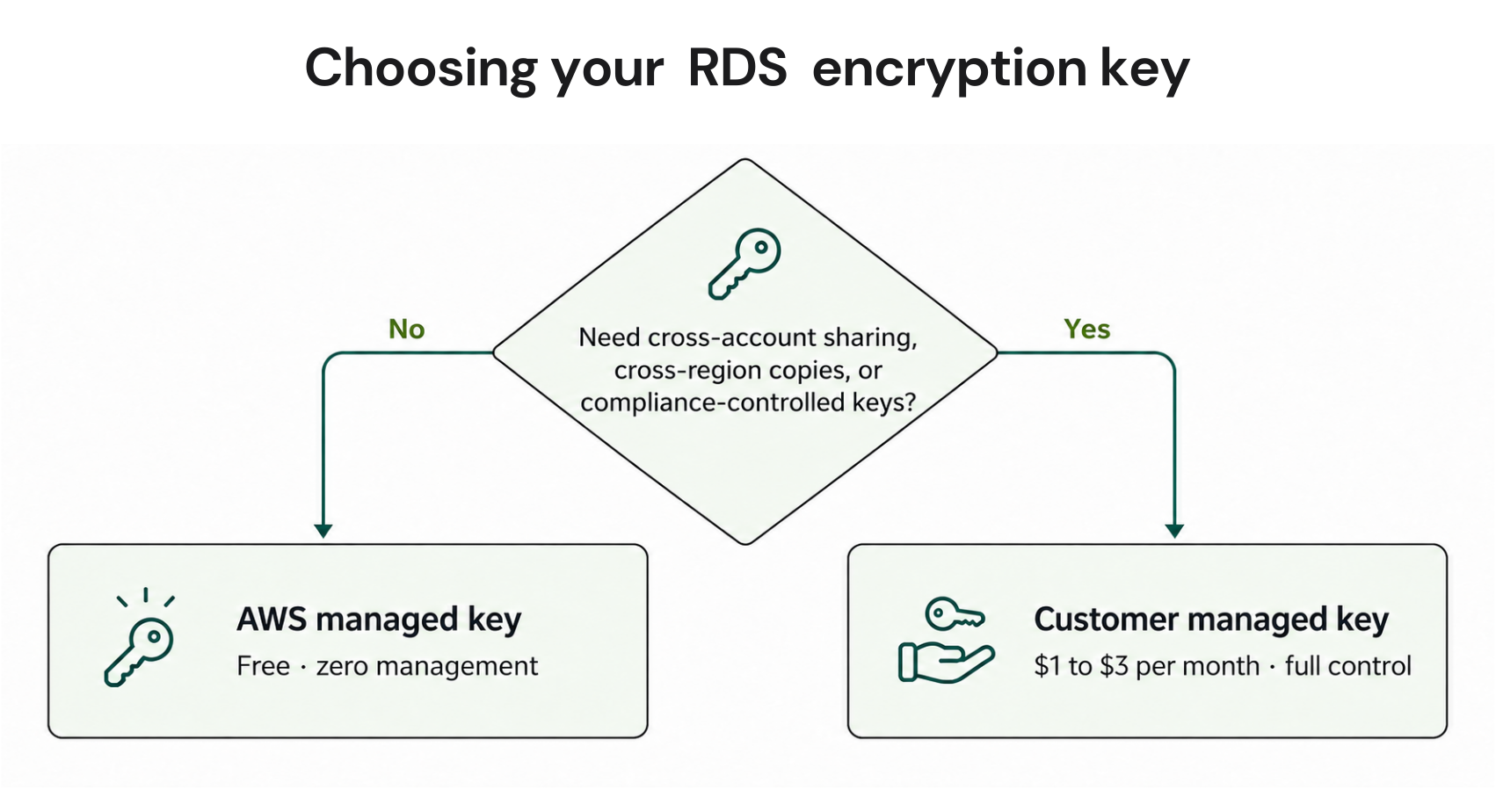
The AWS-managed key (aws/rds) is free, automatically rotated annually, and requires no management. It is the correct choice for teams without specific compliance requirements for customer-controlled encryption keys, cross-account snapshot sharing, or cross-region replication. For most small-to-medium production RDS deployments, the AWS-managed key provides strong encryption with zero operational overhead.

Use CMKs When You Need: Cross-Region Copies, Cross-Account Sharing, or Compliance Controls

Customer-managed KMS keys are required for: copying encrypted snapshots to another region (AWS-managed keys cannot be used cross-region), sharing encrypted snapshots with another AWS account, meeting compliance frameworks that require customer control over key lifecycle (PCI-DSS, FedRAMP, HIPAA in some interpretations), and using AWS KMS key policies to restrict which IAM principals can access the encrypted data.

CMK Tagging and Inventory

Tag every CMK used with RDS with the purpose, environment, owning team, and associated service. Use tags: Purpose=RDS-Encryption, Environment=Production, Team=DatabaseOps, Service=RDS. These tags enable automated audits that prevent accidental deletion and make it easier to answer ‘what is this key used for?’ before a maintenance action.

Never Disable or Delete Keys Without Checking Dependents First

Before any key management action (disable, schedule deletion, update key policy), query all RDS instances in the region to confirm none are encrypted with the target key. AWS Config, AWS Security Hub, and AWS Resource Explorer can all surface RDS instances by encryption key. Make this check a mandatory step in your key management runbook.


Set up Usage AI in 30 minutes. Save from day one.No infrastructure changes. No lock-in. If Usage.ai doesn’t save you money, you pay nothing.FIND MY SAVINGS


Frequently Asked Questions

1. Does AWS charge for encryption using KMS?

The AWS-managed KMS key for RDS (aws/rds) is free with no monthly charge. Customer-managed KMS keys cost $1 per key per month, pro-rated hourly. API calls to KMS (GenerateDataKey, Decrypt) cost $0.03 per 10,000 requests. A typical single-instance deployment with a CMK costs $12-13/year in total KMS charges. Verify at aws.amazon.com/kms/pricing — rates change.


2. Is RDS encrypted by default?

No. RDS encryption at rest is not enabled by default. You must explicitly enable encryption when creating an RDS instance. Encryption cannot be enabled on an existing unencrypted instance — it requires the snapshot-copy-restore migration process. AWS Organizations Service Control Policies (SCPs) can enforce encryption at creation time across accounts.


3. Does database encryption affect performance?

Minimally. RDS encryption at rest uses AES-256 at the EBS storage driver level with hardware AES-NI acceleration on all current-generation instances. Performance impact is typically 1-3% on throughput and latency. CPU overhead is under 2% for most workloads. The impact is not zero but is rarely large enough to affect instance sizing decisions or require workload redesign.


4. What causes inaccessible encryption credentials on RDS?

The error occurs when the KMS key used to encrypt the RDS instance is deleted, disabled, or has its key policy modified to exclude the RDS service role. If the key is disabled or policy-modified, the state is potentially recoverable by re-enabling the key or restoring the policy. If the key is permanently deleted (after the 7-30 day pending deletion period), the encrypted data is permanently unrecoverable.


5. Can you encrypt an existing RDS database?

Not directly. Encryption must be set at creation time. To encrypt an existing unencrypted database: create a manual snapshot, copy the snapshot with encryption enabled specifying a KMS key, restore a new instance from the encrypted snapshot, and update application connection strings. The process typically takes 2-6 hours for production-size databases. Plan for a maintenance window with both instances running simultaneously.


6. What is the difference between RDS encryption and SQL Server TDE?

RDS native encryption (KMS-based) operates at the EBS storage layer, below the database engine, requiring no SQL Server configuration. SQL Server TDE operates at the database file level within the SQL Server engine, using SQL Server certificates. Both protect data at rest. Native RDS encryption is simpler to manage. TDE provides per-database granularity and is required when migrating TDE-encrypted on-premises databases to RDS.


7. Do read replicas need to be encrypted?

Yes, if the source instance is encrypted. You cannot create an unencrypted read replica from an encrypted RDS source. Read replicas inherit encryption automatically and use the same KMS key as the source or a different CMK you specify. The replica encryption adds no KMS key cost if using the same key. Specifying a different CMK for the replica adds $1/month for that key.


8. Can you share encrypted RDS snapshots with another account?

Yes, with a customer-managed KMS key. You cannot share snapshots encrypted with the default AWS-managed key across accounts. To share: use a CMK, add the target account to the CMK key policy granting kms:Decrypt and kms:CreateGrant permissions, then share the snapshot. The target account can copy the snapshot and re-encrypt it with their own CMK. No additional KMS charges beyond the standard $1/month and API call fees.

Cut cloud cost with automation
Latest from our blogs