.png)



Every RDS database running on-demand is paying a premium for flexibility that most production databases do not need. Reserved instances eliminate that premium by trading a scheduling commitment for a pricing discount. The exchange is simple: you agree to run a specific type of database for 1 or 3 years, AWS charges you 33-69% less for it.
Getting the most out of RDS reserved instances requires more than clicking ‘Purchase RI’ in the console. The teams that extract maximum savings understand the size flexibility mechanics, avoid the common mistake of reserving oversized instances, know which engines get flexibility and which do not, and monitor utilization so underused reservations get caught early.
This guide covers the complete process — from understanding what an RDS RI actually is, to the six-step purchase sequence, to monitoring after purchase.
See the full RDS Reserved Instances engine-by-engine pricing guide
What Is an RDS Reserved Instance?
An RDS Reserved Instance is not a physical server or a specific database instance. It is a billing discount that AWS applies automatically to your running RDS databases when their attributes match the reservation.
When you purchase a reserved instance, you specify: database engine (MySQL, PostgreSQL, MariaDB, Oracle, SQL Server, Aurora), instance family (db.r8g, db.m7g, db.t4g), deployment type (Single-AZ or Multi-AZ), region, term (1-year or 3-year), and payment option (No Upfront, Partial Upfront, or All Upfront). AWS then applies the reserved rate to any running database in your account matching those attributes, automatically, without any configuration change to the database.
Key mechanic: the RI is a billing artifact, not a resource. Nothing changes about your database when you purchase an RI. The same instance keeps running. The only change is what AWS charges you per hour for it. If you stop or delete the database, the RI continues billing until the term expires — the commitment is to the payment schedule, not to a running instance.
This is why buying the right RI matters so much. An unused RI that does not match any running database is pure waste. An RI that is always matched to a running database delivers savings every hour of the term.
How Much Do RDS Reserved Instances Save?
The savings range from approximately 33% on 1-year No Upfront to up to 69% on 3-year All Upfront, depending on the engine and instance family. Here is a grounded reference using verified rates for MySQL on Graviton4 instances in US East (Vantage.sh May 2026, sourced from AWS API). Verify at aws.amazon.com/rds/mysql/pricing — rates change.
| Instance | On-Demand/hr | 1-Yr No Upfront/hr | 1-Yr Savings | Monthly Saving (1-Yr RI) | Annual Saving (1-Yr RI) |
| db.r8g.large (Single-AZ) | $0.239 | $0.160 | 33% | $57.67 | $692 |
| db.r8g.xlarge (Single-AZ) | $0.478 | $0.320 | 33% | $115.34 | $1,384 |
| db.r8g.large (Multi-AZ) | $0.478 | $0.320 | 33% | $115.34 | $1,384 |
| db.r8g.xlarge (Multi-AZ) | $0.956 | $0.640 | 33% | $230.68 | $2,768 |
| db.r8g.2xlarge (Multi-AZ) | $1.912 | $1.280 | 33% | $461.36 | $5,536 |
Source: Vantage.sh May 18-19, 2026 (AWS API). MySQL, US East (N. Virginia), 1-year No Upfront RI. Monthly saving = (on-demand – RI) x 730 hrs. 3-year RI: verify current availability at aws.amazon.com/rds/mysql/pricing — Vantage.sh shows N/A for 3-yr on r8g. Rates change.
The 33% savings shown above are for 1-year No Upfront — the most conservative commitment. With 3-year All Upfront terms (when available for the engine and instance type), savings reach up to 55-69%. A fleet of 10 db.r8g.xlarge Single-AZ instances at 1-year No Upfront: 10 x $1,384/year = $13,840/year in annual savings. That same fleet on 3-year All Upfront (if available): potentially $25,000-30,000+/year.
The biggest absolute savings come from reserving your largest and most stable instances first. Prioritize by monthly on-demand cost, not by percentage savings.
Does RDS Have Convertible Reserved Instances?
No. This is one of the most common points of confusion for teams moving from EC2 RI management to RDS RI management.
EC2 offers two RI types: Standard (highest discount, locked configuration) and Convertible (slightly lower discount, can be exchanged for different instance types mid-term). RDS offers only Standard Reserved Instances. There are no Convertible RDS Reserved Instances.
What RDS does offer instead is size flexibility — which covers a different kind of flexibility. Size flexibility means a single reservation can automatically cover different sizes within the same instance family. It does not allow you to change the engine, the region, or the instance family. The reservation is still locked to those attributes for the full term.
No Convertible RIs for RDS — this is intentional and permanent. If you need flexibility to change RDS configurations mid-term, the correct product is the AWS Database Savings Plan (for database-tier spend commitments) or careful use of 1-year terms rather than 3-year commitments. Source: AWS official documentation.
What Is RDS Reserved Instance Size Flexibility — and Which Engines Get It?
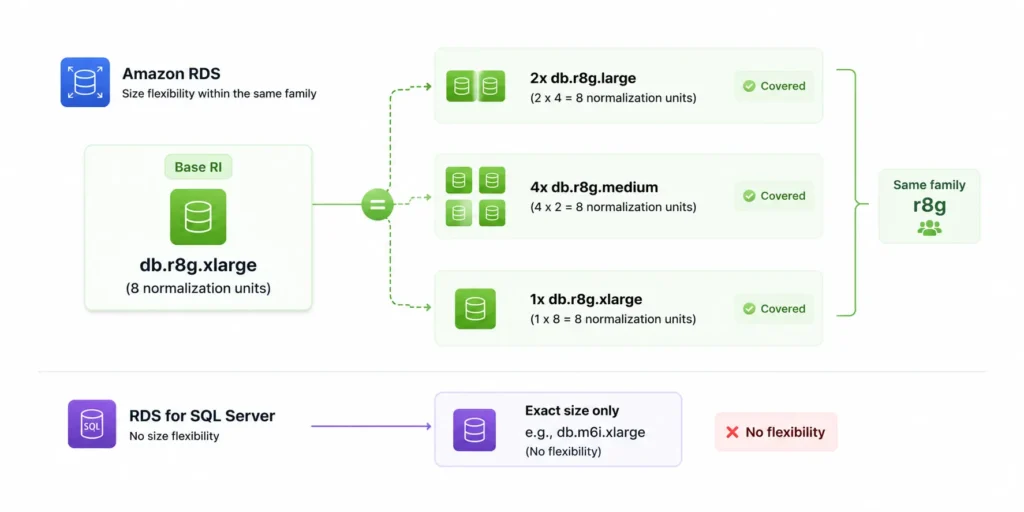
Size flexibility is the mechanism that lets a single RDS RI cover multiple database instances of different sizes within the same family. It works using normalization units that assign a relative weight to each instance size.
Normalization Units for RDS
db.micro = 0.5 | db.small = 1 | db.medium = 2 | db.large = 4 | db.xlarge = 8 | db.2xlarge = 16 | db.4xlarge = 32 | db.8xlarge = 64 | db.16xlarge = 128.
A reservation purchased for db.r8g.xlarge (8 normalization units) automatically covers: 2x db.r8g.large (4 units each), 4x db.r8g.medium (2 units each), or any other combination within the r8g family totaling 8 units. Conversely, the same 8-unit r8g.xlarge reservation covers 50% of a db.r8g.2xlarge (16 units) — the remaining 50% bills at on-demand.
Which Engines Support Size Flexibility
Size flexibility applies to: MySQL, MariaDB, PostgreSQL, Amazon Aurora (all editions), Oracle BYOL (Bring Your Own License).
Size flexibility does NOT apply to: Microsoft SQL Server (License Included or BYOL), Oracle License Included. These engines require exact-size reservations. A db.r8g.xlarge SQL Server RI covers only db.r8g.xlarge SQL Server instances — not db.r8g.large or any other size.
This distinction matters enormously for teams running SQL Server or Oracle LI. Every size change requires a new RI purchase. For MySQL, PostgreSQL, and MariaDB teams, size flexibility provides genuine coverage continuity even after downsizing or splitting instances.
Related: RDS MySQL right-sizing before committing to an RI
The Six-Step Process for Maximizing RDS Reserved Instance Savings
Step 1: Right-Size Every Instance Before You Reserve Anything
Reserving an oversized database locks the waste in for 1-3 years. A 33% discount on an instance you only need at 40% utilization saves less than the same discount on the correctly-sized instance you run at 80% utilization.
Before purchasing any RI, run a 30-day CloudWatch analysis on each target instance. Check four metrics: CPUUtilization (P90 below 40% = over-provisioned on compute), FreeableMemory (consistently above 25% of total RAM = over-provisioned on memory), DatabaseConnections (check against the max_connections ceiling for the proposed smaller size), and BufferCacheHitRatio (above 99% = working set fits comfortably in current buffer pool, downsizing RAM may be safe).
The financial case for right-sizing first: a db.r8g.xlarge RI at 33% savings costs $1,384/year less than on-demand. A correctly-sized db.r8g.large RI at 33% savings costs $692/year less AND the base compute rate is $692/year cheaper. Right-sizing before reserving doubles the effective savings on the oversized-to-right-sized component.
Step 2: Check Extended Support Status Before Purchasing
If any target database is running MySQL 5.7 or PostgreSQL 11, stop. These engines are in Year 3 Extended Support since March 1, 2026 ($0.200/vCPU-hr surcharge). The Extended Support charge is not reduced by reserved instances. It applies on top of the RI rate.
For a db.r8g.xlarge MySQL 5.7 (4 vCPUs), the Extended Support surcharge is 4 x $0.200 x 730 = $584/month. The 1-year RI compute cost is $0.320/hr x 730 = $233.60/month. The RI saves $115.34/month. The Extended Support costs $584/month. You are saving $115 while spending $584 unnecessarily. Upgrade the engine to MySQL 8.0 or 8.4 first, which eliminates the $584/month surcharge. Then reserve. The engine upgrade delivers 5x the savings of the RI optimization.
Step 3: Decide Between Single-AZ and Multi-AZ Before Purchasing
Single-AZ and Multi-AZ reserved instances are purchased separately and cover only their matching deployment type. A Single-AZ RI on a Multi-AZ instance saves nothing. A Multi-AZ RI on a Single-AZ instance also saves nothing — the RI is wasted.
Before purchasing, audit your fleet for deployment type. Use the AWS CLI: aws rds describe-db-instances –query ‘DBInstances[*].[DBInstanceIdentifier,MultiAZ,DBInstanceClass]’ –output table. Identify every Multi-AZ instance (production, critical workloads) and every Single-AZ instance (dev, staging, reporting). Purchase Multi-AZ RIs for Multi-AZ instances, Single-AZ RIs for Single-AZ instances. Do not mix.
Also use this audit to catch the most common source of wasted spend: non-production databases incorrectly running Multi-AZ. Dev and staging databases almost never need high availability. Converting them to Single-AZ before purchasing their reservations saves the Multi-AZ premium on top of the RI discount.
RDS Multi-AZ vs Single-AZ: the cost of high availability
Step 4: Buy at the Smallest Normalization Unit for Maximum Flexibility
This is the most underused technique in RDS RI purchasing for teams running MySQL, PostgreSQL, and MariaDB. For engines that support size flexibility, purchasing a reservation at the smallest instance size you might ever need gives you the most flexible coverage at the same total commitment.
Example: you need coverage equivalent to 1x db.r8g.xlarge (8 normalization units). Option A: purchase 1x db.r8g.xlarge RI. Option B: purchase 2x db.r8g.large RIs (4 units each = 8 total). Both cost the same in total. But with Option B, if you later right-size one of your xlarge instances to large, the two db.r8g.large RIs continue covering both large instances with zero waste. With Option A, the xlarge RI has excess units if the instance was downsized (covering 50% of a large at the reserved rate and 50% at on-demand).
The Concurrency Labs guidance on this is clear: for engines with size flexibility, always buy at the smallest normalization unit. It gives you proportionally identical savings at higher coverage flexibility over the term.
Important caveat: this strategy only applies to engines with size flexibility (MySQL, PostgreSQL, MariaDB, Aurora, Oracle BYOL). For SQL Server and Oracle LI — which have no size flexibility — purchase exactly the instance size you are running. No smaller, no larger.
Step 5: Choose the Payment Option That Matches Your Situation
Three payment options exist, each making a different trade-off between upfront capital and effective hourly savings rate.
No Upfront: Zero capital required today. Charged a discounted hourly rate for the full term. Saves approximately 30-33% versus on-demand. Available for 1-year terms only (3-year commitments require at least Partial Upfront). Best for: teams with constrained capital budgets, first-time RI purchases where you want to test the commitment without a large outlay, or instances where you are not fully confident the workload will remain stable.
Partial Upfront: Moderate lump sum at purchase plus reduced monthly charges for the term. Saves approximately 35-45% depending on engine and instance. Best for: most production databases where you have reasonable confidence in the workload stability and some capital available.
All Upfront: Full term cost paid at purchase. Highest savings rate (up to 55-69% for 3-year terms when available). No monthly charges during the term. Best for: the most stable, longest-running production databases where you have high confidence the workload is not changing for the full term.
The practical rule: start with 1-year No Upfront on your first RI purchase for any database. Review utilization after 12 months. If the RI was fully utilized and the database is still running in the same configuration, renew at Partial or All Upfront for the deeper discount.
| Payment Option | Term Available | Upfront Cost | Typical Savings | Best For |
| No Upfront | 1-year only | $0 | ~30-33% | Low capital, first RI purchase, lower-confidence workloads |
| Partial Upfront | 1-year or 3-year | Moderate (40-60% of term cost) | ~35-50% | Most production databases, balanced capital vs savings |
| All Upfront | 1-year or 3-year | Full term cost | ~45-69% | Highest-confidence stable workloads, maximum savings priority |
Savings percentages are approximate ranges across engines and instance types. Exact rates vary. Verify at aws.amazon.com/rds/pricing for your specific engine and region — rates change.
Step 6: Monitor Utilization Monthly and Act on Underuse Early
Purchasing the RI is not the end of the process. An RI that covers a running database generates savings. An RI whose matching database was deleted or resized generates waste. Monthly utilization monitoring catches this early.
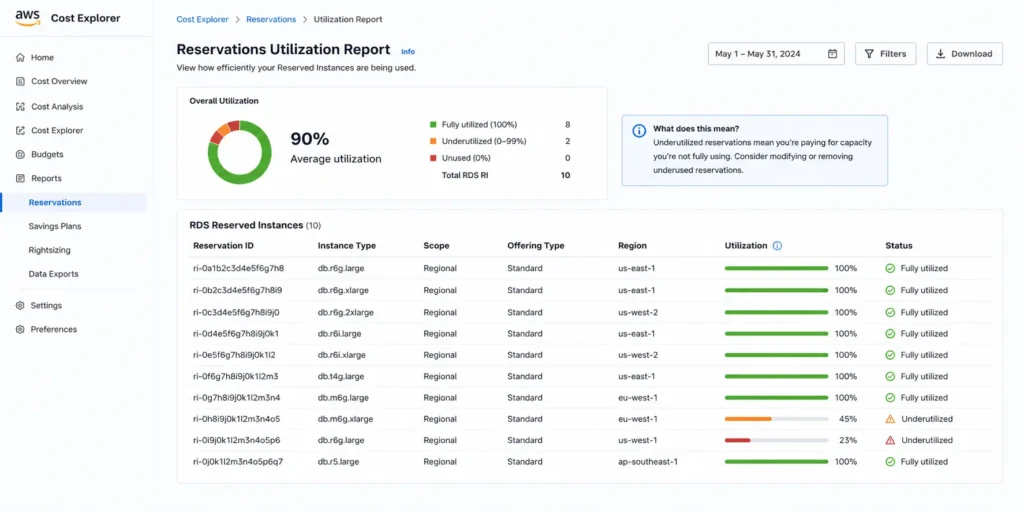
In AWS Cost Explorer, navigate to Reservations > Utilization Report. Filter for Amazon RDS. A well-managed RI fleet should show utilization above 90% across the board. Any RI below 80% utilization deserves immediate investigation: has the database been deleted? Was it resized out of the family? Was it converted between Single-AZ and Multi-AZ?
The CLI equivalent for pulling RI utilization: aws ce get-reservation-utilization –time-period Start=[start],End=[end] –granularity MONTHLY –filter ‘{“Dimensions”:{“Key”:”SERVICE”,”Values”:[“Amazon Relational Database Service”]}}’
When you find an underutilized RI: determine if a matching instance exists elsewhere in the account (the discount automatically covers any matching instance in the same region). If no matching instance exists and the RI still has months left on the term, check whether the database can be restored or a new matching database launched. For Standard RIS (which is all RDS offers), you cannot exchange them for different configurations — the RI runs to term. The practical response is to launch a new database with matching attributes to consume the RI until it expires.
How to Purchase RDS Reserved Instances: AWS Console and CLI
Via the AWS Console
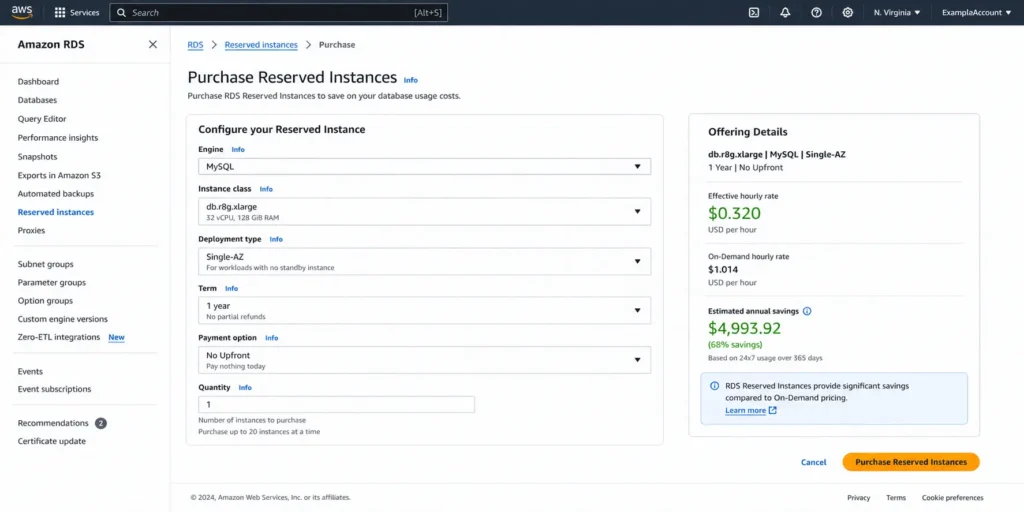
Step 1: Open the Amazon RDS console. In the left navigation, click Reserved Instances under the Resources section.
Step 2: Click Purchase Reserved DB Instances. The purchase form appears.
Step 3: Select your database engine. Note that the engine selection filters which instance types and options are available.
Step 4: Select the DB instance class. For engines with size flexibility (MySQL, PostgreSQL, MariaDB), consider purchasing at the smallest size that covers your normalization unit requirement rather than the exact running size.
Step 5: Select Single-AZ or Multi-AZ deployment type to match your running instances.
Step 6: Select 1-year or 3-year term and No Upfront, Partial Upfront, or All Upfront payment option.
Step 7: Review the Offering Details showing the effective hourly rate and upfront cost. Verify the savings against the current on-demand rate.
Step 8: Enter the quantity and click Purchase. The RI is active immediately and AWS begins applying the discount to any matching running instances within minutes.
Via the AWS CLI
Step 1: Find the offering ID for your desired configuration: aws rds describe-reserved-db-instances-offerings –db-instance-class db.r8g.xlarge –product-description mysql –offering-type ‘No Upfront’ –duration 31536000
Step 2: Note the ReservedDBInstancesOfferingId from the output.
Step 3: Purchase: aws rds purchase-reserved-db-instances-offering –reserved-db-instances-offering-id [offering-id] –reserved-db-instance-id my-reservation-id –db-instance-count 1
Common RDS Reserved Instance Mistakes and How to Avoid Them
Mistake 1: Reserving Before Right-Sizing
The most expensive mistake in RDS RI management. Purchasing a 1-year RI on a db.r8g.xlarge that should be a db.r8g.large locks in 12 months of over-provisioned compute at the reserved rate. The RI saves 33% on the wrong base cost. Right-size first, then reserve. Spend 30 minutes on CloudWatch metrics before buying any RI and the analysis usually pays for itself in the first month.
Mistake 2: Buying Multi-AZ RIs for Non-Production Databases
Development, staging, and QA databases almost never need Multi-AZ. A db.r8g.large Multi-AZ RI costs $233.60/month in reserved fees versus $116.80/month for Single-AZ. Converting 10 non-production databases from Multi-AZ to Single-AZ before reserving saves $14,016/year from that fleet alone — more than most RI optimization programs deliver on the same number of instances.
Mistake 3: Assuming RDS Has Convertible Reserved Instances
Unlike EC2, RDS offers only Standard Reserved Instances. There is no Convertible option that allows you to exchange a reservation mid-term for a different instance type. If you need flexibility to change configurations, use 1-year terms instead of 3-year, or evaluate whether the Database Savings Plan (which offers flexibility at the cost of a lower discount rate) is more appropriate for your workload.
Mistake 4: Ignoring Extended Support Before Reserving
MySQL 5.7 and PostgreSQL 11 are in Year 3 Extended Support since March 2026, incurring $0.200/vCPU-hr surcharges. Buying an RI on a MySQL 5.7 instance saves 33% on the compute while ignoring the Extended Support charge that is typically 2-3x the compute RI cost. Upgrade first, then reserve. The upgrade project eliminates more cost in month 1 than the RI delivers in an entire year.
Mistake 5: Not Tracking Which Reservations Are Actually Being Used
Purchased an RI 14 months ago, then deleted that database and forgot to check if the RI was covering something. Monthly utilization review in Cost Explorer takes 5 minutes and catches this. An unmatched RI that has been billing for 14 months at $116.80/month is $1,635.20 wasted. The review cadence pays for itself immediately.
The Correct Order of Operations for RDS Cost Optimization
Most teams approach RDS cost optimization in the wrong order, optimizing the RI purchasing decision first and the expensive underlying problems later. The correct sequence maximizes savings at each step and avoids locking in bad decisions.
- Identify and eliminate Extended Support charges. MySQL 5.7 or PostgreSQL 11 in Extended Support Year 3? Upgrade first. The Extended Support fee dwarfs the RI savings.
- Convert non-production Multi-AZ to Single-AZ. Dev and staging databases do not need HA. Converting saves the Multi-AZ premium immediately, with no commitment required.
- Right-size instances using 30 days of CloudWatch data. CPUUtilization, FreeableMemory, DatabaseConnections, BufferCacheHitRatio. Downsize any over-provisioned instances before reserving.
- Migrate to current Graviton generation (r8g, m8g) if still on r7g or older. Current generation RIs carry deeper discounts at the same or lower on-demand rate.
- Purchase reserved instances on the clean, right-sized, current-generation fleet. Start with 1-year No Upfront on the highest-spend instances. Review after 12 months before committing to longer terms.
- Monitor utilization monthly. Catch underused reservations early and act before they run to term.
Usage.ai Flex Reserved Instances executes this entire sequence automatically. The platform surfaces Extended Support exposure first, identifies non-production Multi-AZ instances for Single-AZ conversion, evaluates utilization patterns before recommending reservations, and purchases the optimal RI configuration automatically within your approved parameters. Recommendations refresh every 24 hours (versus AWS Cost Explorer’s 72-hour cycle). If any reserved instance becomes underutilized, Usage.ai provides cashback in real money. Fee: percentage of realized savings only. Verified from Usage.ai project documentation.
See how Usage.ai automates RDS reserved instance optimization
Frequently Asked Questions
1. What are RDS reserved instances?
RDS Reserved Instances are billing discounts that AWS applies automatically to running RDS databases whose attributes match the reservation. You commit to a database engine, instance family, region, and deployment type for 1 or 3 years. In exchange, AWS reduces the hourly rate by 33-69% versus on-demand pricing. The database does not change — only the billing rate does. There are no physical resources associated with an RI purchase.
2. How much do RDS reserved instances save?
1-year No Upfront: approximately 30-33%. 3-year All Upfront: up to 55-69% depending on engine and instance. Verified example (db.r8g.large MySQL, US East, 1-yr No Upfront): on-demand $0.239/hr, RI $0.160/hr, savings 33% ($692/year per instance). 3-year terms and upfront payment options deliver deeper discounts. Verify exact rates at aws.amazon.com/rds/pricing — rates change.
3. How do I purchase RDS reserved instances?
AWS console: RDS > Reserved Instances > Purchase Reserved DB Instances. Select engine, instance class, Single-AZ or Multi-AZ, term, payment option, quantity. The RI is active immediately and AWS applies the discount to any matching running instance automatically. AWS CLI: aws rds purchase-reserved-db-instances-offering with the offering ID for your configuration (found via aws rds describe-reserved-db-instances-offerings).
4. Does RDS support Convertible Reserved Instances?
No. RDS offers only Standard Reserved Instances. Unlike EC2, there is no Convertible RI option for RDS. Standard RDS RIs are locked to the purchased configuration (engine, family, region, deployment type) for the full term. The equivalent flexibility mechanism for RDS is size flexibility (within-family coverage for eligible engines) and the AWS Database Savings Plan for spend-based commitments.
5. What is RDS reserved instance size flexibility?
Size flexibility allows a single RDS RI to automatically cover different instance sizes within the same family, using normalization units (large=4, xlarge=8, 2xlarge=16). A db.r8g.xlarge RI covers 2x db.r8g.large, or one db.r8g.xlarge, or any other r8g combination totaling 8 units. Supported engines: MySQL, PostgreSQL, MariaDB, Aurora, Oracle BYOL. Not supported: SQL Server, Oracle License Included. Source: AWS RDS documentation.
6. Can I apply an RDS reserved instance to a read replica?
Yes. Read replicas are standard RDS instances and RI discounts apply automatically to matching replicas. A db.r8g.xlarge MySQL RI in us-east-1 will cover a read replica of the same instance type in the same region. Multi-AZ deployment type does not apply to read replicas (they are Single-AZ by definition), so use Single-AZ RIs for replicas.
7. What happens if I delete my database and still have an active RI?
The RI continues billing until the term expires. It is a payment commitment, not tied to a specific running instance. The RI discount will apply to any other matching database in the same account and region. If no matching instance exists, the RI generates no savings and the committed amount is lost. Launch a new matching database to consume the RI, or let it expire at term end.
8. Should I buy a 1-year or 3-year RDS reserved instance?
Start with 1-year No Upfront on your first RI purchase for any database. Review utilization after 12 months. If the instance ran stably with the same configuration for the full year, consider 3-year Partial or All Upfront for the next term to capture the deeper discount. Never commit to 3-year terms before validating 12 months of stable usage. For databases with active migration roadmaps (Aurora migration, engine upgrades, instance family changes), stay on 1-year terms.