.png)



The flexibility does not remove commitment risk. You still pay the committed hourly amount even when eligible usage falls below it, so the safest strategy is to size against the durable baseline rather than average or peak database spend.
What the database Savings Plan does
The database Savings Plan exchanges a fixed hourly spending commitment for discounted pricing on qualifying Azure database usage. Instead of reserving a specific database instance, you commit to an amount such as $10 per hour and Azure applies the benefit to eligible consumption within the selected scope.That gives the plan its main advantage: eligible usage can change during the term without requiring the same configuration-level commitment associated with reservations.
The “up to 35%” figure needs context. Treat 35% as a ceiling, not the expected blended saving for every database estate. Microsoft’s benchmark uses Azure SQL Database serverless pricing from March 2026.
Your realized savings depend on which eligible database meters consume the commitment and the discount available for those meters.
How the hourly commitment works
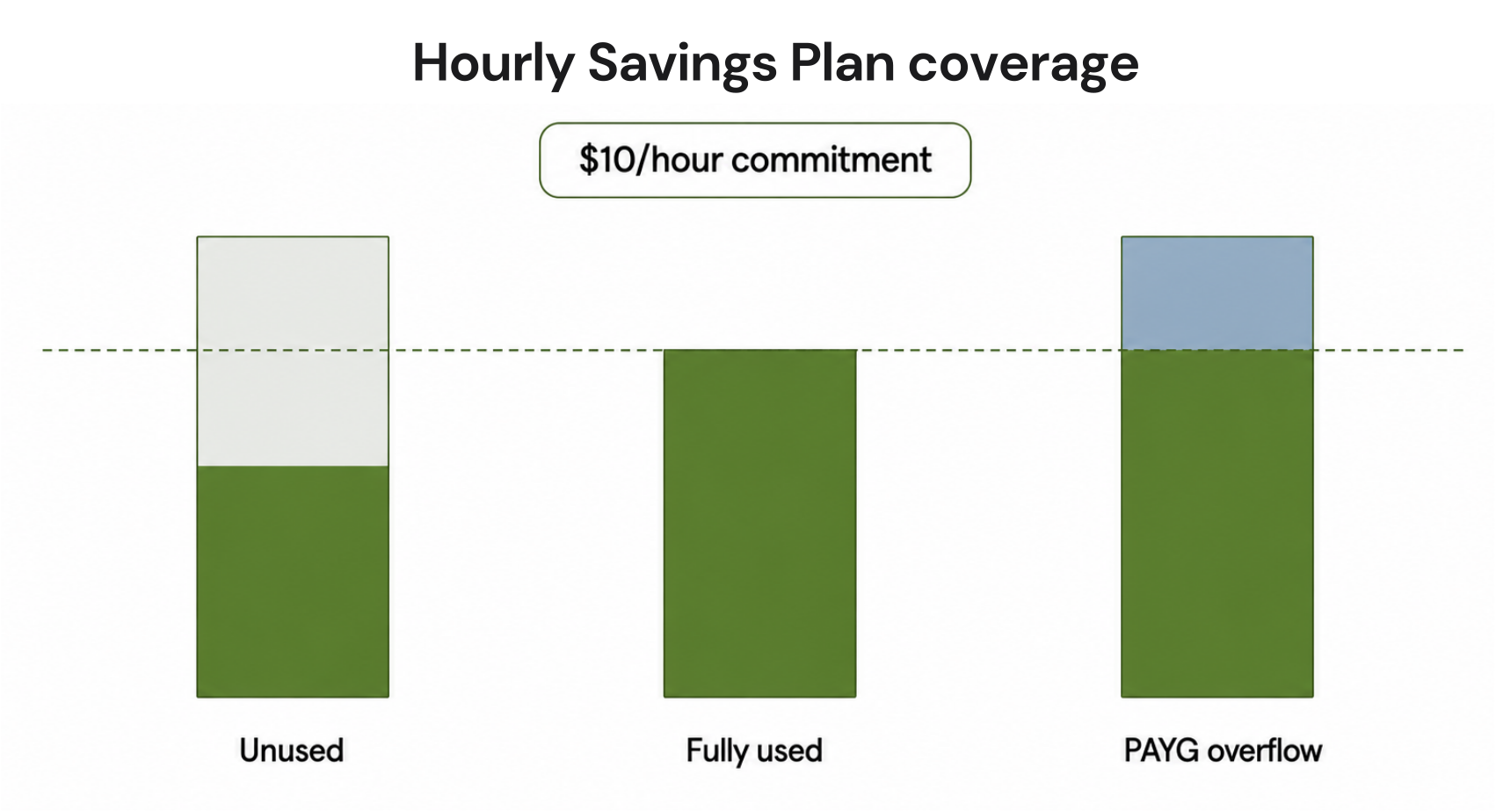
Suppose you purchase a $10-per-hour database Savings Plan.If eligible discounted usage consumes the entire $10 commitment during an hour, the plan is fully utilized. If only $7 of qualifying usage is available, the remaining $3 of committed value for that hour is unused.
It does not carry forward to a busier hour tomorrow.
This is why sizing should focus on the minimum repeatable level of eligible hourly usage rather than monthly averages.
| Hourly situation | Eligible usage | Commitment | Result |
|---|---|---|---|
| Stable hour | $10 | $10 | Fully utilized |
| Low-usage hour | $7 | $10 | $3 of commitment unused |
| High-usage hour | $14 | $10 | $10 covered, remaining usage billed |
Validate which database usage actually qualifies
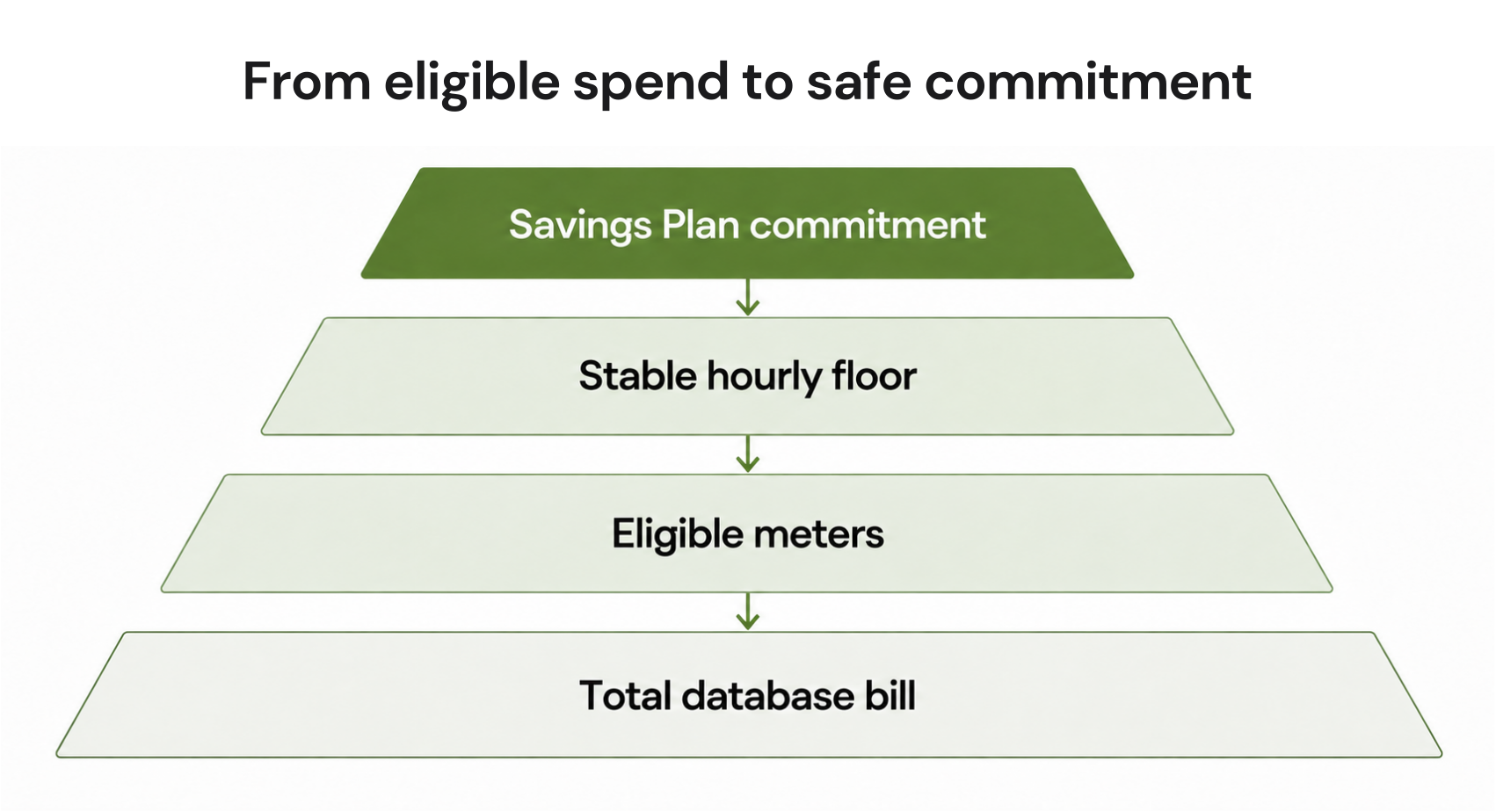
Do not size a Savings Plan from total database spend. Storage, networking, backup, and other charges may follow different billing rules and may not receive the plan’s discount.A service appearing on an eligible-product list also does not mean every meter associated with that service receives the same savings rate.
Before purchasing:
Identify the database services generating the spend.
Review Microsoft’s Savings Plan included-products information.
Check the applicable Savings Plan price sheet.
Separate qualifying meters from non-qualifying costs.
Compare the resulting eligible hourly spend with Cost Management data.
Use that eligible baseline when evaluating the commitment amount.
How Azure applies Savings Plan benefits
Azure automatically determines where eligible Savings Plan benefits create value during each hour. You do not manually assign the commitment to an individual database.Where an eligible reservation and Savings Plan could both cover usage, Azure applies the reservation benefit first. Savings Plan benefits can then apply to remaining eligible usage.
This means FinOps teams should evaluate reservations and Savings Plans together rather than sizing each independently against the same baseline.
For a stable database configuration with strong long-term certainty, a reservation may still provide better economics. For eligible spend expected to move across supported database configurations, the Savings Plan can provide more flexibility.
How to size the commitment safely
Start with the stable hourly floor of qualifying database usage, not the maximum savings percentage. The objective is to maintain consistently high utilization while leaving uncertain or seasonal spend outside the commitment.A useful sizing process is:
1. Isolate eligible usage
Remove storage, networking, backup, and other meters that do not qualify for the database Savings Plan benefit.2. Review multiple usage windows
Look at enough history to understand normal variation, migrations, seasonal behavior, and recent architecture changes.Microsoft’s recommendation tools can help identify commitment opportunities, but recommendations are estimates based on historical usage. They cannot know about an upcoming database migration, application shutdown, acquisition, or major redesign.
3. Find the durable hourly floor
Identify the amount of eligible spend that remains present even during quieter hours.For example:
- Typical eligible usage: $13 to $16/hour
- Quiet-hour eligible usage: $10/hour
- Occasional low point: $8/hour
4. Account for existing reservations
Do not commit the Savings Plan against usage already expected to receive reservation benefits.Review the remaining uncovered eligible usage after reservations are considered.
5. Choose scope intentionally
Broader scope generally gives Azure more eligible usage against which to apply the commitment.Depending on your billing structure and permissions, supported scopes can include:
- Resource group
- Subscription
- Management group
- Shared scope
6. Buy in layers
A commitment does not need to cover every eligible dollar on day one.Starting conservatively lets you observe utilization before adding another layer of committed spend. This is particularly useful when database architecture is evolving.
How to buy a database Savings Plan
Microsoft supports purchase through the Azure portal and REST API. Before following the purchase steps, confirm that your organization has an eligible EA, MCA, or MPA billing arrangement and the required purchasing role. For most teams, the portal is the simplest route.You can pay upfront or monthly. Microsoft sets the same total commitment cost for both options, although monthly billed amounts can vary with exchange rates for MCA or MPA customers transacting in non-USD currencies.
In the Azure portal:
Open the Savings Plan purchase experience.
Select the relevant billing scope.
Review available recommendations.
Enter the hourly commitment amount.
Choose the Savings Plan scope.
Select monthly or upfront billing.
Confirm the purchase details and required permissions.
Review the commitment carefully before completing the purchase.
Monitor utilization after purchase
Savings Plan optimization continues after the purchase. Utilization tells you whether enough eligible usage is available each hour to consume the commitment.Review utilization in Azure Cost Management and investigate periods where the commitment is not fully used. Common causes include:
- Database migrations
- Service consolidation
- Workload shutdowns
- Scaling changes
- Reservation purchases that alter benefit ordering
- Resource movement outside a narrow Savings Plan scope
- Incorrect assumptions about meter eligibility
Savings Plan or reservation?
The right choice depends on how certain you are about the workload and how much architectural flexibility you need.| Workload situation | Better starting point |
|---|---|
| Stable database configuration with predictable long-term usage | Evaluate reservation |
| Stable spend but changing database configurations | Evaluate Savings Plan |
| Stable core plus changing workloads | Consider reservation plus Savings Plan |
| Usage still changing materially | Stay PAYG and gather more history |
Database Savings Plan readiness matrix
Use commitment, confidence and architecture stability together when deciding whether to buy.| Architecture stable | Architecture evolving | |
|---|---|---|
| High confidence in eligible spend | Compare reservation economics with Savings Plan | Savings Plan may fit better |
| Low confidence in eligible spend | Wait or start conservatively | Keep more usage on PAYG |
How we fit the strategy
Azure provides native tools for rightsizing workloads and purchasing Reservations and Savings Plans. These options can reduce the cost of stable usage, but long-term commitments can create risk when workloads change and actual usage no longer matches the original commitment.At Usage.ai, we help teams manage approved Azure commitment purchases as usage changes. With Flex Insured Commitments, teams can get the up to 72% savings of a 1- or 3-year commitment with none of the commitment.
If an eligible Flex Commitment costs more than equivalent pay-as-you-go usage, we provide cashback protection to help cover the difference. See our cashback documentation for details.
Our goal is to help manage the commitment layer after you have established an appropriate Azure compute baseline, particularly when usage is stable enough to benefit from commitment pricing but may change over time.
Build the commitment around evidence
Before increasing database commitment coverage, confirm:- the meters actually qualify
- reservation coverage has already been accounted for
- the hourly baseline is stable
- scope gives the commitment enough eligible usage
- planned migrations are included in the forecast
- the economics still make sense if usage declines
Review your baseline, commitment options, and risk before committing.
Frequently asked questions
How long is an Azure Savings Plan for databases?
The database Savings Plan uses a one-year commitment term. The committed hourly amount is billed throughout that term.
Can Azure database Savings Plans save 35%?
Microsoft advertises savings of up to 35%, but that figure is a ceiling rather than the expected saving for every workload. Microsoft’s benchmark is based on Azure SQL Database serverless pricing from March 2026.
Should I use total database spend to size the plan?
No. First identify the meters eligible for Savings Plan pricing. Storage, networking, backup, and other database-related costs may not qualify and can inflate the commitment baseline if included.
What happens when a reservation and Savings Plan both match usage?
Azure applies reservation benefits before Savings Plan benefits. The Savings Plan can then apply to remaining eligible usage, so existing reservations should be included when sizing the plan.
What happens if I do not use my full hourly commitment?
The unused portion of that hour's commitment does not roll over. You continue paying the committed amount, which is why conservative baseline sizing and ongoing utilization monitoring are important.