.png)



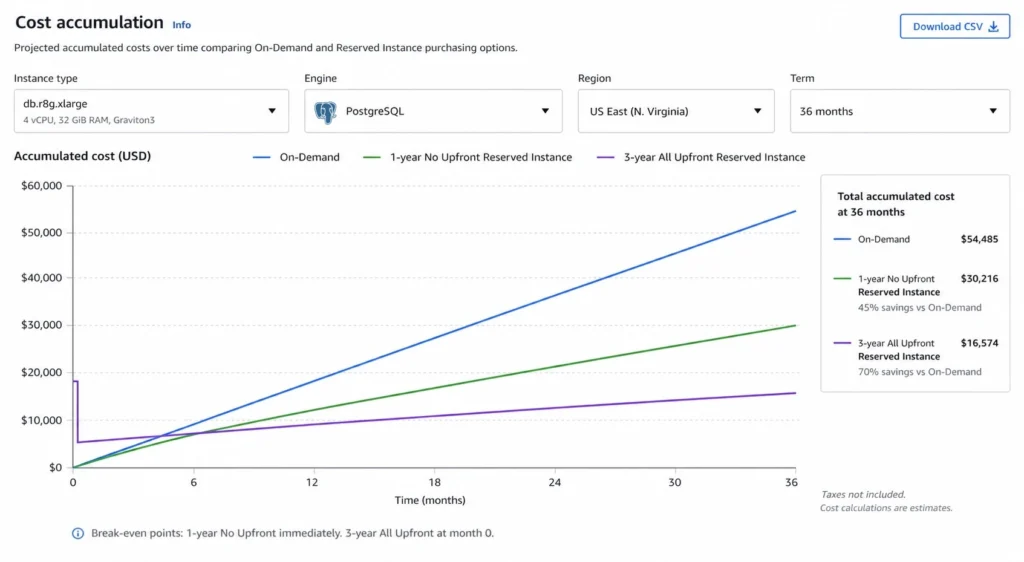
Every RDS instance running on-demand is paying the highest rate AWS offers for that database. RDS reserved instance pricing cuts that rate by 29% on the lowest 1-year commitment to 69% on a 3-year All Upfront term, depending on the engine and instance type. For a db.r8g.xlarge PostgreSQL running Multi-AZ, the difference between on-demand and 3-year reserved is roughly $4,800 per year on a single instance. Multiply that across a production fleet of 20 instances and you are looking at $96,000 per year in avoidable compute spend.
The mechanics of RDS reserved instance pricing are more nuanced than EC2 because the engine matters as much as the instance type. Size flexibility rules differ by engine. Oracle and SQL Server have license model variants that produce dramatically different reservation economics. And Extended Support charges, which have become a significant cost item since March 2026, are specifically excluded from RI discount coverage, creating a trap for teams that reserve first and then discover their engine version is past end-of-standard-support.
This guide covers every engine, every payment option, and every rule that determines how much your RDS reserved instances actually save you.
What Are RDS Reserved Instances and How Do They Work?
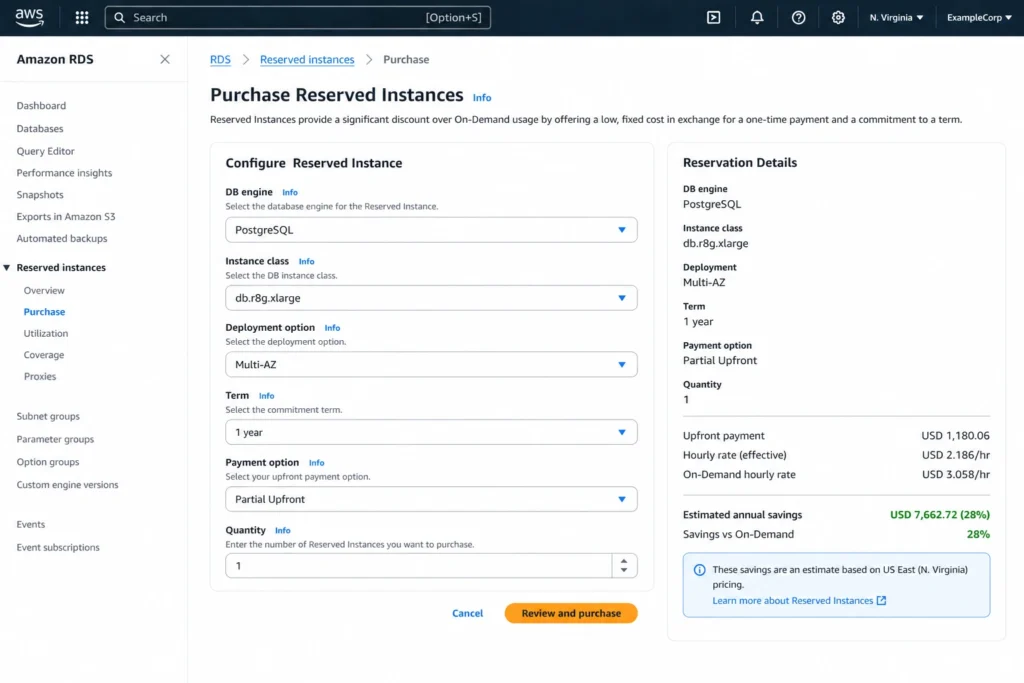
RDS reserved instances are a billing commitment that gives you a discounted hourly rate on RDS instances in exchange for a 1-year or 3-year term. You choose the engine, instance class, region, Multi-AZ or Single-AZ deployment type, and payment option at purchase. AWS automatically applies the reservation discount to matching running instances in your account.
You are billed for the entire term of the reservation regardless of whether the instance is running. If you stop an RDS instance, you continue to pay the reserved rate. If you terminate the instance, you continue to pay for the reservation until the term expires. Reserved instances cannot be cancelled or refunded, which makes sizing decisions important.
RDS reserved instances are classified as Standard type, meaning they apply only to the specific engine and instance family you specify. Unlike EC2, there are no Convertible RDS reserved instances. The size flexibility feature (described in detail below) provides some flexibility within the same instance family, but you cannot change engines or move to a different instance family after purchasing.
Also read: How AWS Savings Plans Share Across Consolidated Billing Accounts
What Is the Exact RDS Reserved Instance Pricing by Engine?
Here is the RDS reserved instance pricing comparison across all major engines for representative instance types in US East (N. Virginia) as of April 2026 (verify at aws.amazon.com/rds/pricing — rates change).
| Engine / Instance | On-Demand/hr (Single-AZ) | 1-Year No Upfront/hr | 1-Year Savings | 3-Year All Upfront/hr | 3-Year Savings |
| MySQL db.t4g.micro | $0.016 | ~$0.011 | ~31% | ~$0.008 | ~50% |
| MySQL db.r8g.large | $0.240 | ~$0.171 | ~29% | ~$0.118 | ~51% |
| PostgreSQL db.r8g.xlarge | $0.480 | ~$0.341 | ~29% | ~$0.235 | ~51% |
| PostgreSQL db.r8g.xlarge Multi-AZ | $0.960 | ~$0.682 | ~29% | ~$0.470 | ~51% |
| MariaDB db.m7g.large | $0.185 | ~$0.131 | ~29% | ~$0.091 | ~51% |
| SQL Server SE db.r8g.xlarge (LI) | $1.224 | ~$0.914 | ~25% | ~$0.727 | ~41% |
| Oracle LI db.r8g.xlarge | $1.562 | ~$1.167 | ~25% | ~$0.928 | ~41% |
| Oracle BYOL db.r8g.xlarge | $0.480 | ~$0.341 | ~29% | ~$0.235 | ~51% |
| Aurora MySQL db.r8g.xlarge | $0.480 | ~$0.264 | ~45% | ~$0.163 | ~66% |
The pattern is clear: open-source engines (MySQL, MariaDB, PostgreSQL) and Oracle BYOL deliver 29-51% savings on already-lower base rates. Commercial engines (SQL Server LI, Oracle LI) deliver 25-41% savings on much higher base rates. Aurora delivers the deepest percentage savings (45-66%) due to its different pricing model. For a team choosing between MySQL and Oracle LI for equivalent compute, the reserved instance price of Oracle LI at $0.928/hr is still 3-4x higher than MySQL reserved at $0.235/hr, even after the 3-year discount.
What Are the Three RDS Reserved Instance Payment Options?
RDS reserved instances offer three payment structures. One important constraint most guides omit: No Upfront is only available for 1-year terms. If you want a 3-year reservation, you must choose either Partial Upfront or All Upfront.
No Upfront (1-Year Only)
Pay nothing at purchase. AWS charges the reserved hourly rate for every hour of the 1-year term regardless of whether the instance is running. Savings versus on-demand are typically 29-34% for most RDS engines. This is the lowest-risk entry point for teams testing reserved instance usage with no capital outlay. Break-even versus on-demand is immediate since the rate is lower from hour one.
Partial Upfront (1-Year or 3-Year)
Pay a portion of the total cost at purchase and a reduced hourly rate for the remaining term. For a 1-year term, Partial Upfront typically saves 33-38% over on-demand. For a 3-year term, savings increase to approximately 50-60%. The upfront payment improves cash flow planning versus All Upfront while delivering meaningfully better savings than No Upfront. Most commonly chosen for 3-year terms where the savings justify the upfront commitment.
All Upfront (1-Year or 3-Year)
Pay the entire term cost at purchase. Zero hourly charges for the reservation duration. Savings versus on-demand are the highest: approximately 34-38% for 1-year, up to 63-69% for 3-year depending on engine and instance type.
Best for teams with capital budget availability and high confidence in long-term stable usage of the specific instance type and engine. The difference between All Upfront and No Upfront on the same term is typically 3-10%, so for large instance types with high absolute costs, the difference in total spend is significant. For a db.r8g.xlarge Oracle BYOL running 3 years, the difference between No Upfront and All Upfront is approximately $1,500-2,000 total.
Which RDS Engines Support Size Flexibility?
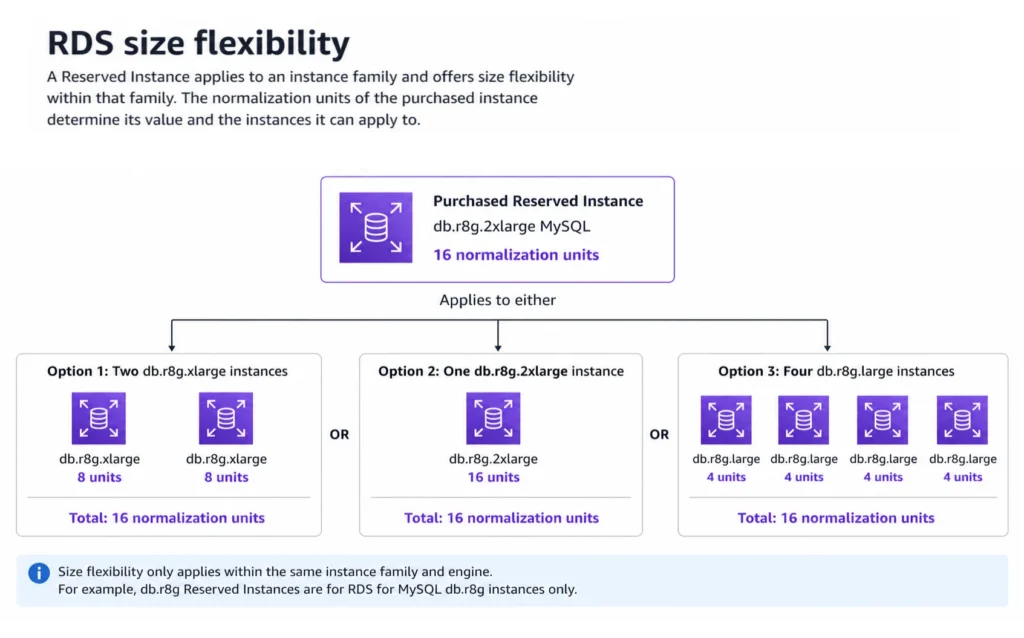
Size flexibility is one of the most useful features of RDS reserved instances, and one of the most misunderstood. It allows your reserved instance discount to apply proportionally to different instance sizes within the same family, using a normalization unit system similar to EC2.
Engines with size flexibility: MySQL, MariaDB, PostgreSQL, Aurora (MySQL and PostgreSQL), Oracle BYOL.
Engines WITHOUT size flexibility: Microsoft SQL Server (all editions), Oracle License Included.
For engines with size flexibility, a db.r8g.xlarge reservation (16 normalization units) can cover two db.r8g.large instances (8 units each = 16 units total). It also applies across Single-AZ and Multi-AZ configurations within the same family. A db.r8g.large PostgreSQL Single-AZ reservation applies to a db.r8g.large PostgreSQL Multi-AZ instance, covering a portion of the compute cost based on normalization units.
Normalization Units for Key Instance Sizes
The normalization unit values for RDS instance sizes follow the same doubling pattern as vCPU count. A db.micro = 0.5 units. A db.small = 1 unit. A db.medium = 2 units. A db.large = 4 units. A db.xlarge = 8 units. A db.2xlarge = 16 units. A db.4xlarge = 32 units. A db.8xlarge = 64 units. If you have a 1-year db.r8g.4xlarge MySQL reservation (32 units) and your workload scales down to four db.r8g.large instances (4 units each = 16 units total), your reservation covers those four instances completely with 16 units remaining unused.
For SQL Server and Oracle LI, where size flexibility does not apply, you must buy reservations that match your exact instance size. Resizing a SQL Server instance voids the reservation coverage. This makes SQL Server reservation sizing significantly more risky and requires more careful capacity planning before committing.
Also read: Understanding Savings Plan Amortized Cost in AWS Cost Explorer
What Is the Real Dollar Savings from RDS Reserved Instances?
Percentage discounts are less useful than dollar amounts when you are trying to justify a reservation to a finance team. Here are four realistic production RDS scenarios with exact annual savings figures.
Scenario 1: PostgreSQL Production Database (db.r8g.xlarge, Multi-AZ)
On-demand: $0.960/hr x 8,760 hrs = $8,410/year. 1-year No Upfront: ~$0.682/hr x 8,760 = ~$5,974/year. Annual savings: $2,436 (29%). 3-year All Upfront amortized: ~$0.470/hr x 8,760 = ~$4,117/year. Annual savings: $4,293 (51%). Over the 3-year term: $12,879 total savings on a single instance. A team running 5 such instances saves $64,395 over 3 years.
Scenario 2: MySQL Web Application Cluster (4x db.r8g.large, Single-AZ)
On-demand: 4 x $0.240/hr x 8,760 = $8,410/year. 1-year Partial Upfront: ~35% savings = ~$5,467/year. Annual savings: ~$2,943. 3-year All Upfront: ~50% savings = ~$4,205/year. Annual savings: ~$4,205/year. Over 3 years: $12,615 total savings on 4 nodes.
Scenario 3: SQL Server Standard (db.r8g.xlarge, Multi-AZ, 2 instances)
On-demand: 2 x $2.448/hr x 8,760 hrs = $42,889/year (Multi-AZ SQL Server SE rates are approximately 2x single-AZ LI rate). 1-year No Upfront: ~25% savings = ~$32,167/year. Annual savings: $10,722. 3-year All Upfront: ~41% savings = ~$25,304/year. Annual savings: $17,585/year. Total 3-year savings: $52,755. The high absolute rate of SQL Server LI means that even a 25% RI discount generates large absolute dollar savings.
Scenario 4: Oracle BYOL vs License Included Decision
This is where the largest RDS savings live and where most guides stop too early. An Oracle LI db.r8g.xlarge Multi-AZ at $3.124/hr on-demand. Oracle BYOL db.r8g.xlarge Multi-AZ at $0.960/hr on-demand (same compute, no license). Migrating from LI to BYOL before reserving saves $2.164/hr = $18,957/year before any RI discount.
After migration to BYOL and buying a 3-year All Upfront RI: effective rate ~$0.470/hr. Total saving vs Oracle LI on-demand: $3.124 – $0.470 = $2.654/hr = $23,249/year. Over 3 years: $69,747 total. If you own Oracle licenses through an Enterprise Agreement, BYOL plus 3-year reserved is the single highest-impact RI decision in the RDS portfolio.
What Is the Break-Even Analysis for RDS Reserved Instances?
The break-even analysis answers: when does a reserved instance become cheaper than paying on-demand for the same period?
For No Upfront reservations, there is no break-even calculation because there is no upfront cost. The reserved rate is lower than on-demand from the first hour. Every hour the instance runs, you save the rate difference. No Upfront is cost-positive from day one.
For Partial Upfront and All Upfront, there is an upfront payment to recover before net savings begin. The break-even month depends on the size of the upfront payment relative to the monthly rate savings.
Worked example for db.r8g.xlarge PostgreSQL Single-AZ, 1-year All Upfront: Upfront payment: approximately $3,200. Monthly savings versus on-demand: $0.480 – $0.365 amortized = $0.115/hr x 730 hrs = $83.95/month. Break-even: $3,200 / $83.95 = 38 months. Wait, that exceeds 12 months. This illustrates an important point: for 1-year All Upfront, the break-even calculation using just the monthly rate comparison can be misleading. The correct comparison is total 1-year All Upfront cost versus total 1-year on-demand cost. If the total All Upfront cost is $3,200 and the on-demand cost for 12 months is $0.480 x 8,760 = $4,205, the All Upfront saves $1,005 (24%). Break-even in this context is 12 months, because the upfront commitment is for exactly 12 months of usage.
For 3-year terms, the break-even question becomes: does the workload actually run for 3 full years at a similar scale? AWS’s guidance that 70% utilization justifies reserved instances applies primarily to the usage ratio, not the term length. A 3-year All Upfront reservation becomes economically superior to 1-year No Upfront at approximately 18-24 months of continuous usage, depending on the rate difference between the two options.
What Is the RDS Extended Support Cost Trap for Reserved Instances?
Starting March 1, 2026, AWS charges $0.20 per vCPU-hour in US East for RDS Extended Support on MySQL and PostgreSQL instances past their major version end-of-standard-support date. This is the most financially dangerous gap in RDS cost management, and it directly interacts with reserved instances in a way that many teams do not anticipate.
The critical rule: RDS reserved instance discounts do NOT apply to Extended Support charges. The Extended Support fee is calculated as an additional vCPU-hour surcharge on top of your instance rate, and reserved instances only discount the base compute rate. Your reserved instance still reduces the compute portion of your bill, but the Extended Support surcharge runs at full price on top.
Worked example: db.m7g.xlarge (4 vCPUs) running MySQL 8.0 after it reaches end-of-standard-support. Base compute on-demand: $0.311/hr. After 3-year All Upfront reserved: ~$0.140/hr. Extended Support surcharge: 4 vCPUs x $0.20/hr = $0.80/hr. Effective hourly rate with reserved node and Extended Support: $0.140 + $0.80 = $0.940/hr. Compare to the on-demand rate without Extended Support: $0.311/hr. The team paying $0.940/hr on a 3-year reserved instance is paying 3x the original on-demand rate, purely because of the Extended Support surcharge on an EOL engine version.
Engine versions approaching end-of-standard-support in 2025-2026: MySQL 8.0 (community EOL is April 2026), PostgreSQL 14 (November 2026). Always verify current EOL dates at docs.aws.amazon.com/AmazonRDS/latest/UserGuide/USER_UpgradeDBInstance.Upgrading.html before purchasing multi-year reserved instances on any engine version.
The right sequence: upgrade your engine version first. Then evaluate reserved instance purchasing. Buying a 3-year reserved instance on an EOL engine version is one of the costliest mistakes in RDS cost management.
How Do RDS Reserved Instances Compare to Database Savings Plans?
Database Savings Plans (launched December 2025) provide an alternative commitment discount for MySQL, PostgreSQL, MariaDB, Aurora, and certain other engines. Here is how to choose between the two options.
| Factor | RDS Reserved Instances | Database Savings Plans | Max Savings | Best For |
| Discount depth | Up to 69% (3-yr All Upfront) | Up to 20% (provisioned Gen 7+) | RIs win by 49 ppt | RIs for committed workloads |
| Engine coverage | All RDS engines incl. Oracle, SQL Server | MySQL, PostgreSQL, MariaDB, Aurora only (Gen 7+) | RIs broader | RIs for Oracle and SQL Server |
| Size/family flexibility | Yes (MySQL, PG, Aurora, Oracle BYOL) | Spend-based, applies across types | Different models | DSP more flexible |
| Region lock | Single region | Any region | DSP more flexible | DSP for multi-region |
| Term length | 1-year or 3-year | 1-year only | RIs: 3-yr option | RIs for 3-yr horizon |
| Covers Serverless | No | Yes (Aurora Serverless up to 35%) | DSP only option | DSP for Aurora Serverless |
| Can stack both | Yes | Yes | Stack both | Use RIs for base, DSP for flex |
AWS Database Savings Plans Explained for DB Teams
How Do You Buy and Manage RDS Reserved Instances Correctly?
Step 1: Identify Stable Long-Running Instances
The strongest candidates for RDS reserved instances are production database instances that run 24 hours a day, 7 days a week, have been stable in size for at least 30 days, and are expected to continue running in the same region for at least 12 months. Pull your RDS instance list and filter for instances with uptime above 80% in the last 30 days. Instances that are stopped regularly (dev environments, batch databases) are poor RI candidates because you pay for every hour of the term regardless of usage.
Step 2: Verify Engine Version Before Committing
Before purchasing any reserved instance, confirm that your engine version has at least 18 months of standard support remaining. If the version reaches end-of-standard-support within your reservation term, the Extended Support surcharge will add $0.10-0.20 per vCPU-hour to your effective rate, potentially eliminating your RI savings or even making the total cost higher than on-demand would have been on a supported version. Check the RDS maintenance window and schedule an engine upgrade before purchasing multi-year reservations on older versions.
Step 3: Choose the Right Instance Family
Graviton3-based instances (db.m7g, db.r7g, db.t4g) deliver approximately 15% better price-performance than equivalent x86 instances at the same or lower on-demand rate. If you are currently on db.m5 or db.r5 instances, migrating to the db.m7g or db.r7g family before reserving reduces the base rate, lowers the absolute dollar amount you commit, and still delivers the same 29-69% RI savings on the lower rate. For MySQL and PostgreSQL, this migration is straightforward.
Step 4: Start with 1-Year No Upfront
The 1-year No Upfront option saves 29-34% with no capital outlay and minimal commitment risk. It is the right starting point for any workload where you have reasonable confidence in 12-month stability but less certainty about 36-month plans. After 12 months of confirmed stable usage, evaluate whether the 3-year term is justified. The incremental savings from extending to 3-year All Upfront (an additional 15-35 percentage points depending on engine) are significant enough to justify careful analysis before each renewal.
Step 5: Use Size Flexibility to Right-Size Without Risk
For engines supporting size flexibility (MySQL, PostgreSQL, MariaDB, Aurora, Oracle BYOL), buy reservations at the instance family level rather than the specific size. A db.r8g family reservation can cover your current db.r8g.xlarge instances and automatically apply to db.r8g.2xlarge instances if you scale up, or split across smaller instances if you scale down. This removes the capacity planning rigidity that makes SQL Server and Oracle LI reservations significantly more risky.
How Does Usage.ai Automate RDS Reserved Instance Purchasing?
Managing RDS reserved instances across a production fleet of 20-50 instances involves constant analysis: checking utilization, evaluating upcoming term expirations, identifying new instances that qualify for reservation, and catching instances where the engine version is approaching end-of-standard-support before you renew.
Usage.ai Flex Reserved Instances monitor RDS instance utilization across all engines and refresh the analysis every 24 hours, versus AWS Cost Explorer’s 72+ hour refresh cycle. At $6-12K/day in uncovered RDS on-demand spend for a mid-size fleet, a 3-day analysis lag means $18-36K in unnecessary charges per review cycle. The platform automatically identifies RDS instances where reserved instances are under-purchased, where terms are expiring, and where new instances have crossed the utilization threshold that justifies reservation.
Usage.ai also covers RDS through the Flex DB Savings Plan for teams running MySQL, PostgreSQL, and Aurora on Gen 7+ instances who want spend-based flexibility across regions. For Oracle and SQL Server, where Database Savings Plans do not apply, Usage.ai Flex Reserved Instances is the only automated optimization path. If a reservation becomes underutilized because an instance is resized or deprecated, Usage.ai provides cashback and credits on the unused portion. The fee is a percentage of realized savings only.
See how much you can save on RDS with Usage.ai
Frequently Asked Questions
1. What are RDS reserved instances?
RDS reserved instances are a billing commitment that discounts your RDS instance hourly rate by 29-69% in exchange for a 1-year or 3-year term. Three payment options are available: No Upfront (1-year only, 29-34% savings), Partial Upfront (1 or 3-year, 33-60% savings), and All Upfront (1 or 3-year, 34-69% savings). Reserved instances apply automatically to matching running RDS instances in the same region.
2. What is reserved instance pricing?
Reserved instance pricing is a discounted billing rate offered in exchange for a term commitment. For RDS, it reduces the on-demand hourly rate by 29-69% depending on engine, instance type, term length, and payment option. You pay for the entire reserved term regardless of whether the instance runs. AWS applies the discount automatically to matching instances without configuration changes.
3. What is AWS RDS pricing?
AWS RDS pricing includes compute (hourly instance rate), storage ($0.115/GB-month for gp3), provisioned IOPS (if applicable), backup storage (above the free allocation), data transfer, and optionally Extended Support for EOL engine versions. Compute rates vary by engine: MySQL and PostgreSQL are cheapest, Oracle LI and SQL Server LI are most expensive due to license inclusion. Reserved instances reduce the compute rate by 29-69% (verify at aws.amazon.com/rds/pricing — rates change).
4. How much do RDS reserved instances save?
1-year No Upfront: 29-34% savings. 1-year All Upfront: 34-38% savings. 3-year Partial Upfront: approximately 50-60% savings. 3-year All Upfront: 53-69% savings depending on engine. Aurora delivers the highest percentage savings (up to 66% on 3-year). For a db.r8g.xlarge PostgreSQL Multi-AZ, the 3-year All Upfront RI saves approximately $4,300/year versus on-demand.
5. Do RDS reserved instances cover Extended Support charges?
No. Extended Support charges ($0.10-0.20 per vCPU-hour starting March 2026 for certain engine versions) are billed separately and are not discounted by reserved instances. If your instance is on an EOL engine version, the Extended Support surcharge is added on top of your reserved rate. Always upgrade to a supported engine version before purchasing multi-year reserved instances.
6. Which RDS engines support size flexibility?
MySQL, MariaDB, PostgreSQL, Aurora (MySQL and PostgreSQL compatible), and Oracle BYOL support size flexibility. Microsoft SQL Server and Oracle License Included do NOT support size flexibility. Without size flexibility, you must buy reservations that match your exact instance size, making SQL Server and Oracle LI reservation sizing significantly less forgiving.
7. Is RDS cheaper than S3?
They serve different purposes, so the comparison is not meaningful for most use cases. S3 stores objects at $0.023/GB-month in US East. RDS stores and processes relational data at $0.115/GB-month for gp3 storage plus hourly compute costs. If you are storing files or objects, S3 is appropriate and far cheaper than RDS storage for the same volume. If you need a relational database, there is no cost-comparable S3 alternative.
8. Can you cancel RDS reserved instances?
No. RDS reserved instances are non-refundable and non-cancellable. You pay for the entire reservation term regardless of whether the instance runs. AWS allows modifications within the same instance family for size-flexible engines, and reserved instance hours can be applied to matching instances in the same account and region. Plan carefully before committing, especially for 3-year terms.