.png)


Key Takeaways
|
Choosing between 1-year and 3-year EC2 Savings Plans is a $52K-$250K decision most companies get wrong. A 3-year commitment delivers 15-22 percentage points deeper discount than 1-year but locks you into 36 months of fixed hourly spend with zero exit options.
Say, your usage drops 30% in month 18 due to containerization or Graviton migration, you’ll pay the full commitment through month 36, and that’s $52,560 in waste on a $10/hour commitment.
This guide shows you the exact break-even month when 3-year plans become financially superior (Month 24-28), which payment option minimizes capital risk, and how to layer commitments by stability rather than picking one term for your entire fleet.
You’ll also see how Usage.ai’s Flex Commitments deliver Savings Plan-equivalent discounts without the 1-year vs 3-year tradeoff.
What’s the Real Discount Difference Between 1-Year and 3-Year EC2 Savings Plans?
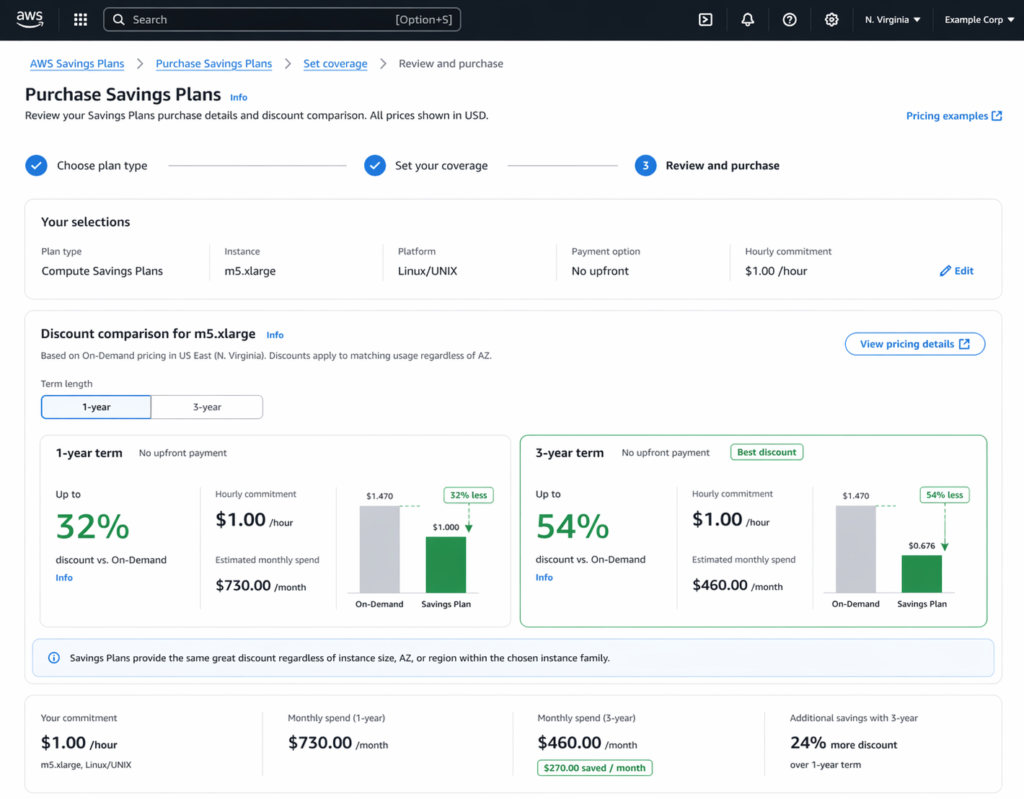
The discount gap between 1-year and 3-year EC2 Instance Savings Plans ranges from 12-22 percentage points depending on payment option.
Discount Ranges by Term
| Payment Option | 1-Year Discount | 3-Year Discount | Gap |
| No Upfront | 40-47% | 56-62% | 12-16% |
| Partial Upfront | 44-54% | 60-67% | 14-18% |
| All Upfront | 48-60% | 64-72% | 16-22% |
Here’s an example to understand the ranges better:
Running an m5.xlarge instance in us-east-1 (Linux):
- On-Demand: $0.192/hr = $1,680/year
- 1-year All Upfront: ~$840/year (50% off)
- 3-year All Upfront: ~$586/year (65% off)
- 3-year advantage: $254/year per instance
For 100 m5.xlarge instances, the 3-year advantage is $25,400 annually or $76,200 over three years.
But that assumes you’ll run the same instance type for all 36 months with no architecture changes, container migration, or new AWS instance generations launching (AWS released M6i in 2021 and M7i in 2023, both cheaper per vCPU than their predecessors).
How Payment Options Affect Break-Even Timeline
AWS offers three payment structures. Here’s how the upfront portion affects your break-even timeline and risk exposure.
| Payment Option | 1-Year Discount | 1-Year Break-Even | 3-Year Discount | 3-Year Break-Even | Best For |
| No Upfront | 40-47% | Month 7-8 | 56-62% | Month 18-22 | Startups, unpredictable workloads |
| Partial Upfront | 44-54% | Month 6-7 | 60-67% | Month 16-19 | Growing companies with stable baseline |
| All Upfront | 48-60% | Month 5-6 | 64-72% | Month 14-17 | Enterprises with CapEx budgets |
All Upfront 3-year has the deepest discount but the longest break-even. If you overcommit, you’ve locked capital for 36 months with no exit. All Upfront 1-year gives you maximum discount with annual adjustment flexibility, so, if you overcommit, you’ve only locked 5-6 months of capital.
| THE PRACTICAL RULE
If your architecture changes more than once annually, avoid All Upfront 3-year. If your instance types haven’t changed in 24+ months, All Upfront 3-year is defensible. |
The Real Cost of Getting 3-Year Commitments Wrong
AWS doesn’t advertise that the Savings Plan hours are billed at full committed rate, even if instances are stopped.
Here’s an example of what over-commitment costs you:
You commit to $10/hour in 3-year plans. Usage drops to $7/hour in Year 2 due to containerization.
- Year 1: $87,600 spent, 100% utilized
- Year 2-3: $87,600/year spent, 70% utilized = $52,560 wasted over 2 years
With 1-year commitments:
- Year 1: $87,600, 100% utilized
- Year 2-3: Adjust to $61,320/year = $0 wasted
The 3-year’s 15% deeper discount ($13,140) is wiped out by $52,560 in unused commitment and the net loss becomes $39,420.
AWS doesn’t advertise that Savings Plan hours are billed at the full committed rate, even if instances are stopped. Reserved Instances work differently; unused RIs can sometimes be sold in the marketplace.
Instance Family Migration Risk: You commit to M5 via 3-year plan in January 2024. AWS launches M7i (15% better price-performance) in March 2024.
Now, you have two options:
- Stay on M5 and run suboptimal instances for 33 months
- Switch to M7i and pay On-Demand for M7i while M5 plan goes unused (double-paying)
With 1-year commitments, you adjust to M7i in January 2025, and that’s 10 months of lag vs 33 months.
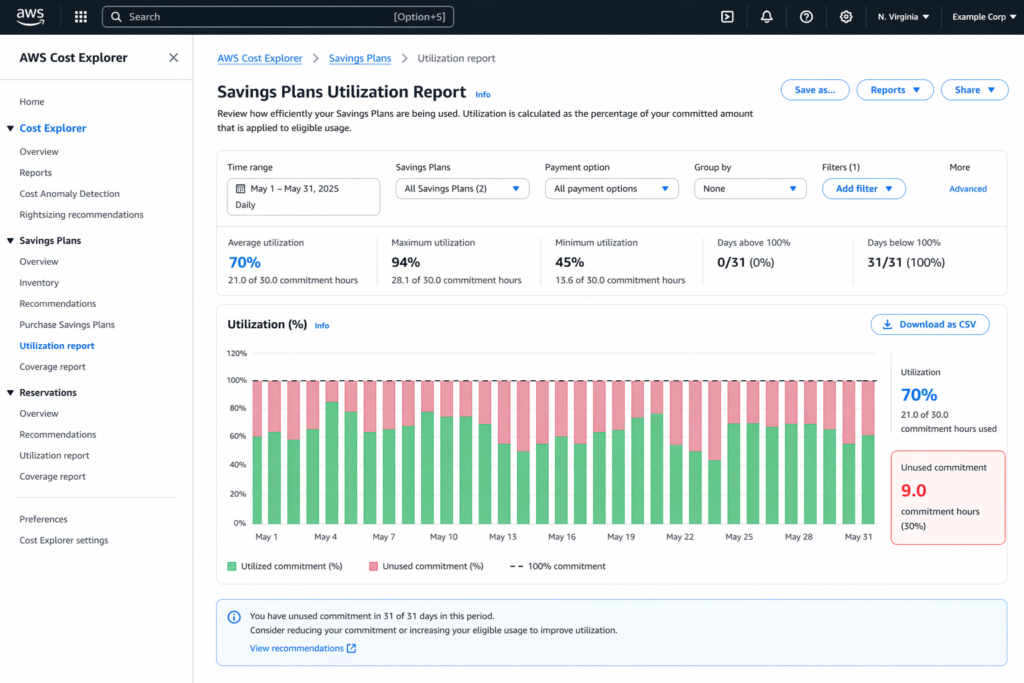
WARNING THRESHOLD: If utilization drops below 80% for 2+ consecutive months, you’ve overcommitted by 20%+. At $200K annual commitment, that’s $40K/year wasted.
When Should You Consider 3-Year Commitments
Despite the risks, 3-year EC2 Savings Plans are correct in specific scenarios.
Proven Stable Workloads
If you’ve run identical instance types for 24+ consecutive months with no architecture changes, 3-year commitments are defensible.
Here’s an example: A trading platform running 200 c5.2xlarge instances unchanged since 2020 with no container migration planned saves an extra $260K over 3 years with 3-year All Upfront (68% discount) vs 1-year renewable (52% discount).
CapEx Budget Alignment
Companies with 3-year CapEx depreciation cycles can align All Upfront 3-year plans with financial planning. For example, pay $500K Year 1, then show $0 compute CapEx Years 2-3. This only works if business won’t demand architecture changes mid-cycle.
Regulated Industries with Slow Change
Healthcare, financial services, and government sectors often run certified systems that can’t be modified without re-certification ($250K+ cost). A hospital’s HIPAA-compliant EHR on r5.4xlarge instances won’t migrate for 5+ years, though architectural inertia is guaranteed, making 3-year commitments safer than 1-year.
When 1-Year Plans Deliver Better Risk-Adjusted ROI
For most companies, 1-year EC2 Savings Plans offer better returns than 3-year commitments.
Evolving Infrastructure
If your team ships architecture changes quarterly or experiments with Lambda/Fargate/containers, 1-year plans let you adjust annually. By the time you migrate 30% of workload to EKS by June and switch to Graviton by December, you can re-commit at the new lower baseline in January. That’s zero waste. With 3-year plans, you’re locked into overcommitment for 30 more months.
High-Growth Companies
If AWS spend grows 50%+ YoY, predicting 36-month usage is impossible. Here’s a simple rule of thumb:
- Under $50K/month spend = stick to 1-year
- $50K-$200K/month = 1-year for baseline + Spot for spikes
- Over $200K/month = consider layering quarterly
Dev/Test/Staging
Non-production workloads should never be on 3-year commitments. This is because in such cases when usage fluctuates wildly, these environments migrate to new instance types first. A better approach is to Spot for 70-80% (90% discount), 1-year Savings Plans for baseline, and to never commit beyond 12 months.
Layering Strategy: Combining 1-Year and 3-Year for Optimal Coverage
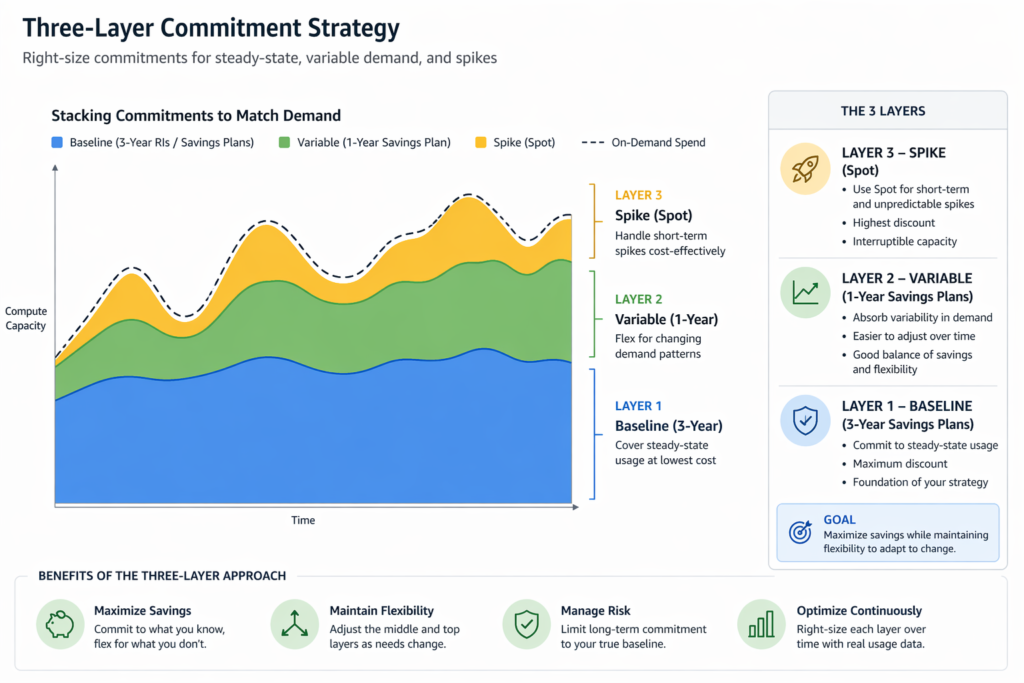
The smartest approach isn’t “all 1-year” or “all 3-year”, but it is to layer commitments by stability.
Here’s a 4-Step Layering Method:
- Identify Baseline: Analyze 12 months in Cost Explorer. Find minimum hourly usage that never drops below this level.
- Commit Baseline at 3-Year: If minimum is $5/hour, commit this at 3-year All Upfront (68-72% discount). Risk is minimal since this usage never fluctuates.
- Cover Variable Layer at 1-Year: Average usage is $10/hour, baseline is $5/hour. The $5/hour variable layer gets 1-year Partial Upfront (54% discount). Adjust annually.
- Use Spot for Spikes: Usage spikes to $15/hour during peaks. Top $5/hour runs on Spot (70% discount, interruptible). Never commit Savings Plans to spike traffic.
The financial outcome will look like this:
- Baseline: $43,800/year at 70% discount = $13,140
- Variable: $43,800/year at 54% discount = $20,148
- Spikes: $10,000/year at 70% discount = $3,000
- Total: $36,288 vs $87,600 On-Demand = 58% total savings
Compare to all 1-year: $40,296/year. Layering saves an additional $4,008 annually with lower risk than all 3-year.
This layering strategy works across cloud providers. GCP’s Committed Use Discounts follow a similar 1-year vs 3-year structure, with resource-based and spend-based options.
How Usage.ai Eliminates the 1-Year vs 3-Year Dilemma
The 1-year vs 3-year decision exists because AWS forces you to predict future usage. Automated cloud cost optimization platforms eliminate that guesswork by continuously adjusting coverage based on real-time patterns.
Usage.ai’s Flex Commitments deliver Savings Plan-equivalent discounts (40-60%) without forcing you to choose between 1-year and 3-year terms.
How Flex Commitments Work:
- $0 upfront payment: savings start immediately
- No multi-year lock-in: adjust quarterly based on actual usage
- Cashback assurance: if you underutilize, Usage.ai refunds the gap (real money, not just credits)
- 24-hour refresh: recommendations update daily vs AWS’s 72+ hour lag
Here’s a side-by-side comparison:
| Situation | AWS 3-Year | AWS 1-Year | Usage.ai Flex |
| Usage drops 30% in Month 6 | Pay for unused (waste) | Pay until renewal (waste) | Cashback refund |
| New instance family launches | Locked 33 months | Locked 9 months | Switch immediately |
| Need to exit AWS | Sunk cost | Sunk cost | Full buyback guarantee |
When Flex Beats Both 1-Year and 3-Year:
- Architecture changes every 6-9 months (microservices, containers, serverless adoption)
- CFO won’t approve upfront CapEx but needs immediate cost reduction
- Unsure if workload will stay on AWS 12+ months (multi-cloud strategy, M&A risk)
- Want SP-level discounts without SP-level commitment risk
Usage.ai’s 24-hour recommendation refresh and cashback assurance means you never overcommit based on stale data, and overcommitment isn’t catastrophic if it happens.
Motive, EVGo (NASDAQ: EVGO), Blank Street Coffee, and Secureframe use Usage.ai to manage hundreds of millions in AWS spend annually.
Break-Even Analysis: When Does 3-Year Actually Beat 1-Year?
The 3-year plan becomes superior only after break-even, i.e., when cumulative 3-year savings exceed 1-year savings.
Here’s an example to see the exact break-even timeline:
m5.xlarge in us-east-1 with All Upfront payment:
- On-Demand: $1,680/year
- 1-year: $840 (50% off)
- 3-year: $1,758 total ($586/year, 65% off)
| Month | 1-Year Cumulative Savings | 3-Year Cumulative Savings | 3-Year Advantage |
| 12 | $840 | $840 | $0 |
| 24 | $1,680 (renewed) | $1,680 | Break-even |
| 36 | $2,520 (3 renewals) | $2,772 | +$252 |
3-year only pulls ahead if you run the exact same instance type for all 36 months. If you migrate to M6i in Month 20, the 1-year plan lets you switch penalty-free. The 3-year plan locks you into suboptimal pricing for 16 more months.
| RULE OF THUMB 3-year plans break even in Month 24-28. If you’re not confident you’ll run the same instance family for 24+ months, 1-year will give you better risk-adjusted ROI. |
Decision Framework: Choose 1-Year or 3-Year Based on These 5 Factors
Factor 1: Instance Family Stability
Have you run the same instance family for 18+ months with no migration plans?
- Yes → 3-year safer.
- No → 1-year or Flex.
- Unsure → If a new generation launched in the past 12 months, choose 1-year.
Factor 2: Architecture Change Frequency
- Quarterly+ → 1-year only
- Annually → 1-year, evaluate 3-year for baseline
- Every 2-3 years → 3-year for 50-70%
- Rarely (5+ years) → 3-year for 80%+
Factor 3: Cash Flow vs Discount Priority
- Discount priority → 3-year All Upfront
- Cash flow priority → 1-year Partial/No Upfront
- Balanced → 1-year All Upfront
Factor 4: Workload Type
- Production 24/7 → 3-year if stable, 1-year if evolving
- Dev/Test → 1-year max, prefer Spot
- Batch/Analytics → Never beyond 1-year
- ML training → Spot + 1-year baseline
Factor 5: Company Growth Stage
- Under $25K/mo → No commitments or 1-year only
- $25K-$100K/mo → 1-year baseline
- $100K-$500K/mo → Layered strategy
- Over $500K/mo → Layered + automation
Some Quick Matrix:
| If You Are | Choose |
| Stable + discount-focused + enterprise | 3-year All Upfront 60-80% |
| Evolving architecture quarterly | 1-year only |
| Unsure + high growth | 1-year or Usage.ai Flex |
| Mix of stable + variable | Layering: 3-year baseline + 1-year variable |
Common Mistakes That Cost Companies $50K-$500K Annually
Mistake 1: Committing Before Rightsizing
AWS Cost Explorer assumes current usage is correct. If you’re overprovisioned by 2x (running m5.2xlarge when m5.xlarge suffices), you’ll commit to overprovisioned rates. Here’s a fix: Run AWS Compute Optimizer before buying Savings Plans. Rightsize first, commit second.
Mistake 2: Buying Based on Peak Usage, Not Baseline
AWS recommends average usage, not minimum. If your usage is $5/hour baseline with $15/hour peaks, AWS recommends $10/hour, leading to $29,200/year in overcommitment waste. Here’s a fix: Commit only to minimum hourly usage across 90 days. Use Spot or On-Demand for spikes.
Mistake 3: Not Monitoring Utilization Post-Purchase
Utilization below 85% is wasted money. Set CloudWatch alarms if utilization drops below 85% for 3 consecutive days. At 80% utilization on a $200K commitment, you’re wasting $40K/year.
Ready to Eliminate Commitment Risk?
The 1-year vs 3-year decision exists because AWS forces you to predict future usage. Usage.ai removes that guesswork entirely.
Our automated commitment engine continuously adjusts your coverage based on real-time usage with no manual purchasing, quarterly reviews, or utilization monitoring required. You get Savings Plan-equivalent discounts (40-60%) without locking into multi-year terms. And if your usage drops? Cashback assurance refunds the gap.
We’ve delivered $91M+ in verified cloud savings for 300+ enterprise customers including Motive, EVGo (NASDAQ: EVGO), Blank Street Coffee, and Secureframe.
Book a 15-Minute Savings Assessment
Our fee model is simple: we take a percentage of what we save you. If we save you nothing, you pay nothing.
Frequently Asked Questions
1. What happens if I don’t use all my 3-year EC2 Savings Plan?
You’re billed for 100% of the commitment regardless of actual usage. If you commit to $10/hour and only use $7/hour, you still pay $10/hour for all 26,280 hours over 3 years. The unused $3/hour is waste and AWS doesn’t refund it. The only exit is to wait for the term to expire.
2. Can I cancel a 3-year Savings Plan if my usage drops?
No. AWS Savings Plans cannot be canceled, refunded, or transferred once purchased. If usage drops 50% in Year 2, you’ll continue paying the full commitment rate for the remaining 24 months. This is why 1-year plans or Usage.ai’s Flex Commitments (with cashback assurance) are safer for unpredictable workloads.
3. Do 1-year Savings Plans automatically renew?
No. AWS Savings Plans expire at the end of the term and do not auto-renew. You must manually purchase a new Savings Plan if you want to continue receiving discounted rates. If you forget to renew, instances revert to On-Demand pricing immediately.
4. Can I buy multiple 1-year Savings Plans instead of one 3-year plan?
Yes, and this is often smarter. Buying three consecutive 1-year Savings Plans gives you the ability to adjust commitment levels annually as your infrastructure evolves. While the per-year discount is 10-15% lower than a single 3-year plan (50% vs 65%), the flexibility to reduce overcommitment in Years 2-3 often results in better net savings.
5. How do I know if my usage is stable enough for a 3-year commitment?
Review the past 18-24 months of EC2 usage in AWS Cost Explorer. If your minimum hourly usage has remained within ±10% of the average for 18+ consecutive months, and you have no plans to migrate instance families or adopt containers/serverless, a 3-year commitment is defensible for that baseline usage. If usage fluctuates >20% month-to-month, stick to 1-year commitments.
6. Does Usage.ai’s Flex Commitment give me the same discount as AWS 3-year plans?
Usage.ai Flex Commitments deliver 40-60% savings, equivalent to AWS 1-year to 3-year Partial Upfront Savings Plans, but without the multi-year lock-in or upfront payment. The tradeoff is a slightly lower maximum discount than AWS 3-year All Upfront (72%) in exchange for cashback assurance and quarterly flexibility. For companies with unpredictable workloads, the risk-adjusted ROI is higher.
7. What’s better for startups: 1-year Savings Plans or no commitment at all?
Startups under $50K/month AWS spend should avoid commitments entirely until usage stabilizes for 90+ consecutive days. Use Spot Instances (70-90% discount) for batch jobs and dev/test, and On-Demand for production. Once you hit $50K/month and usage is stable, buy 1-year No Upfront Savings Plans to cover only the baseline.
8. Can I change payment option mid-term (e.g., switch from No Upfront to All Upfront)?
No. Once you purchase a Savings Plan with a specific payment option, it cannot be modified. If you bought No Upfront and later want All Upfront pricing, you must wait for the term to expire and purchase a new plan with the desired payment structure. This is another reason why 1-year plans are lower-risk.
9. How does the break-even point change with payment options?
Break-even timing depends on upfront cost and discount depth. All Upfront has the earliest break-even (Months 14-17 for 3-year) because you’ve paid everything upfront and receive the deepest discount.
10. What’s the difference between EC2 Instance Savings Plans and Compute Savings Plans?
EC2 Instance Savings Plans lock you to a specific instance family (M5, C5, R5) in a specific region but offer 5-10% deeper discounts (up to 72%). Compute Savings Plans cover any instance family, any region, and apply to Fargate and Lambda as well, but with 5-10% lower discount depth (up to 66%).