.png)



Most startups overpay for cloud by 30-50% not because engineers are careless, but because the default billing model is on-demand pricing, and it is, hands-down, the most expensive option. The tools below exist to close that gap, and they do it through very different mechanisms: visibility, alerting, automation, or commitment purchasing. Which one you need depends on your spend level and team capacity, not which vendor has the flashiest dashboard.
Cloud spending is projected to exceed $1 trillion annually by 2027 (Gartner, verify at gartner.com as figures change), and the average company wastes 25-35% of that spend on idle resources, over-provisioned instances, or missed commitment discounts. For a startup running $100K/month on AWS, that’s $25K-$35K wasted every single month.
The tools in this guide are categorized by function, not popularity. You will know exactly which tool solves which problem and when each makes sense for your stage.
What Are Cloud Cost Optimization Tools?
Cloud cost optimization tools are software platforms that identify, reduce, and automate savings on AWS, GCP, and Azure cloud bills. They fall into four functional categories:
- Visibility tools surface where money is going: by service, team, environment, or application. They do not act on the data; they surface it.
- Alerting tools detect anomalies, for example, a spike in data transfer charges, a forgotten dev environment, an instance left running over a weekend. They tell you something went wrong after it happened.
- Rightsizing tools analyze utilization and recommend instance type changes or resource terminations. The best ones do this automatically.
- Commitment purchasing tools automate the purchase of Savings Plans, Reserved Instances, or Committed Use Discounts. For example, a startup running EC2 on-demand at $0.192/hr for an m5.xlarge can pay$0.141/hr under a 1-year Compute Savings Plan, and that’s a 27% reduction without changing a single line of code (verify at aws.amazon.com/savingsplans/pricing — rates change).
Most startups need tools from at least two categories. A common mistake is spending budget on visibility when the real opportunity is commitment purchasing.
How to Choose: A Decision Framework by Startup Stage
Before the tool list, use this framework to identify what you actually need.
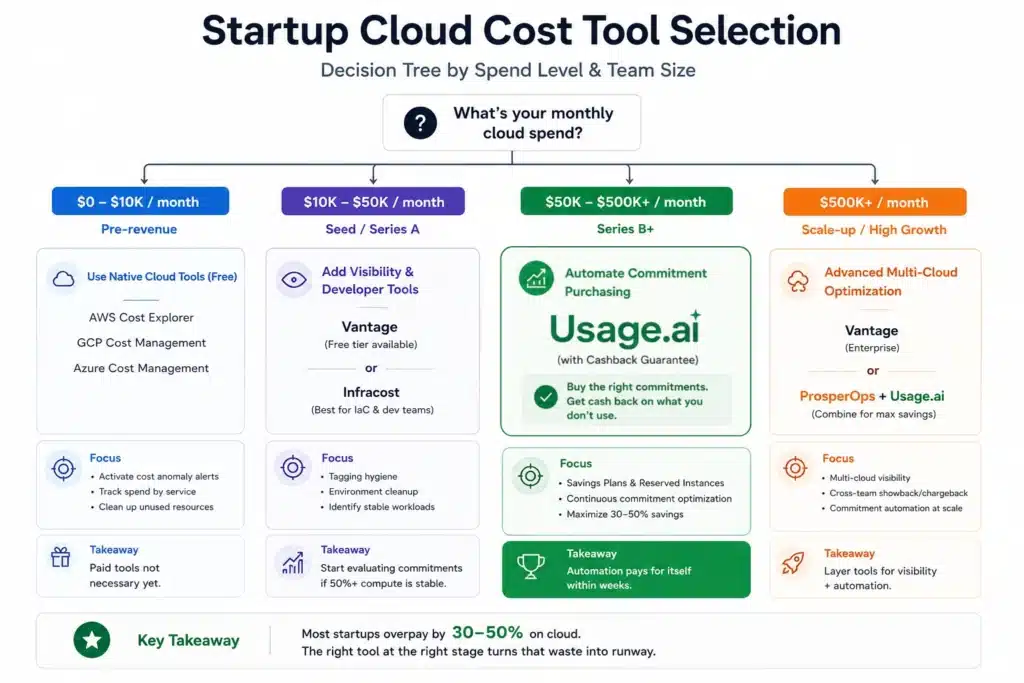
Pre-revenue / $0-$10K/month cloud spend Use cloud provider native tools (AWS Cost Explorer, GCP Cost Management, Azure Cost Management). They are free. The waste at this spend level does not justify paid tooling. Activate AWS Cost Anomaly Detection (free tier) to catch unexpected spikes.
Seed / Series A / $10K-$50K/month cloud spend Add a visibility layer: Vantage (free tier available) or Infracost if you have developer-driven infrastructure. Focus on tagging hygiene and environment cleanup first. These deliver savings before any tool purchase. Start evaluating commitment purchasing if at least 50% of your compute is stable and predictable.
Series B+ / $50K-$500K+/month cloud spend At this level, commitment purchasing automation pays for itself within weeks. A $200K/month EC2 bill running entirely on-demand has $60K-$80K/month in savings available through Savings Plans and Reserved Instances alone (verify savings rates at aws). Manual management of commitments at this scale is a full-time job. Automation tools pay back their cost in the first month.
The Best Cloud Cost Optimization Tools for Startups in 2026
Vantage – Best for Multi-Cloud Visibility and Fast Setup
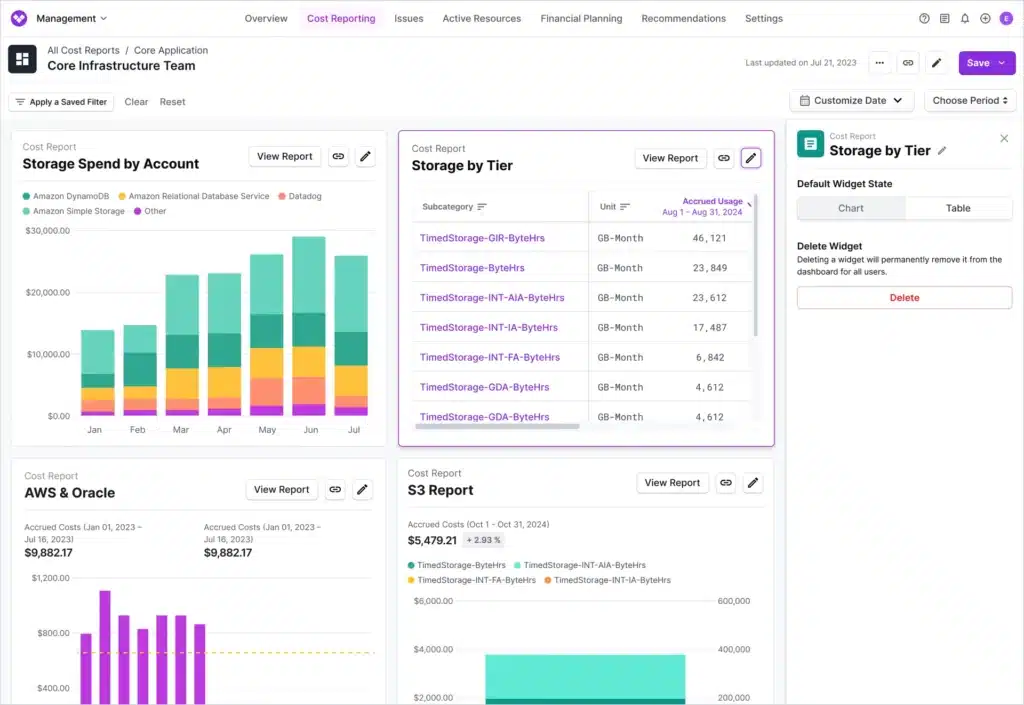
Vantage is a cloud cost observability platform that connects to AWS, GCP, Azure, Kubernetes, Datadog, Snowflake, and 20+ other services. It provides cost reports, unit cost metrics, and automated savings recommendations.
What it does well:
- Cost allocation by team, service, and environment using tag-based reporting
- Free tier available; startups can get meaningful visibility before spending anything
- Unit cost tracking (cost per customer, cost per API call); useful for SaaS gross margin analysis
- Multi-cloud support with consistent reporting across AWS, GCP, and Azure
What it does not do: Vantage surfaces recommendations but does not purchase commitments on your behalf. Acting on Savings Plan or Reserved Instance recommendations still requires manual purchasing or a separate tool.
Best for: Startups that need a fast, low-friction visibility layer across multiple clouds without a dedicated FinOps engineer.
Pricing: Free tier available; paid plans start for teams needing advanced features (verify at vantage.sh/pricing as rates change).
Kubecost: Best for Kubernetes and Containerized Workloads
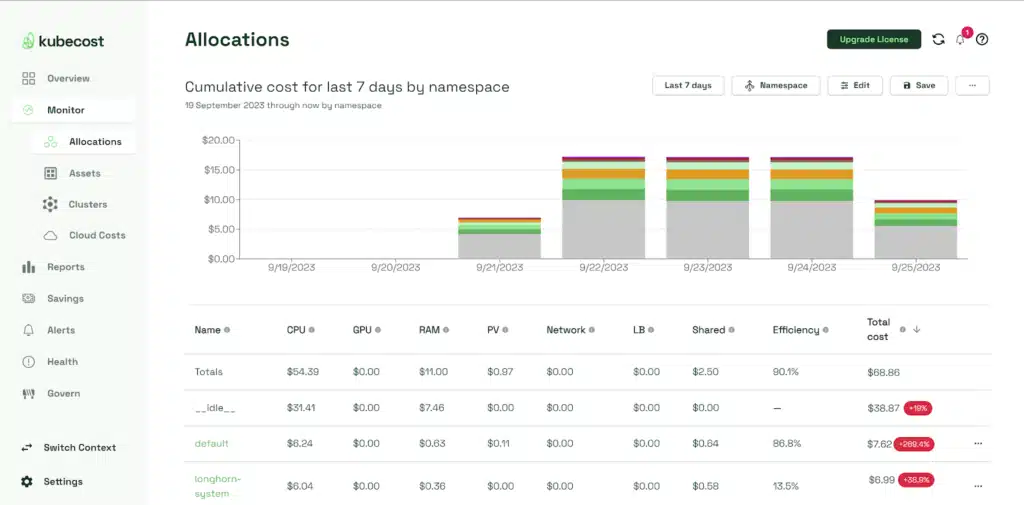
If your startup runs containers on Kubernetes (EKS, GKE, AKS), Kubecost solves a problem that no cloud-native billing tool handles well: attributing container costs to specific namespaces, deployments, pods, and teams.
AWS Cost Explorer shows you that you spent $40K on EC2 last month. Kubecost shows you that $18K of that came from your data processing namespace, $12K from the API tier, and $10K from a test environment that nobody shut down.
What it does well:
- Namespace-level, deployment-level, and pod-level cost breakdown
- Idle resource detection within clusters
- Cost allocation for shared infrastructure (ingress, monitoring, logging)
- On-premise deployment option for sensitive environments
What it does not do: Kubecost does not manage commitments. It also does not cover non-Kubernetes AWS services; no RDS cost breakdown, no S3 attribution.
Best for: Startups with Kubernetes as their primary compute platform spending $20K+/month on cluster resources.
Pricing: Open-source version is free; Kubecost Enterprise for teams needing RBAC, multi-cluster, and support (verify at kubecost.com/pricing, rates change).
Infracost: Best for Pre-Deployment Cost Control
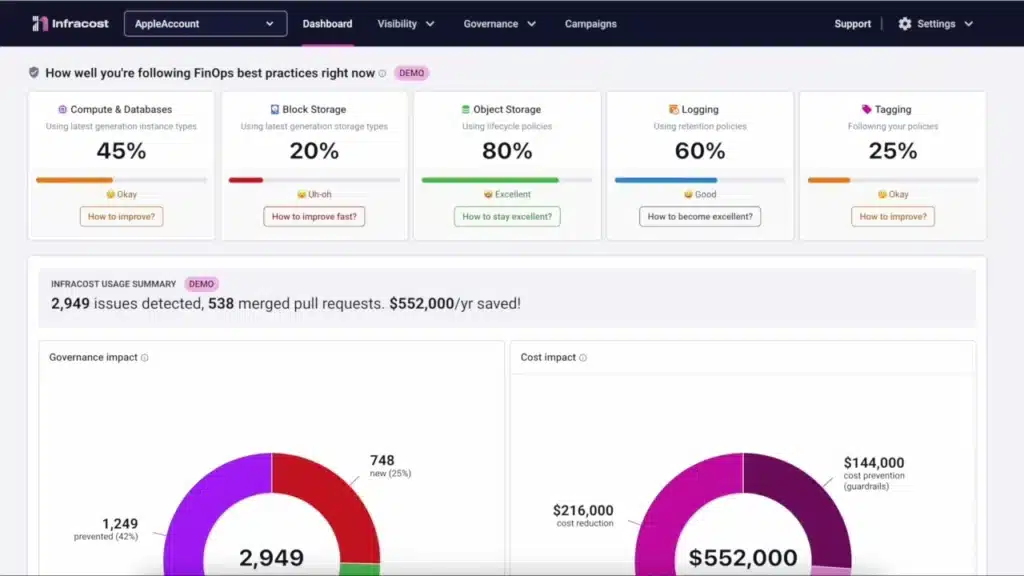
Infracost integrates into CI/CD pipelines and pull requests to show engineers the cost impact of infrastructure changes before they are merged. When a developer adds an RDS instance or changes an EC2 instance type, Infracost calculates the monthly cost delta and posts it as a PR comment.
What it does well:
- Catches expensive infrastructure decisions before they hit production
- Works with Terraform, Terragrunt, and Pulumi
- Integrates with GitHub, GitLab, and Bitbucket
- Engineers see cost impact in context; no separate tool login required
What it does not do: Infracost does not manage existing cloud costs. It is purely a pre-deployment guardrail. It does not cover non-IaC resources or manual console changes.
Best for: Startups with infrastructure-as-code discipline where engineering velocity is high enough that cost surprises are a recurring problem.
Pricing: Free for individuals; paid team plans available (verify at infracost.io/pricing, rates change).
CloudZero: Best for SaaS Unit Economics
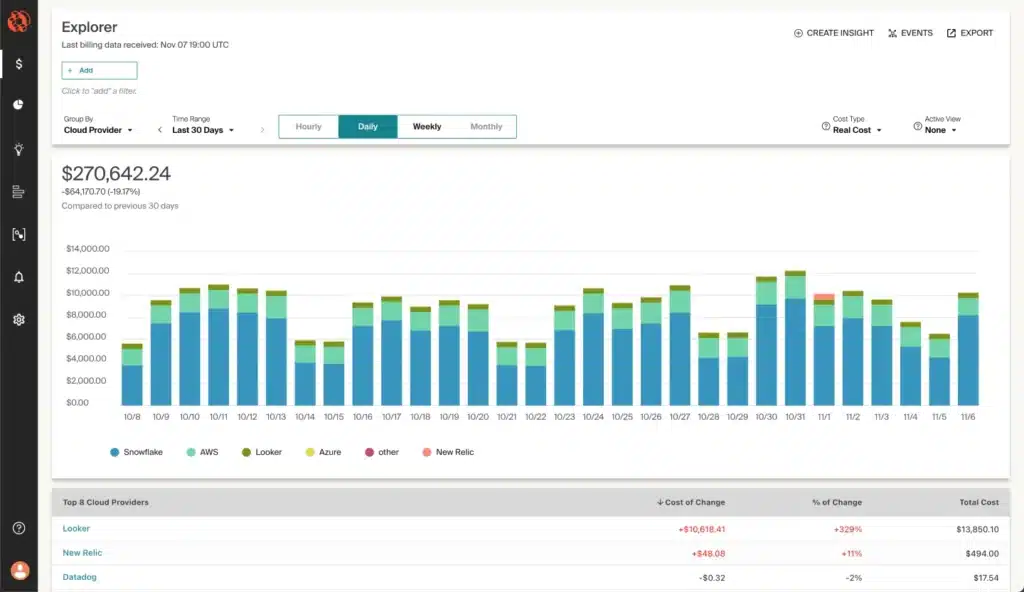
CloudZero maps cloud spending to business dimensions, like product features, customers, and tenants. For a SaaS startup, this answers the question: “How much does it cost to serve each customer?” or “How much does feature X cost us per month?”
This is fundamentally different from standard cost allocation. Most visibility tools allocate by AWS tag or resource. CloudZero allocates by business logic, including spend that is not tagged.
What it does well:
- Cost-per-customer and cost-per-feature reporting
- Handles untagged and shared infrastructure allocation
- Gross margin visibility tied to cloud cost data
- Engineering team cost attribution without requiring perfect tagging
What it does not do: CloudZero does not automate commitment purchasing. It is a pure analytics layer.
Best for: SaaS startups post-Series A tracking gross margins at the unit level and needing cloud cost data tied to business metrics, not just AWS service categories.
Pricing: Verify at cloudzero.com/pricing — rates change.
ProsperOps: Best for Hands-Off AWS Reserved Instance Management
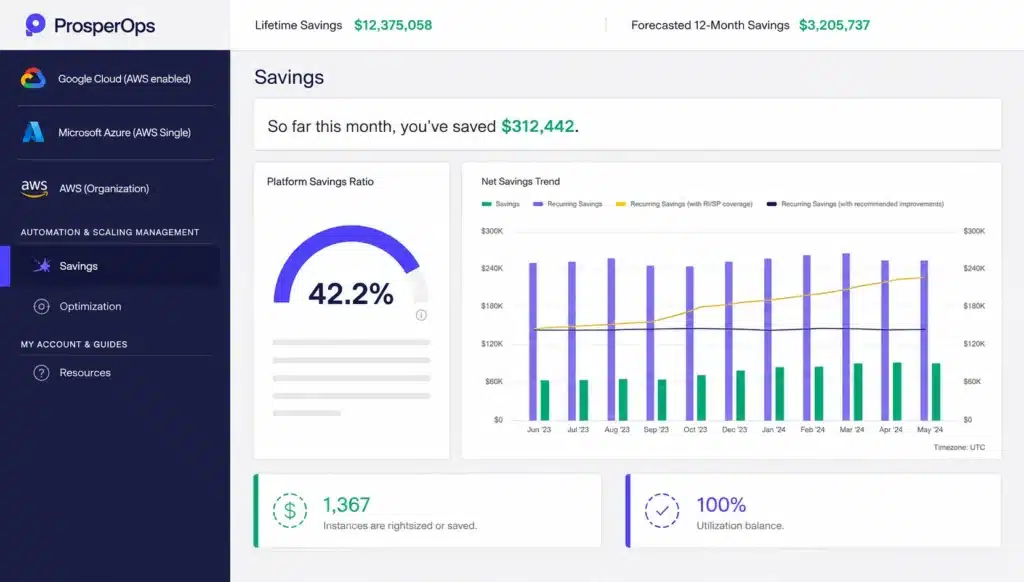
ProsperOps automates the management of Reserved Instances, Savings Plans, and Committed Use Discounts across AWS, Azure, and GCP. It continuously analyzes usage and purchases, modifies, and rebalances commitments to maximize discount rates while minimizing over-commitment risk.
One important context note for startups evaluating ProsperOps: Flexera acquired ProsperOps in 2026. ProsperOps is now part of the Flexera platform, which is primarily an enterprise IT asset management product. Startups should verify whether pricing, packaging, and go-to-market have changed since the acquisition before assuming startup-friendly access and pricing still apply.
What it does well:
- Autonomous commitment management across AWS, Azure, and GCP
- Risk-managed purchasing; it does not buy commitments your usage cannot absorb
- Fees are a percentage of realized savings; no fee if nothing is saved
- Works at the billing layer; no infrastructure access required
What it does not do: ProsperOps does not offer a buyback guarantee on underutilized commitments. Underutilization protection depends on the platform’s risk management model, not a cash return. It is also now part of an enterprise platform (Flexera), which may affect accessibility and pricing for early-stage startups.
Best for: Multi-cloud teams at $50K+/month compute spend that want autonomous commitment management. Startups should validate current pricing and startup accessibility post-Flexera acquisition.
Pricing: Percentage of realized savings (verify at prosperops).
AWS Cost Explorer + Cost Anomaly Detection — Free, But Know Its Limits
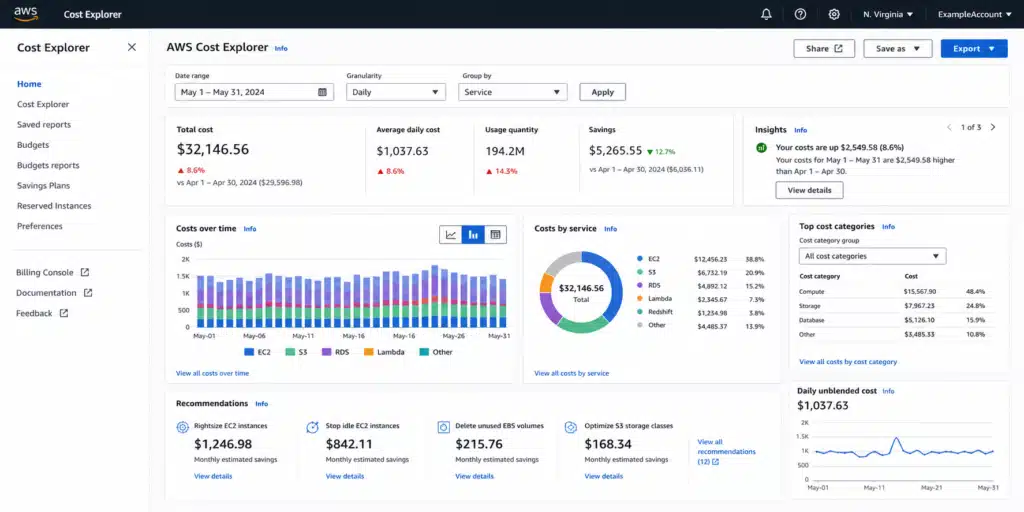
AWS Cost Explorer is free (with usage-based charges for API calls; verify at aws). It provides usage and cost data, Savings Plans recommendations, and Reserved Instance recommendations.
The recommendation engine is genuinely useful for straightforward AWS environments. The key constraint: AWS Cost Explorer recommendations refresh every 72+ hours. That means if a new workload spins up and runs inefficiently, you may not see a Savings Plan recommendation for three days. At $10K/day in compute spend, three days of on-demand pricing versus a Savings Plan rate represents a measurable cost.
Cost Anomaly Detection is a separate free service within AWS Cost Management that monitors for unexpected spending spikes using machine learning. It is worth activating for every AWS account regardless of which other tools you run.
Best for: Early-stage startups (sub-$50K/month) as a no-cost baseline. For higher spend levels, the 72+ hour recommendation refresh becomes a real limitation.
When Does Commitment Purchasing Make Sense for a Startup?
Commitment purchasing (Savings Plans, Reserved Instances, GCP Committed Use Discounts, Azure Reserved VM Instances) is the single largest savings lever on any cloud bill. It consistently delivers 30-60% savings on compute versus on-demand rates. The blocker for most startups is the perceived risk: what if we commit and our usage drops?
That concern is real. A 1-year Standard Reserved Instance on AWS is locked in and there is no buyback, or cancellation, and selling on the RI marketplace is not guaranteed at full value. If you purchase 50 RI units expecting that usage and it drops to 30, you are paying for 20 units that produce no value.
This lock-in risk is why many startups delay commitment purchasing well past the point where it would pay off. A startup running $150K/month on EC2 on-demand for 18 months has left $600K+ on the table.
The practical answer is to use Convertible Reserved Instances (which allow some modifications) or Compute Savings Plans (which apply automatically across EC2 families, Fargate, and Lambda) to reduce commitment risk. But even these require manual management and still carry 1-3 year terms.
What Is the Commitment Purchasing Risk Gap, and How Does Usage.ai Address It?
For startups that want the savings of commitment purchasing without the lock-in risk of native AWS, GCP, or Azure tools, Usage.ai was designed specifically around this problem.
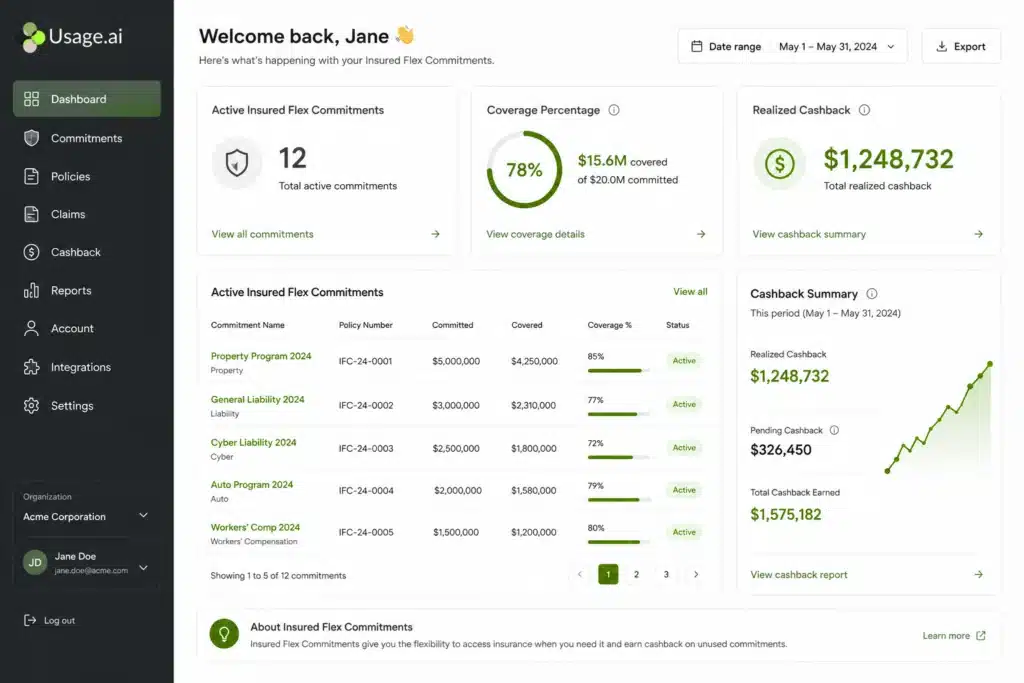
- Insured Flex Commitment: An SP/RI-equivalent discount structure that delivers savings of 30-60% on compute without requiring multi-year lock-in or upfront payment. Every commitment is fully insured. Underutilized portions are returned as cashback (real money), not credits.
- Zero Lock-In Guarantee: Usage.ai’s Insured Flex Commitments carry no multi-year obligation. Commitments adjust quarterly. If usage patterns shift, scale down with no penalty. A buyback guarantee covers any underutilized commitments. The recovered value is paid as cashback (real money), not credits.
- Buyback Guarantee: If a commitment purchased through Usage.ai goes underutilized, Usage.ai buys it back and returns the value as cashback, not credits.
This distinction matters because every other commitment tool either accepts AWS/GCP/Azure’s native lock-in terms (1-3 years, no buyback) or offers credits as underutilization protection. Credits are confined to future usage on that platform. Cashback is cash.
Usage.ai operates at the billing layer only, with 30-minute setup and no infrastructure changes required. The fee model charges a percentage of realized savings only. Zero fee if Usage.ai saves nothing.
Supported clouds: AWS, Azure, GCP.
Usage.ai refreshes recommendations every 24 hours versus AWS Cost Explorer’s 72+ hour refresh cycle. At $6K-$12K/day in uncovered compute spend, that 3-day lag compounds to $18K-$36K per refresh cycle in unnecessary on-demand charges. The arithmetic is not subtle.
Learn more about how Insured Flex Commitments work.
Tool Comparison Table: Best Cloud Cost Optimization Tools for Startups
| Tool | Primary Function | Multi-Cloud | Commitment Automation | Lock-In Risk | Free Tier | Best For |
| Vantage | Visibility + Reporting | Yes (20+ integrations) | No (recommendations only) | N/A | Yes | Multi-cloud visibility, fast setup |
| Kubecost | Kubernetes cost attribution | Yes (EKS, GKE, AKS) | No | N/A | Yes (open source) | Container cost breakdown |
| Infracost | Pre-deployment cost gates | Yes (IaC) | No | N/A | Yes (individuals) | Developer cost awareness |
| CloudZero | SaaS unit economics | Yes | No | N/A | No | Cost-per-customer reporting |
| ProsperOps | Commitment automation | AWS, Azure, GCP | Yes (autonomous) | AWS native terms | No | Multi-cloud commitment management; verify startup pricing post-acquisition |
| AWS Cost Explorer | Native AWS visibility | AWS only | Recommendations only | N/A | Yes | Baseline visibility, no budget |
| Usage.ai | Commitment automation + cashback insurance | AWS, Azure, GCP | Yes (with buyback guarantee) | Zero lock-in, cancel anytime | No | Automated savings with underutilization protection |
Decision Tree: Which Tool Do You Actually Need?
Use this flowchart to find the right starting point.
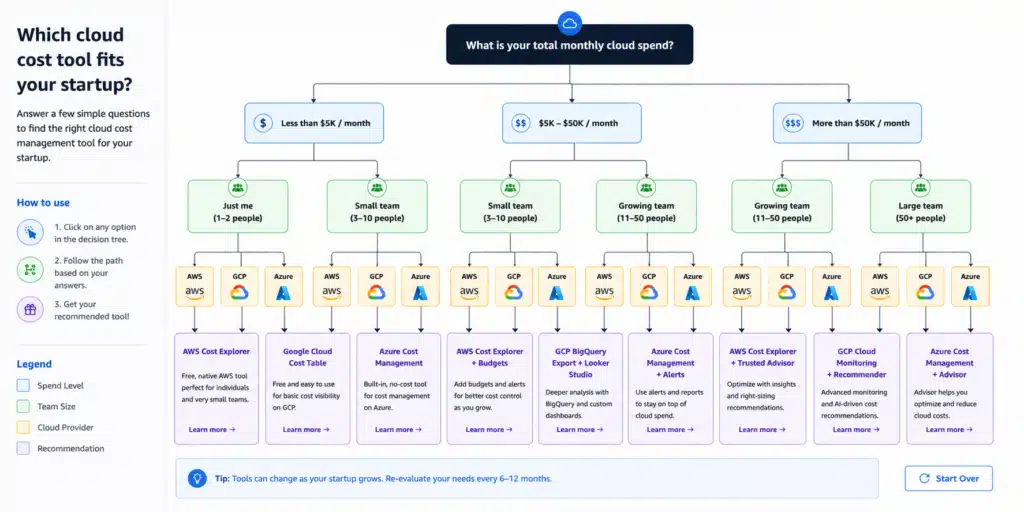
Start here:
Is your monthly cloud spend under $10K?
- YES: Use AWS Cost Explorer / GCP Cost Management / Azure Cost Management (all free). Activate AWS Cost Anomaly Detection. Return to this list when spend exceeds $25K.
- NO: Continue.
Is your primary workload containerized (Kubernetes)?
- YES: Add Kubecost for cluster cost attribution regardless of other tools.
- NO: Continue.
Do you use infrastructure-as-code (Terraform, Pulumi)?
- YES: Add Infracost to your CI/CD pipeline for pre-deployment cost gates.
- NO: Continue.
Do you need cost-per-customer or cost-per-feature reporting?
- YES: Evaluate CloudZero.
- NO: Continue.
Is your compute spend above $50K/month on EC2 or equivalent?
- YES: You have commitment purchasing savings available. Evaluate ProsperOps/Flexera (AWS, Azure, GCP) or Usage.ai (AWS, Azure, GCP) based on your cloud footprint and whether startup-friendly pricing applies. Both charge a percentage of savings only.
- NO: Start with Vantage (free tier) for visibility. Revisit commitment tools when spend crosses $50K/month.
Do you have usage patterns across multiple clouds and need zero lock-in on commitments?
- YES: Usage.ai’s Insured Flex Commitments apply across AWS, Azure, and GCP with a buyback guarantee on underutilized commitments, cashback (not credits) as protection, and no multi-year lock-in.
- NO: ProsperOps/Flexera covers AWS, Azure, and GCP, but verify current startup pricing post-acquisition before committing.
Are Commitment Optimization Tools Worth It for Startups?
Yes, if your monthly compute spend is above $50K and at least 40-50% of your compute is stable workloads (not bursty, not ephemeral dev environments).
The break-even math is simple. A $200K/month EC2 bill running 100% on-demand has approximately $60K-$80K/month in Savings Plans savings available. Most commitment automation tools charge 10-20% of realized savings. At $60K in savings, a 15% fee costs $9K/month. You net $51K/month in savings. Payback period: zero months, day one.
The risk for startups is committing to more than your stable usage baseline. Tools like ProsperOps and Usage.ai both account for this by analyzing your usage pattern before purchasing any commitment. Usage.ai specifically adds the buyback guarantee so underutilization does not become stranded spend, a protection ProsperOps does not offer.
Do Native Cloud Tools Work for Cost Optimization?
AWS Cost Explorer, GCP Cost Management, and Azure Cost Management are useful baselines, particularly at low spend levels where third-party tool costs are not justified. Their limitations at scale are well-documented:
- Recommendation refresh rate. AWS Cost Explorer generates Savings Plans recommendations on a refresh cycle of 72+ hours. Usage.ai refreshes every 24 hours. For a $300K/month AWS environment, three days of delayed recommendations represents $18K-$54K in uncaptured savings per refresh cycle depending on on-demand rates.
- No autonomous action. Native tools recommend. They do not act. A Savings Plans recommendation in Cost Explorer requires a human to log in, evaluate the recommendation, and complete a purchase. This workflow breaks down at scale and in organizations where cloud cost ownership is distributed across teams.
- No buyback protection. AWS native commitments carry 1-3 year lock-in terms with no third-party buyback option. If your usage drops after committing, you absorb the loss.
- No multi-cloud view. AWS Cost Explorer does not show GCP or Azure spend. If you run multi-cloud, native tools give you three separate siloed views with no unified recommendation layer.
How Much Can Startups Actually Save on Cloud Costs?
The range is wide depending on current commitment coverage and workload type. Real-world benchmarks sourced from verified Usage.ai customer outcomes:
A startup running entirely on-demand EC2 with no Savings Plans can expect 30-40% savings on compute by moving to Compute Savings Plans alone (verify savings rates at aws). For database workloads, RDS Reserved Instances save 20-35% versus on-demand.
The range across the Usage.ai customer base is 30-50% reduction in total cloud spend, consistent with industry benchmarks for commitment purchasing automation.
What Happens If a Startup’s Cloud Usage Drops After Committing?
This is the most common objection to commitment purchasing at the startup stage, and it is a fair one.
With AWS native 1- or 3-year Reserved Instances, usage drops create stranded costs. You pay for capacity you are not using with no recourse other than attempting to sell on the AWS Reserved Instance Marketplace (not guaranteed at full value, and not available for all RI types).
Compute Savings Plans are more flexible because they apply automatically across EC2 families, Fargate, and Lambda. But they still carry 1- or 3-year terms and no buyback option from AWS.
Usage.ai Insured Flex Commitments address this directly. Commitments adjust quarterly. Scale down? No penalty. If a commitment goes underutilized, Usage.ai buys it back and pays cashback (real money, not credits). This is a categorically different risk profile than native cloud commitments and fundamentally different from competitor tools that offer only credit-based protection.
Startups that could not previously justify commitment purchasing due to usage uncertainty now have a path to capture those savings without assuming the downside risk.
Learn more about the cashback guarantee.
Cloud Cost Optimization for AWS, GCP, and Azure: Key Differences
Each cloud provider has its own commitment purchasing framework. Understanding the mechanics helps you evaluate which tools solve which provider-specific problems.
AWS: Compute Savings Plans, EC2 Instance Savings Plans, and Reserved Instances. Savings Plans are generally more flexible; RIs are more specific. Savings Plans apply across EC2, Fargate, and Lambda automatically. RIs apply to specific service-region-instance type combinations. Discount ranges: 20-60% versus on-demand (verify at aws).
GCP: Committed Use Discounts (resource-based and spend-based). Resource-based CUDs commit to a specific machine type and region for 1 or 3 years. Spend-based CUDs commit to a dollar amount of usage per hour. GCP also has Sustained Use Discounts (SUDs) which apply automatically to eligible VM usage without any commitment required. Learn more about GCP CUDs vs SUDs: A Technical Comparison.
Azure: Reserved VM Instances, Azure Savings Plans for compute, and Reserved Capacity for services like SQL Database, Cosmos DB, and Synapse Analytics. Azure also offers Dev/Test pricing for non-production workloads that can reduce costs significantly for startups with large development environments.
Most startup cost optimization tools focus heavily on AWS because AWS represents the largest share of startup cloud spend. Multi-cloud coverage varies significantly across platforms.
What Metrics Should Startups Track for Cloud Cost Efficiency?
Commitment coverage rate. The percentage of your eligible compute spend covered by Savings Plans, RIs, or equivalent commitment structures. An uncovered rate above 60% is a strong signal that commitment purchasing optimization is the highest-ROI action available.
RI/SP utilization rate. Of the commitments you have purchased, what percentage is actually being used? Utilization below 85% means you are paying for commitments you cannot absorb. Both high coverage and high utilization need to be true simultaneously.
Cost per unit of business output. For SaaS: cost per customer, cost per API request, or cost per transaction. This connects cloud spend to business economics, not just AWS service categories.
Untagged resource rate. Resources without tags cannot be allocated to teams, products, or environments. High untagged rates indicate poor cost governance and make optimization harder.
Idle resource spend. Compute, databases, and load balancers running with zero or near-zero utilization. Even 10-15% of total spend in idle resources is common in growing startups.
Frequently Asked Questions
1. What is the best cloud cost optimization tool for an early-stage startup?
For startups spending under $25K/month on cloud, AWS Cost Explorer (free), GCP Cost Management (free), and Azure Cost Management (free) provide enough visibility to identify obvious waste. Activate AWS Cost Anomaly Detection at no cost. For startups with Kubernetes workloads, add Kubecost’s open-source version. Once monthly spend crosses $50K, commitment purchasing tools like ProsperOps or Usage.ai (AWS, Azure, GCP) deliver the largest savings relative to cost.
2. How much can a startup save with cloud cost optimization tools?
Startups running compute entirely on-demand typically save 30-50% by implementing Savings Plans, Reserved Instances, or equivalent commitment structures. At $100K/month cloud spend, that is $30K-$50K in monthly savings. The exact savings depend on how much of the current spend is on-demand compute versus already-discounted commitments. (Savings rates: verify at aws; rates change.)
3. What is the difference between cloud cost visibility tools and commitment automation tools?
Visibility tools (Vantage, CloudZero, AWS Cost Explorer) surface where money is being spent and surface recommendations. Commitment automation tools (ProsperOps, Usage.ai) act on those recommendations by purchasing and managing Savings Plans, Reserved Instances, or Committed Use Discounts autonomously. Visibility alone does not reduce your bill. Commitment purchasing does. Most startups above $50K/month benefit from both categories running together.
4. Is it safe for a startup to buy Reserved Instances or Savings Plans?
AWS native Reserved Instances carry 1-3 year lock-in with no buyback option. Compute Savings Plans are more flexible across instance families but still carry 1- or 3-year terms. The risk is buying more than your stable usage can absorb. Automated tools like ProsperOps and Usage.ai analyze your usage pattern before purchasing, reducing over-commitment risk. Usage.ai’s Insured Flex Commitments add a buyback guarantee: if usage drops and a commitment goes underutilized, Usage.ai buys it back and pays cashback (real money, not credits). This eliminates the primary risk that makes startups hesitant to commit.
5. Do cloud cost optimization tools require infrastructure access?
No reputable commitment optimization tool requires infrastructure access. AWS-level tools operate at the billing layer, meaning they need billing read access and commitment purchasing permissions in AWS IAM, but no access to your application infrastructure, source code, or compute instances. Usage.ai requires billing-layer access only, 30-minute setup, and no infrastructure changes.
6. What is a Compute Savings Plan and how does it save money?
A Compute Savings Plan is a flexible commitment to a consistent amount of compute usage (measured in $/hour) in exchange for a discount of up to 66% versus on-demand EC2 pricing. Unlike EC2 Instance Savings Plans, Compute Savings Plans apply automatically across EC2 instance families, Fargate, and Lambda. For startups with diverse EC2 fleets or serverless workloads, Compute Savings Plans typically capture more savings than instance-specific Reserved Instances because they apply broadly. The tradeoff: they require a 1- or 3-year term commitment.
7. How is Usage.ai different from ProsperOps for startup cloud cost management?
Both tools automate commitment purchasing and charge a percentage of realized savings with no fee if savings are zero. Key differences: ProsperOps now covers AWS, Azure, and GCP but was acquired by Flexera in 2026, an enterprise IT platform, so startups should verify current pricing and accessibility directly. ProsperOps does not offer a buyback guarantee; underutilization risk is managed through conservative purchasing. Usage.ai adds an explicit buyback guarantee with cashback (real money, not credits) on underutilized commitments and remains an independent startup-accessible platform. For teams that want explicit downside protection on commitments regardless of cloud, Usage.ai’s structure is categorically different.
8. What are the key metrics for cloud cost efficiency?
The four metrics that matter most for startup cloud cost governance: commitment coverage rate (what percentage of eligible compute is covered by Savings Plans or RIs), RI/SP utilization rate (of commitments purchased, what percentage is being absorbed), cost per unit of business output (cost per customer, per request, per transaction), and untagged resource percentage (resources that cannot be attributed to teams or products).
Disclaimer: Competitor and third-party information in this article reflects publicly available data and Usage.ai’s analysis as of the date of publication. Product capabilities, pricing, and company ownership in the cloud cost optimization market change frequently. Readers should verify current competitor details directly with each vendor before making purchasing decisions. Usage.ai makes no warranties regarding the accuracy or completeness of third-party information contained herein.