GCP Committed Use Discounts (CUDs): Complete Guide to Types, Pricing & Savings

Updated April 29, 2026
20 min read
GCP Committed Use Discounts (CUDs): Complete Guide to Types, Pricing & Savings
On this page

If you’re running workloads on GCP and paying on-demand rates, you’re spending more than you need to. On-demand is the default and the most expensive way to run cloud infrastructure. Google Cloud offers Committed Use Discounts (CUDs) to fix this where you commit to using resources for 1 or 3 years, and you’ll save 28–57% on most workloads, with discounts reaching 70% on memory-optimized machines.

The tricky part is figuring out how much to commit to. Commit too much and you’re stuck paying for capacity you don’t use. Commit too little and you’re still burning cash on on-demand rates. 

This guide walks you through the three types of CUDs Google offers, how to choose the right one for your setup, and how to size commitments without getting locked into the wrong amount. For a broader view of commitment strategies across AWS, Azure, and GCP, see our cloud commitment optimization guide.

What Are GCP Committed Use Discounts?

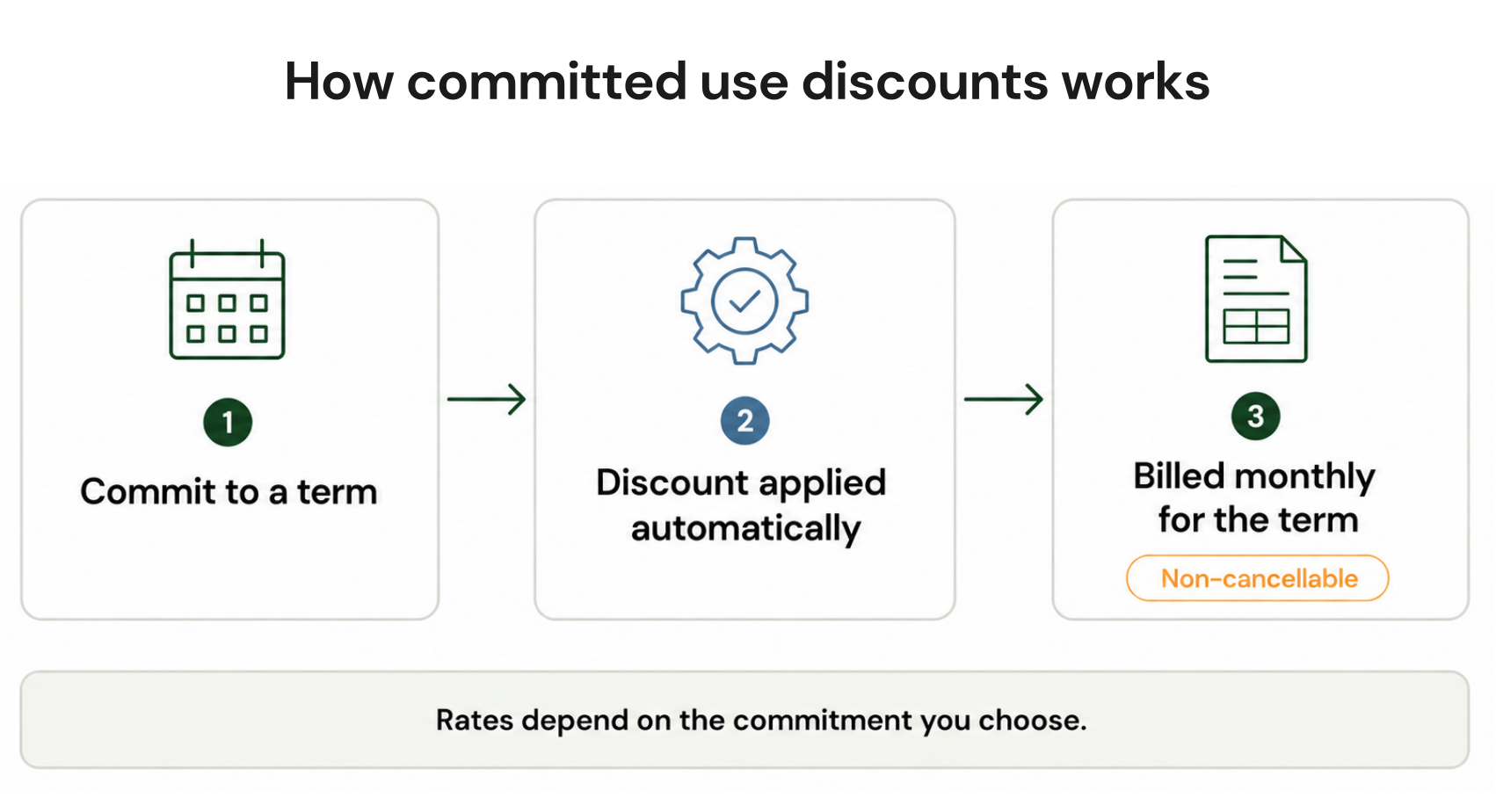
GCP Committed Use Discounts (CUDs) are pricing agreements where you commit to a minimum level of cloud resource usage or spend over 1 or 3 years. In exchange, Google applies discounted rates to those resources. These discounts aren’t available on on-demand pricing regardless of how much you spend.

CUDs apply at the billing account level. When you purchase a CUD, it can automatically cover usage across all projects linked to that billing account. You don’t need to tag specific VMs or provision resources in advance as the discount applies to eligible usage automatically.

However, the commitments are non-cancellable. If you purchase a 3-year CUD and your usage drops, you pay the committed amount every month regardless.

How Much Can You Save? GCP CUD Discount Rates by Type and Term

Resource-Based CUD Savings by Machine Type

For Compute Engine resource-based CUDs, discounts vary by machine series and term length. These numbers come from Google Cloud documentation.

Machine Series 1-Year Discount 3-Year Discount
General purpose (N1, N2, N2D, E2, N4, C3, C3D, C4) ~37% ~55%
Compute-optimized (C2, C2D) ~37% ~55%
Memory-optimized (M1, M2, M3) ~37% ~70%
GPU resources (A100, L4, etc.) Varies Varies

Here’s an example of how CUD pricing works on a standard compute instance:

  • On-demand: n2d-standard-8 VM costs ~$0.3378/hour
  • 1-year CUD: Same VM costs ~$0.2129/hour (37% discount)
  • 3-year CUD: Same VM costs ~$0.1521/hour (55% discount)
  • Annual savings: Running that single instance on a 3-year commitment saves ~$1,680 compared to on-demand

Google Cloud Console screenshot displaying a Committed Use Discount comparison table for N2 machine types, showing on-demand rates, 1-year commitment rates, and 3-year commitment rates with percentage discount

Compute Flexible CUD Savings (28% and 46%)

Compute Flexible CUDs are spend-based commitments for Compute Engine, GKE, and Cloud Run. You commit to a minimum dollar-per-hour of eligible spend. The discount structure is flat. These rates apply across all eligible VM families and regions under the same billing account:

  • 1-year Flex CUD: 28% off committed hourly spend
  • 3-year Flex CUD: 46% off committed hourly spend

Service-Specific Spend-Based CUD Savings

Beyond compute, spend-based CUDs are available for managed services. Discount rates vary by service.

Service 1-Year Discount 3-Year Discount
Cloud SQL ~20% ~40%
GKE Autopilot ~20% ~45%
Bigtable Varies Varies
BigQuery (PAYG compute) Available Available
Memorystore (Valkey, Redis, Memcached) Available Available
AlloyDB Available Available

The term length decision (1-year vs 3-year) affects both your discount rate and exposure risk. For a framework on choosing the right term based on infrastructure stability, read our 1-year vs 3-year commitment decision guide.

How GCP Pricing Works: On-Demand vs Sustained Use vs Committed Use

GCP offers three main pricing layers for compute. Each represents a different balance between flexibility and cost:

On-Demand Pricing is the default. You pay per second or per hour for what you use. No commitment is required, but at the same time, there are no discounts too. For organizations with unpredictable or variable workloads, this is the right model. For stable production infrastructure, it’s the most expensive option.

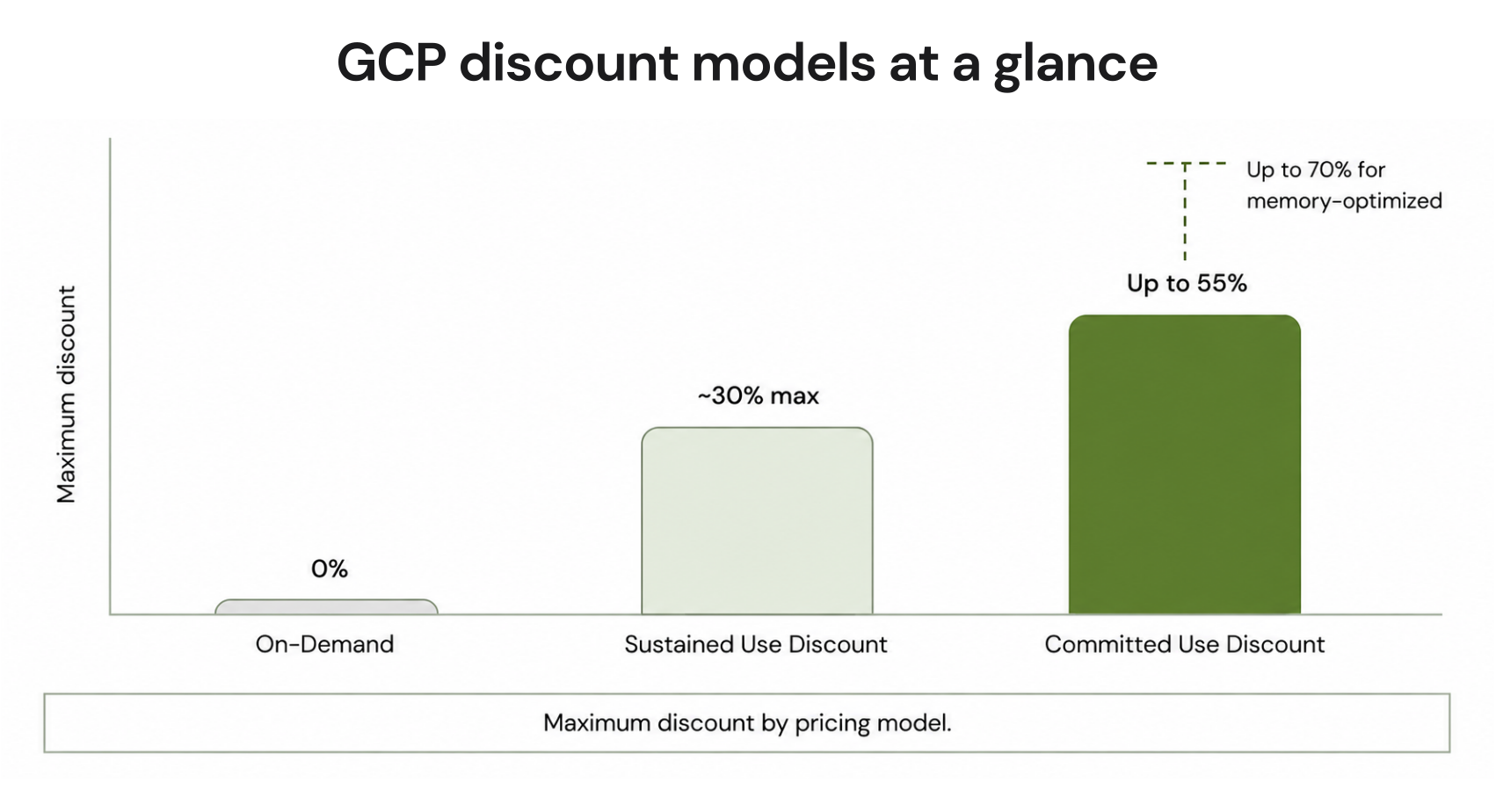
Sustained Use Discounts (SUDs) are automatic discounts that GCP applies when a Compute Engine VM runs for a large portion of the billing month. The maximum SUD is approximately 30% for a VM running continuously, applied to vCPU and memory. SUDs are lower in magnitude than CUDs and don’t apply to all machine types or services.

Committed Use Discounts (CUDs) require an explicit purchase. You commit to a minimum resource amount or spend level for 1 or 3 years. In exchange, you get the deepest discounts available on GCP, up to 57% on most compute, and up to 70% on memory-optimized machines.

Feature On-Demand Sustained Use (SUD) Committed Use (CUD)
Commitment required None None 1 or 3 years
Max discount 0% ~30% Up to 57% (up to 70% memory-optimized)
Discount application None Automatic Automatic once purchased
Cancelable N/A N/A No
Best for Variable/unpredictable workloads Workloads running most of the month Stable, predictable baseline usage
Financial risk None None Medium–High if overcommitted
Requires forecasting No No Yes

The most important trade-off: CUDs deliver 2× the savings of SUDs, but require you to forecast usage accurately. If your infrastructure shrinks after you commit, you pay for the unused portion.

Types of GCP Committed Use Discounts

1. Resource-Based CUDs (Standard CUDs)

A resource-based CUD is a commitment to use a specific amount of Compute Engine resources, typically vCPUs and memory in a specific region, for 1 or 3 years. Google applies discounted pricing when your VM usage matches the committed resource footprint.

Resource-based CUDs are purchased at the project or billing-account level and are scoped to a specific machine series. An N2 commitment covers N2 usage, but it does not apply to N2D or C3 VMs. When you purchase commitments for general-purpose machine types, you pick which machine series the commitment applies to, and discounts from different series never overlap.

Best for: Stable fleets with known machine types. VMs that haven’t changed series or region in 12+ months. Workloads where the specific instance family isn’t going to shift.

Discount rates: 37% (1-year) to 55% (3-year) for general-purpose and compute-optimized machines. Up to 70% for memory-optimized machines on a 3-year term.

Key limitations:

  • Scoped to a specific machine series. If you migrate from N2 to N4 mid-commitment, the discount no longer applies to the migrated VMs. You pay on-demand rates on the new VMs while the N2 commitment keeps billing.
  • Scoped to a specific region. CUDs don’t transfer across regions.
  • Non-cancellable. Purchasing the wrong size or series is a billing exposure for the entire term.

Google Cloud Console Committed Use Discounts purchase interface showing machine series dropdown, region selector, vCPU quantity input field, and memory allocation input field

2. Compute Flexible CUDs (Flex CUDs / Spend-Based)

A Compute Flexible CUD is a spend-based commitment where you commit to spending a minimum amount per hour on eligible Google Cloud compute resources. The discount (28% for 1-year, 46% for 3-year) applies to any eligible usage under the same billing account, regardless of VM family or region.

Flex CUDs were expanded in mid-2024 to cover not just Compute Engine VMs, but also GKE Standard and Autopilot clusters and Cloud Run services with instance-based billing. As of 2025, a single Flex CUD commitment can cover your entire eligible “VMs + containers + serverless” compute footprint.

How the math works: If you commit to $100/hour of on-demand spend on a 3-year Flex CUD, you pay $54/hour (46% off $100) as your commitment fee. Each hour, Google applies up to $100 of discounted coverage to your eligible usage. Your $54/hour commitment covers up to $100/hour of on-demand-equivalent resources.

As of January 2026, GCP fully migrated spend-based CUDs to a “multiprice” (direct discount) model. Under the old model, the CUD was structured as a commitment fee plus a credit offset at list price. Under the new model, discounts apply directly to SKU prices. The end cost is identical, but billing data is cleaner. (verify for your account’s migration date cloud.google.com/docs/cuds-multiprice)

Best for:

  • Workloads migrating between machine families (N2 → N4, for example)
  • Environments using a mix of Compute Engine, GKE Autopilot, and Cloud Run
  • Teams that want to optimize at the spend level rather than the resource level
  • Growing infrastructure where precise resource forecasting is difficult

CUD application priority: Each hour, Google first applies resource-based CUDs to eligible usage, then applies Flex CUDs to any remaining eligible spend. This means combining both types doesn’t produce overlapping discounts, you layer them logically.

Flex CUDs are GCP’s answer to spend-based flexibility. AWS Savings Plans work similarly, offering portability across instance families, though the discount mechanics differ. 

GCP Billing account dashboard showing Flex CUD purchase interface with hourly spend commitment input field and term length selector for 1-year or 3-year commitments

3. Service-Specific Spend-Based CUDs

Service-specific CUDs work like Flex CUDs but are scoped to a single Google Cloud service. You commit to a minimum hourly spend on, for example, Cloud SQL and the discount applies only to Cloud SQL usage in your billing account.

Currently active service-specific CUDs include:

  • Cloud SQL (PostgreSQL, MySQL, SQL Server)
  • BigQuery (PAYG compute capacity) — for teams running significant analytics workloads, BigQuery Committed Use Discounts can deliver substantial savings on slot-based pricing 
  • Bigtable (nodes)
  • Memorystore (Valkey, Redis Cluster, Redis, Memcached)
  • AlloyDB
  • Google Cloud VMware Engine
  • Spanner

Note: As of recent Google documentation, standalone GKE Autopilot CUDs and standalone Cloud Run CUDs are no longer available for new purchase. Google now directs customers to use Compute Flexible CUDs instead to cover those services. 

What Does a GCP CUD Actually Cost? A Real-World Example

A company runs production workloads on Google Cloud with a stable Compute Engine baseline of $10,000 per month. That spend has held consistent for 9 months with no major spikes, or seasonal drops. 

Here’s what happens when they purchase a Flex CUD instead of staying on on-demand rates.

On-demand monthly cost: $10,000

Option 1: 1-year Flex CUD

  • Commit to: $10,000/month ÷ 720 hours/month = ~$13.89/hour
  • Discount: 28% off
  • Monthly commitment fee: $13.89 × (1 − 0.28) × 720 = $7,200
  • Monthly savings: $10,000 − $7,200 = $2,800/month
  • Annual savings: $33,600

Option 2: 3-year Flex CUD

  • Same hourly commitment: ~$13.89/hour
  • Discount: 46% off
  • Monthly commitment fee: $13.89 × (1 − 0.46) × 720 = $5,400
  • Monthly savings: $10,000 − $5,400 = $4,600/month
  • Annual savings: $55,200
  • 3-year total savings: $165,600

The risk: If this company’s Compute Engine spend drops to $5,000/month in year 2 (may be due to infrastructure optimization, product sunset, etc.), they’re committed to paying $5,400/month while using only $5,000/month of resources. The commitment becomes a cost, not a saving.

This is why commitment sizing is the central challenge in GCP CUD strategy and why the FinOps community treats it as a portfolio management problem, not a one-time purchase decision.

What Services Are Eligible for GCP Committed Use Discounts?

Compute Flexible CUD eligible services (single commitment covers all):

  • Compute Engine VMs (N1, N2, N2D, N4, N4D, N4A, C3, C3D, C4, C4A, C4D, E2, and more)
  • GKE Standard edition
  • GKE Autopilot clusters
  • Cloud Run services with instance-based billing

Service-specific CUD eligible services (separate commitment per service):

  • Cloud SQL (PostgreSQL, MySQL, SQL Server)
  • BigQuery (PAYG compute capacity slots)
  • Bigtable (nodes)
  • Memorystore (Valkey, Redis Cluster, Redis, Memcached)
  • AlloyDB
  • Spanner
  • Google Cloud VMware Engine
  • Cloud Interconnect

Not eligible for CUDs:

  • Storage (Cloud Storage, persistent disk storage, backup)
  • Network egress
  • Preemptible / Spot VMs (already discounted)
  • App Engine standard environment (follows different pricing model)
  • Dataflow (uses its own FlexRS discount model)

GCP Billing Console Committed Use Discounts overview page displaying active commitment list and breakdown of eligible services including Compute Engine, GKE, Cloud SQL, and BigQuery

What Changed in 2025–2026: The New CUD Consumption Model

GCP made two significant CUD program changes in 2024–2026 that directly affect how you purchase, interpret billing data, and manage your CUD portfolio:

Mid-2024: Flex CUD coverage expansion 

Google expanded Compute Flexible CUDs to cover GKE Autopilot clusters and Cloud Run services alongside Compute Engine VMs. A single commitment now covers your entire eligible compute footprint rather than requiring separate commitments per service. This change directly benefits companies running containerized or serverless workloads alongside traditional VMs.

July 15, 2025: New consumption model (multiprice) 

Google introduced a new billing model for spend-based CUDs where discounts apply directly to SKU prices (the “multiprice” or “direct discount” model) rather than the legacy system of charging at list price and issuing a credit offset. For customers who purchased their first spend-based CUD on or after July 15, 2025, the new model applies automatically. For existing customers, a migration notification appeared in the Google Cloud Console Billing Overview page.

The practical impact on cost is zero, the total bill is the same either way. But, its impact on FinOps operations is significant. The new model produces cleaner billing exports, simpler reconciliation, and billing data that’s easier to explain to finance teams without a 10-minute prelude on how credits work.

September 5, 2025: Expanded Flex CUD coverage 

Google announced broader machine family coverage for Compute Flex CUDs, including additional VM families. If you purchased Flex CUDs before this date and want to confirm your commitment covers newer VM families (N4, N4D, C4, etc.), verify your commitment scope in the GCP Billing Console.

Resource-Based CUD vs Flex CUD: When to Use Each

You don’t have to choose just one CUD type, but you do need to know which one fits which part of your infrastructure. The decision comes down to stability. If your workloads run on the same machine family in the same region month after month, resource-based CUDs deliver deeper discounts. If your infrastructure is evolving, running a mix of Compute Engine and GKE, or scaling unpredictably, Flex CUDs give you flexibility without locking you into specific resources.

Here’s how to decide.

Dimension Resource-Based CUD Flex CUD
What you commit to Specific vCPU + memory in a specific region and machine series Hourly spend amount
Portability Fixed to one machine series and region Portable across VM families, regions, GKE, Cloud Run
Max discount Up to 57% (up to 70% memory-optimized) 28% (1-year) / 46% (3-year)
Best for Stable, unchanging infrastructure Workloads that evolve, migrate, or mix services
Risk profile Higher; locked to specific resources Lower; follows spend, not specific resources
Machine migration impact CUD stops applying when you migrate to a new series Discount continues after migration
Management complexity Per-series, per-region purchase decisions Single commitment covers broad footprint

Choose resource-based CUDs when:

  • Your VM fleet has been on the same machine series and region for 12+ months with no planned migration
  • You’re on memory-optimized instances (M1, M2, M3) and want the maximum discount (up to 70% on 3-year)
  • You have a precise, stable resource footprint to commit against

Choose Flex CUDs when:

  • Your infrastructure is evolving; active migration between machine families (N2 → N4 is common)
  • You run a mix of Compute Engine, GKE Autopilot and Cloud Run
  • You want to simplify portfolio management (one commitment vs many series-specific commitments)
  • You can forecast spend more reliably than specific resource shapes

Combining both: The recommended approach for large environments is to layer both types. Use resource-based CUDs for the most stable portion of your fleet (VMs that haven’t changed in 12+ months). Use Flex CUDs to cover the dynamic remainder around workloads that shift across regions, teams scaling up and down, and modern compute services like GKE Autopilot.

Google’s billing engine applies resource-based CUDs first each hour, then applies Flex CUDs to remaining eligible spend.

How to Calculate the Right GCP CUD Commitment Size

What Is Commitment Coverage?

Commitment coverage is the percentage of your eligible cloud spend that’s covered by CUDs rather than charged at on-demand rates.

Coverage = (Committed Spend or Resources) / (Total Eligible Spend or Resources)

A 70% coverage rate means 70% of your eligible compute spend is receiving CUD discounts. The remaining 30% is charged at on-demand rates and is intentionally left uncovered to absorb variability.

The Three Coverage Strategies

Strategy Coverage Target Risk Best For
Conservative 40–60% Low Rapidly growing infrastructure; high M&A or migration activity
Balanced 60–80% Medium Most production environments with moderate predictability
Aggressive 80–95% High Extremely stable workloads with multi-year infrastructure plans

For most FinOps teams, the 60–80% coverage range delivers the best risk-adjusted savings. Tracking this requires clean billing data and proper cost allocation. See how to slash your gcp bill by 30-50% in 5 minutes.

How to Purchase GCP Committed Use Discounts

Prerequisites:

  • Billing account owner or Billing Account Administrator IAM role
  • Active GCP billing account linked to the projects you want to cover
  • Usage data: at minimum 60 days of billing history to size commitments appropriately
  • For resource-based CUDs: identify target machine series and region before purchasing

Step-by-step purchase process:

Step 1: Analyze baseline usage 

Pull 6–12 months of resource or spend data from the Billing Console or BigQuery billing export. Identify your stable baseline. It is the level of usage that holds across weekdays, weekends, and off-peak hours. This is your commitment ceiling.

GCP Billing Console showing 6-month compute usage chart with baseline usage level highlighted versus peak usage spikes, used for CUD sizing analysis

Step 2: Identify the right CUD type 

Determine whether resource-based or Flex CUDs fit your infrastructure (use the decision table above). For services like Cloud SQL, check whether a service-specific CUD is available and compare the discount rate against your baseline spend.

Step 3: Navigate to the CUD purchase screen 

In the Google Cloud Console: Billing → Committed Use Discounts → Purchase. For spend-based (Flex) CUDs, navigate to your Billing Account, select Committed Use Discounts, then select the Compute Flexible CUD product.

Step 4: Configure and purchase 

  • For resource-based CUDs: select machine series, region, vCPU count, memory amount, and term (1 or 3 years). 
  • For Flex CUDs: enter your hourly spend commitment and select the term. Review the monthly commitment fee before confirming. 

Note that this commitment is non-cancellable from the moment you confirm purchase.

Step 5: Verify and monitor 

After purchase, the commitment appears in your Billing Console under Committed Use Discounts. Within 24 hours, the discount should begin applying to eligible usage. Monitor the CUD Analysis Report weekly during the first 30 days to confirm the commitment is covering the expected usage.

What to do if you accidentally purchased the wrong commitment: CUDs cannot be self-service cancelled. Contact Cloud Billing Support immediately. In some cases, Google will reverse a purchase made in error within a narrow window. There is no guarantee though. 

CUDs vs Sustained Use Discounts (SUDs): Key Differences

Sustained Use Discounts (SUDs) are automatic discounts Google applies when a VM runs for most of a billing month. Maximum discount is around 30%. CUDs, on the other hand, require an explicit purchase and lock you in for 1 or 3 years, but they deliver 57–70% off depending on the type and term.

There’s a tradeoff too. CUDs have zero risk but cap at 30% savings. CUDs deliver 2–3× the savings but come with overcommitment risk if your usage drops. If a VM is already covered by a CUD, SUDs don’t apply. CUDs take precedence because they offer the deeper discount.

The bottom line: If you’re relying on SUDs alone, you’re leaving 27–40 percentage points of savings on the table. For a $50,000/month compute bill, that’s $13,500–$20,000 every month you don’t move to CUDs.

For a detailed breakdown of how SUDs and CUDs stack, when one makes sense over the other, and real-world examples, read our full comparison: GCP Committed Use Discount vs Sustained Use Discount.

How to Avoid Over-Committing: The Automation Approach

The central challenge with GCP CUDs is purchasing the right amount, at the right time, without the risk of locking into a commitment that becomes a liability as your infrastructure evolves.

Manual commitment management has three structural problems:

  • The lag problem. By the time most FinOps teams complete a usage analysis, present a recommendation, and get purchase approval, the usage data is 2–4 weeks old. Infrastructure changes weekly. A commitment sized on last month’s data may already be wrong.
  • The portfolio complexity problem. At scale, a GCP environment has dozens of commitment decisions in play simultaneously: resource-based CUDs per machine series per region, Flex CUDs at the billing account level, and service-specific CUDs for Cloud SQL and other managed services. Managing this as a spreadsheet exercise doesn’t scale.
  • The asymmetry problem. Overcommitment has a direct financial cost (paying for unused committed capacity). Undercommitment has an opportunity cost (paying on-demand rates for usage that could have been discounted). Both are losses. Manual commitment purchasing tends to optimize for one at the expense of the other.

This is where automated commitment management changes the equation. The best cloud cost optimization tools handle CUD sizing, purchasing, and monitoring continuously rather than as quarterly manual reviews

Usage.ai’s GCP CoPilot handles Compute Engine, GKE, and Cloud SQL commitments autonomously with a structure that directly addresses the overcommitment risk that makes manual CUD purchasing so difficult.

Usage.ai’s Flex Compute Engine CUD delivers 28–46% savings, Flex GKE Autopilot CUD delivers 20–46% savings, and Flex Cloud SQL CUD delivers 25–52% savings, all with $0 upfront cost. The platform operates at the billing layer only, requiring no infrastructure changes and approximately 30 minutes to onboard.

The differentiator that directly addresses CUD underutilization risk is Guaranteed Buyback. If Usage.ai purchases a commitment on your behalf and your usage drops, the platform provides cash-back rebates for any underutilized portion. This converts the commitment risk from a potential liability into a bounded, assured position.

For companies that have been avoiding CUDs because of the overcommitment risk, this changes the decision calculus. The discount upside is available without accepting unlimited downside if usage patterns change.

See How Much You’re Leaving on GCP

Usage.ai connects to your GCP billing layer in 30 minutes. You can review your current CUD coverage rate, which commitments are underutilized, and exactly how much automated Flex CUD purchasing would save you annually.

The fee is a percentage of realized savings only. If Usage.ai saves you nothing, you pay nothing.

Get Your Free GCP Savings Assessment →

Frequently Asked Questions

1. How do GCP Committed Use Discounts work?

GCP Committed Use Discounts (CUDs) give you discounted pricing in exchange for committing to a minimum level of usage or spend for 1 or 3 years. Google automatically applies the discount to eligible usage each hour. If your usage falls below the committed level, you still pay the full commitment fee. CUDs are non-cancellable.


2. What is the difference between a committed use discount and a sustained use discount?

Sustained Use Discounts (SUDs) are automatic discounts of up to ~30% for VMs running more than 25% of a billing month. Committed Use Discounts require a 1 or 3-year commitment but deliver deeper discounts of up to 57% for most compute and 70% for memory-optimized machines.


3. What is a Compute Flexible Committed Use Discount?

A Compute Flexible CUD (Flex CUD) is a spend-based commitment where you commit to a minimum hourly dollar amount of eligible GCP compute spend. Google discounts that spend by 28% (1-year) or 46% (3-year). Flex CUDs apply across VM families, regions, GKE clusters, and Cloud Run.


4. What happens if I don’t use all of my GCP committed use discount?

If your usage falls below the committed level, you pay the commitment fee without receiving the full discount benefit. Unused commitment does not carry forward to future hours. For resource-based CUDs, unused capacity is billed at the committed rate. CUDs cannot be cancelled once purchased.


5. How do I calculate the right GCP CUD commitment size?

Size your commitment against baseline usage which is the minimum level that holds consistently across weekdays, weekends, and off-peak hours. Pull 6–12 months of billing data, identify the 10th–20th percentile of hourly usage, and use that as your commitment ceiling. Covering 60–80% of eligible usage typically delivers the best balance.


6. Can GCP committed use discounts be cancelled?

No. Once purchased, CUDs cannot be self-service cancelled. You’re committed to the agreed hourly spend or resource amount for the full 1 or 3-year term, billed monthly. If you accidentally purchased a commitment, contact Cloud Billing Support immediately. Google may reverse it within a very narrow window.


7. Are GCP CUDs shared across projects?

Yes. CUDs purchased at the billing account level automatically apply to eligible usage across all linked projects. For resource-based CUDs, enable “Discount sharing” in the Billing Console. Flex CUDs apply billing-account-wide by default. A single CUD purchase can benefit multiple teams and projects without per-project commitments.


8. Is it better to buy a 1-year or 3-year GCP CUD?

A 3-year Flex CUD delivers 46% off vs 28% for 1-year, nearly 65% more discount. A 3-year resource-based CUD delivers ~55% vs ~37% for 1-year. The trade-off is exposure. 3-year commitments lock you in for 36 months vs 12, increasing overcommitment risk if infrastructure changes.


9. What is the difference between resource-based and spend-based CUDs on GCP?

Resource-based CUDs commit to specific Compute Engine resources (vCPU and memory) in a specific region and machine series, delivering up to 55–70% off. Spend-based Flex CUDs commit to a minimum hourly dollar amount and apply discounts across machine families, regions, and services like GKE and Cloud Run (28–46% off).

Cut cloud cost with automation
Latest from our blogs