
 AWS
AWS Microsoft Azure
 Google Cloud


Start with the resources your application needs, then compare purchasing options for the usage you expect to maintain. Savings Plans and Reserved Instances reduce eligible compute rates, but unused commitments can offset those discounts.
Instance type: CPU, memory, processor architecture, and performance limits
Region: use the rates for the AWS Region where the workload runs
Operating system and software: include paid licenses and subscriptions
Running hours: estimate the time each resource remains provisioned
Purchasing option: account for discounts and unused commitments
How EC2 pricing works
For the Linux On-Demand examples here, billing is per second with a 60-second minimum. A running instance incurs compute charges even when its application is idle. Operating-system and software billing rules can differ.Monthly compute cost = hourly rate × running hours × instance count. Ten m5.large instances at $0.096 per hour for 730 hours cost $700.80 before storage and networking.
EC2 pricing models and purchase options
On-Demand, Savings Plans, Reserved Instances, and Spot address different usage patterns. Dedicated Hosts provide physical-server isolation and have their own purchasing options.On-Demand instances
On-Demand suits new, temporary, or variable workloads and usage above existing commitments. Stopping an instance ends its usage charges, while EBS storage and other retained resources can keep billing. AWS explains instance billing states here.Savings Plans
Savings Plans commit you to eligible usage measured in dollars per hour for one or three years. Choose the plan type around the infrastructure changes you expect, then size the commitment against usage likely to remain.Compute Savings Plans: up to 66% savings across eligible EC2 usage, with flexibility across families and Regions; also cover eligible Fargate and Lambda usage.
EC2 Instance Savings Plans: up to 72% savings within one instance family and Region; size, operating system, and tenancy can change within that scope.
Reserved Instances
Reserved Instances provide discounts when usage matches their attributes and applicable flexibility rules. Standard and Convertible RIs have different modification and exchange options.Standard RIs: up to 72% savings. Some attributes can be modified, subject to AWS restrictions; Standard RIs cannot be exchanged like Convertible RIs.
Convertible RIs: up to 66% savings. Exchanges can change configuration, but must satisfy AWS rules, including equal or greater value.
Spot Instances
Spot uses spare EC2 capacity at discounts of up to 90%. Consider it for batch processing, build jobs, and distributed applications that recover from instance interruptions.AWS generally provides a two-minute notice before stopping or terminating a Spot instance, but notices are best effort. Hibernation begins immediately after notification. Design recovery without depending on the full warning period. AWS Spot interruption notices.
Dedicated Hosts and capacity reservations
Dedicated Hosts allocate a physical server to your account for specific licensing or isolation requirements. Their purchasing options include On-Demand, reservations, and eligible Savings Plans.On-Demand Capacity Reservations secure capacity in an Availability Zone and can work with eligible discounts. Unused reserved capacity can still incur charges. AWS purchasing options.
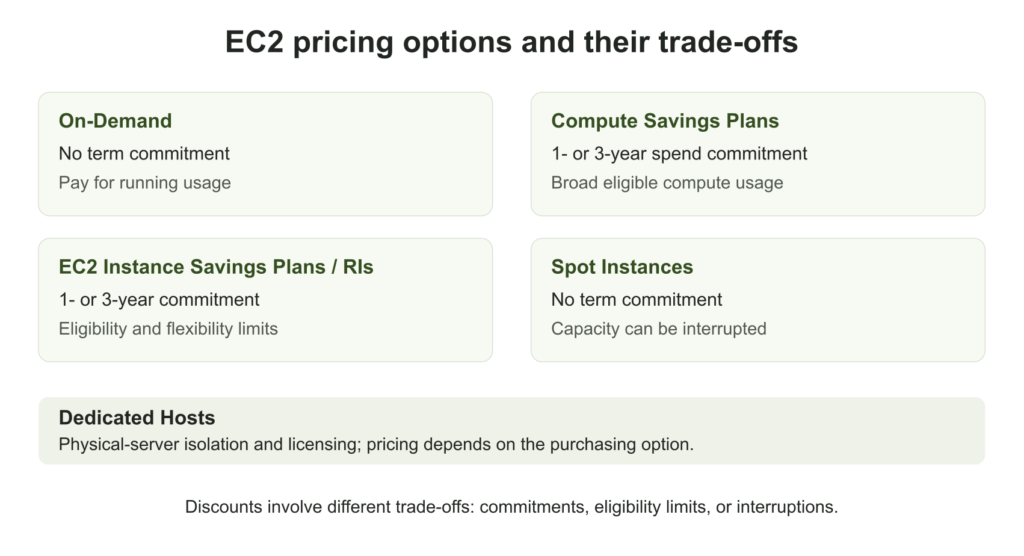
EC2 pricing options compared
Advertised maximum discounts are ceilings across eligible configurations, terms, and payment choices. They are not guaranteed savings for every instance.| Option | Max savings | Commitment | Flexibility | Interruption terms |
|---|---|---|---|---|
| On-Demand | No commitment discount | None | Change usage as needed | No Spot reclamation |
| Compute Savings Plan | Up to 66% | 1 or 3 years | Eligible EC2, Fargate, Lambda | No Spot reclamation |
| EC2 Instance Savings Plan | Up to 72% | 1 or 3 years | One family and Region | No Spot reclamation |
| Standard RI | Up to 72% | 1 or 3 years | Limited modifications | No Spot reclamation |
| Convertible RI | Up to 66% | 1 or 3 years | Exchanges under AWS rules | No Spot reclamation |
| Spot | Up to 90% | No term commitment | Capacity can change | AWS may reclaim capacity |
| Dedicated Hosts | Varies by purchase option | Depends on purchase option | Dedicated physical server | Depends on configuration |
For a like-for-like quote, hold the instance configuration, Region, operating system, term, and payment option constant. Spread any upfront payment across the term when calculating effective hourly cost, and show the cash payment separately.
How coverage and utilization affect EC2 savings
Coverage measures the share of eligible usage receiving discounted rates. Commitment utilization measures the share of the purchased commitment consumed. Neither metric measures how busy an instance’s CPU or memory is.A = On-Demand-equivalent cost of Savings Plans-covered usage
B = eligible usage billed at On-Demand rates
Utilization (%) = used commitment ÷ total purchased commitment × 100. High coverage can coexist with wasted spend if the commitment is too large. AWS utilization definition.
At an illustrative 35% discount and full commitment utilization, 40% coverage saves 14% on eligible compute; 80% coverage saves 28%. The complete monthly example below also accounts for storage and networking.
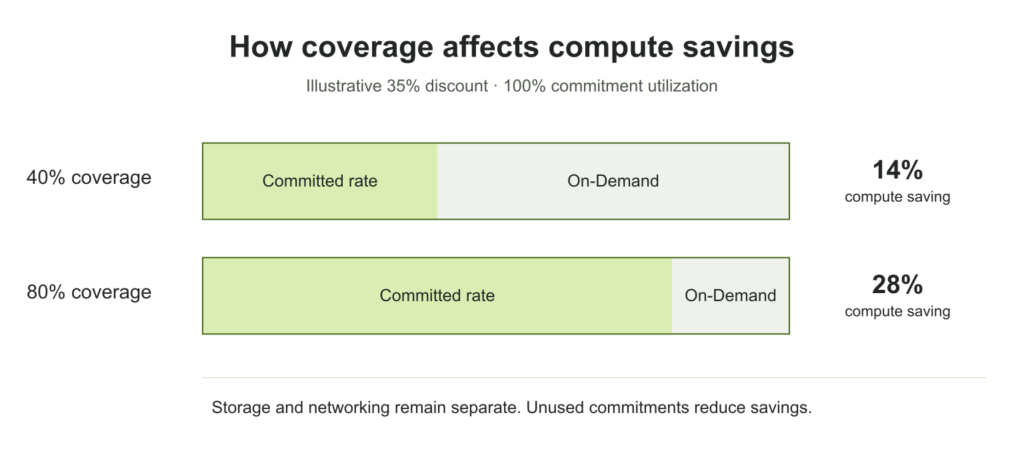
Low coverage: eligible usage remains On-Demand. Assess whether it is stable enough to justify a commitment.
Low utilization: some purchased commitment goes unused. Include that cost when calculating net savings.
EC2 instance pricing per hour and month
These reference rates use Linux without a paid operating-system license, shared tenancy, and On-Demand pricing in US East (N. Virginia), or us-east-1.
Monthly estimates assume 730 running hours. Prices are in USD and exclude storage, networking, taxes, and additional software charges. Hourly rates were checked on October 15, 2026.
| Instance | Specifications | Hourly rate | 730-hour month |
|---|---|---|---|
| t4g.nano | 2 vCPUs · 0.5 GiB · Arm | $0.0042/hr | $3.07 |
| t3.micro | 2 vCPUs · 1 GiB · x86 | $0.0104/hr | $7.59 |
| m5.large | 2 vCPUs · 8 GiB · x86 | $0.0960/hr | $70.08 |
| m7g.large | 2 vCPUs · 8 GiB · Arm | $0.0816/hr | $59.57 |
| m7i.large | 2 vCPUs · 8 GiB · x86 | $0.1008/hr | $73.58 |
| c7g.large | 2 vCPUs · 4 GiB · Arm | $0.0725/hr | $52.93 |
| r7g.large | 2 vCPUs · 16 GiB · Arm | $0.1071/hr | $78.18 |
Arm instances require compatible applications and dependencies. T-family instances use CPU credits; sustained usage above baseline can add charges in Unlimited mode. Include those charges when comparing burstable instances with instances designed for sustained load.
For workload selection, see our EC2 instance types guide and AWS burstable-instance documentation.
EC2 pricing by operating system
Windows Server, SQL Server, commercial Linux subscriptions, and Marketplace software can change the total price. Compare the exact machine image and licensing configuration you intend to run. A compute discount does not imply the same reduction across software or supporting-service charges.Costs beyond the EC2 instance rate
EBS volumes and snapshots
EBS volumes remain billable while provisioned, including when attached instances are stopped. Snapshots have separate storage charges. gp3 includes 3,000 IOPS and 125 MB/s of throughput; additional provisioned performance can increase the bill. Amazon EBS pricing.Data transfer and networking
Network cost depends on the traffic path. Cross-AZ and internet-bound traffic may incur transfer charges, and NAT processing can add another charge to the same traffic.AWS provides 100 GB of free internet data transfer out per month, aggregated across eligible services and Regions, excluding China and GovCloud. This is an account-level allowance, not an allowance for each instance. AWS data-transfer pricing.
Example zonal NAT gateway rate in us-east-1: $0.045/hour, or $32.85 over 730 hours, plus $0.045 per GB processed.
For suitable S3 and DynamoDB traffic, gateway endpoints avoid routing through a NAT gateway. Check the complete traffic path.
A standard AWS-provided public IPv4 address costs $0.005/hour, or $3.65 over 730 hours. BYOIP and other address products have different rules. Amazon VPC pricing.
How to calculate your monthly EC2 cost
Consider ten Linux m5.large instances inus-east-1, running for 730 hours. Each has a 100 GB gp3 EBS volume using included baseline performance.
The private instances use one zonal public NAT gateway in the same Availability Zone, with one standard Elastic IP address. Total NAT-processed traffic is 100 GB for the month.
Assume no chargeable cross-AZ traffic and internet egress within the account’s remaining free allowance. The estimate excludes snapshots, load balancers, paid monitoring, support, software subscriptions, and taxes.
| Component | Quantity | Unit rate | Monthly cost |
|---|---|---|---|
| EC2 compute | 10 instances × 730 h | $0.096/hour | $700.80 |
| gp3 storage | 1,000 GB-month | $0.08/GB-month | $80.00 |
| NAT availability | 730 hours | $0.045/hour | $32.85 |
| NAT processing | 100 GB | $0.045/GB | $4.50 |
| Public IPv4 | 730 address-hours | $0.005/hour | $3.65 |
| Total | Defined configuration | Before tax | $821.80 |
A worked commitment-savings example
Assume an illustrative 35% discount on covered compute and full utilization of every purchased commitment. This is a calculation example, not a current Savings Plan quote. Storage and networking remain $121 per month.40% coverage: $602.69 compute, or $723.69 including the other costs. Compute saving: 14%.
80% coverage: $504.58 compute, or $625.58 including the other costs. Compute saving: 28%; complete-example saving: approximately 23.9%.
($700.80 × 80% × 65%) + ($700.80 × 20%) = $504.58
Complete example: $504.58 + $121 = $625.58
Why Savings Plans and RIs can underperform
Usage can fall or move outside a commitment’s eligibility while the purchase remains payable. Set targets around planned migrations, seasonal demand, and workloads due for retirement. There is no universal coverage percentage that fits every environment.Compare the trade-offs in our Savings Plans vs Reserved Instances guide.
Six steps to reduce EC2 costs
- Remove unused storage and unnecessary running hours. Check whether existing commitments remain payable and whether other eligible usage can consume them.
- Rightsize with CPU, memory, disk, network, and application-performance data. Include normal peaks; low average CPU alone does not prove an instance is oversized.
- Test newer families and Arm compatibility. Compare cost per request or completed job, and check operating systems, images, libraries, and native dependencies.
- Review storage and traffic paths. Check provisioned EBS performance, snapshot retention, NAT processing, and cross-AZ transfers.
- Buy commitments against the stable usage that remains. Account for existing commitments and lower-demand periods; leave uncertain usage On-Demand and consider Spot for interruptible work.
- Review coverage, utilization, and net savings regularly, and after major changes. Include fees and unused commitment cost in the result.
mem_available_percent and mem_used_percent; they are additional to default EC2 metrics. CloudWatch agent documentation.
Our Savings Plan KPI guide explains the financial measurements to track.
Waste removed
Remove unused resources and unnecessary running hours.
Resources rightsized
Test performance and capacity before purchasing commitments.
Utilization measured
Measure how much purchased commitment eligible usage consumes.
Commitments sized
Base purchases on expected stable usage and existing commitments.
Savings reviewed
Track net savings and reassess after infrastructure changes.
When to compare EC2 with Fargate or Lambda
Fargate can reduce container-host management work. Its billing continues for provisioned task resources from image download until the task terminates, including time when the application is idle. AWS Fargate pricing.For intermittent work, compare scheduled EC2 instances, Fargate tasks that stop between jobs, and an event-driven Lambda design where appropriate. There is no universal runtime percentage at which one is cheaper. Include resource needs, execution time, supporting services, and operational effort. See our EC2 vs Fargate comparison.
EC2 Free Tier in 2026
Eligible accounts created on or after July 15, 2025 receive $100 in sign-up credits and opportunities to earn up to $100 more. The free account plan ends after six months or when credits run out, whichever occurs first.Free Tier credits expire 12 months after account creation. Remaining eligible credits can be used after upgrading to a paid plan, subject to AWS terms. AWS Free Tier FAQs.
The legacy program for accounts created before July 15, 2025 included limited EC2 usage for the first 12 months. Those 12-month eligibility windows had ended by October 2026. Check your account plan, remaining credits, and eligible resources in AWS Billing. EC2 Free Tier guidance.
Review your EC2 savings opportunities with Usage.ai
Usage.ai helps teams analyze cloud usage and manage commitments. Its Flex Insured Commitment Program includes cashback protection for qualifying losses, subject to program terms. Fees are a percentage of realized savings.If a qualifying commitment costs more than the On-Demand equivalent of the same usage, cashback considers that difference. Published documentation specifies payment 90 days after cashback accrues. Include eligibility, payout timing, and fees when evaluating the benefit. How cashback works.
Review On-Demand exposure, commitment utilization, and potential savings after fees.
Frequently asked questions
What is Amazon EC2 pricing per hour?
In us-east-1, Linux On-Demand reference rates include $0.0042/hour for t4g.nano, $0.0104/hour for t3.micro, and $0.096/hour for m5.large. At 730 hours, their compute costs are $3.07, $7.59, and $70.08. Storage, networking, and additional software are separate.
What is the cheapest EC2 instance type?
Among the reference instances in this article, t4g.nano has the lowest On-Demand compute price at $0.0042/hour in us-east-1. It has 0.5 GiB of memory and requires Arm-compatible software. Workload capacity, performance, and CPU-credit charges can change the economical choice.
Does a stopped EC2 instance still cost money?
Stopping a standard On-Demand instance ends its instance usage charges. EBS volumes, retained Elastic IP addresses, and other provisioned resources may still cost money. Savings Plans and RI obligations continue for their terms; stopping an instance does not cancel those purchases.
What is the difference between Savings Plans and Reserved Instances?
Savings Plans commit to eligible usage in dollars per hour. Compute Savings Plans extend across eligible EC2, Fargate, and Lambda usage; EC2 Instance Savings Plans apply within one instance family and Region. RIs depend on matching configuration attributes and applicable flexibility rules. Zonal RIs can also reserve capacity.
Can Reserved Instances be canceled?
Do not assume an RI can be canceled when requirements change. Eligible Standard EC2 RIs can be listed on the RI Marketplace, subject to AWS restrictions, but a sale is not guaranteed. Convertible RIs cannot be sold there; eligible exchanges follow separate rules.




