
 AWS
AWS Microsoft Azure
 Google Cloud

As you become familiar with your workloads, you may find that some resources are needed consistently. AWS Reserved Instances let you reduce the cost of that ongoing usage by committing to a reservation for one or three years. Your applications continue running while AWS automatically applies the discount to eligible usage.
Before purchasing a reservation, you need to understand how its terms fit your workload. This helps you evaluate the savings and choose an option that supports your plans.
How do AWS Reserved Instances work?
AWS Reserved Instances work by automatically applying discounted pricing to eligible instance usage that meets the reservation’s requirements. The reservation is purchased separately, so existing instances continue running without changes. See AWS RI billing rules.For EC2, the selected instance type, platform, tenancy and Region determine which usage receives the benefit. A Zonal RI also specifies an Availability Zone.
For example, one matching reservation can cover the equivalent of one EC2 instance running continuously. If two identical instances run throughout the same hour, the remaining usage is billed at On-Demand rates unless another applicable discount covers it.
AWS applies the benefit within each clock-hour. The reservation remains payable when no matching instances run, and unused benefits do not carry forward.
Which AWS services offer reservations?
AWS offers reservations for EC2 and several database and analytics services. The same principle applies across these services, but the reservation names and purchasing rules differ.| AWS service | What the reservation covers |
|---|---|
| Amazon EC2 | Reserved Instances reduce eligible EC2 instance charges. Standard and Convertible options are explained below. |
| Amazon RDS | RDS Reserved Instances reduce eligible DB instance charges. |
| Amazon ElastiCache | ElastiCache Reserved Nodes reduce eligible node-based usage charges. |
| Amazon Redshift | Redshift Reserved Nodes reduce eligible provisioned-node charges. |
| Amazon OpenSearch Service | Reserved Instances reduce eligible OpenSearch instance charges. |
| Amazon DynamoDB | DynamoDB reserved capacity reduces the cost of eligible provisioned read and write capacity. |
For EC2, choosing a reservation starts with how much flexibility the workload needs. AWS offers Standard and Convertible RIs to accommodate different expectations about configuration changes during the commitment term.
Standard vs Convertible EC2 Reserved Instances
Standard RIs offer a larger discount with limited modifications. Convertible RIs provide a smaller discount but support exchanges for reservations with different attributes. The right choice depends on whether the workload’s configuration is expected to remain stable.The table below compares Standard and Convertible EC2 Reserved Instances to help assess which option fits the workload’s expected requirements.
| Decision factor | Standard RI | Convertible RI |
|---|---|---|
| Advertised savings | Up to 72% versus On-Demand | Up to 66% versus On-Demand |
| Configuration changes | Limited modifications under AWS rules | Modifications and exchanges that can change instance family, platform or tenancy |
| Exchange conditions | Cannot be exchanged | Replacement reservations must have equal or greater value |
| Change AWS Region | Not supported | Not supported |
| Marketplace resale | Eligible reservations can be listed; a sale is not guaranteed | Cannot be sold |
| Workload fit | Sustained usage with stable configuration requirements | Sustained usage that may require configuration changes |
That flexibility does not remove the risk of declining usage. Convertible exchanges require equal or greater reservation value, so they cannot simply shrink the financial commitment when fewer resources are needed.
The offering class also does not determine whether capacity is reserved. That depends on a separate choice between Regional and Zonal scope.
Regional vs Zonal EC2 Reserved Instances
Regional RIs provide a billing discount across Availability Zones within a selected Region. Zonal RIs also reserve matching capacity in a specific Availability Zone. Both Standard and Convertible RIs can have either scope.The table below compares how scope affects discount eligibility and capacity.
| Decision factor | Regional RI | Zonal RI |
|---|---|---|
| Where the discount applies | Matching usage across Availability Zones in the selected Region | Matching usage in the selected Availability Zone |
| Capacity reservation | Not included | Included for the specified configuration |
| Instance-size flexibility | Available for qualifying Linux/UNIX RIs with default tenancy, subject to AWS restrictions | Not available; instance size must match |
| Price for an otherwise equivalent offering | Same as Zonal | Same as Regional |
| When to consider it | Discount coverage across Availability Zones is the priority | Matching capacity is needed in a specific Availability Zone |
A Zonal RI supports a different requirement. It reserves capacity for the specified configuration in one Availability Zone, but that capacity benefit belongs to the purchasing account and is not shared across the organization. Learn more about AWS Regional and Zonal scope.
Once the offering class and scope are clear, the next decision is how long to commit and how to pay. These choices affect both the reservation’s effective cost and the timing of payments.
RI payment options and commitment terms
AWS offers EC2 Reserved Instances for one- or three-year terms with All Upfront, Partial Upfront and No Upfront payment options. Available rates depend on the selected configuration and offering.The table below explains how each payment option works.
| Payment option | How payment works | Financial consideration |
|---|---|---|
| All Upfront | The reservation cost is paid at purchase for the full term. | Generally provides the lowest effective rate but requires the most cash initially. |
| Partial Upfront | An initial payment is followed by discounted hourly charges billed monthly. | Balances the initial payment with recurring charges. |
| No Upfront | Discounted hourly charges are billed monthly throughout the term. | Preserves cash initially but generally provides a smaller discount. |
A one-year term provides an earlier opportunity to reassess requirements. A three-year term generally offers a larger discount but requires confidence that sufficient eligible usage will continue. Our one-year vs three-year AWS commitment comparison examines that decision in more detail.
Compare offers using their effective hourly cost. Add the upfront payment divided by the term’s total hours to any recurring hourly charge. For an All Upfront reservation, the recurring charge is zero. Learn more about AWS EC2 Reserved Instance pricing.
How much can Reserved Instances actually save?
Realized RI savings depend on the reservation’s total cost and the On-Demand cost of the usage it covers. The advertised discount assumes the reservation benefit is fully consumed.Unused benefits reduce those savings and can make the commitment more expensive than On-Demand.
The table below shows how utilization changes the outcome. Assume an On-Demand rate of $1 per hour and an RI effective rate of $0.60 per hour.
We examine a 100-hour window within the reservation term, allocating $60 of the commitment cost to that period.
| Matching usage within the 100-hour window | Cost without the RI | RI cost allocated to the window | Result |
|---|---|---|---|
| 100 hours | $100 | $60 | $40 saved |
| 80 hours | $80 | $60 | $20 saved |
| 60 hours | $60 | $60 | Break-even |
| 40 hours | $40 | $60 | $20 more than On-Demand |
This is why reservation purchases should reflect expected matching usage throughout the term. A workload can remain active while becoming ineligible for its existing reservation after a configuration change.
A reservation’s value can change when a workload is resized, migrated or retired. Before purchasing, it helps to understand which adjustments AWS permits and which obligations remain.
What are the limitations of Reserved Instances?
Reserved Instances create a financial commitment that continues even when matching usage declines or stops. Changes are subject to the reservation’s service, offering class and eligibility rules.Purchases cannot generally be cancelled. Stopping or terminating the underlying instance does not end the reservation.
Marketplace resale is conditional. Eligible Standard EC2 RIs can be listed, but a buyer is not guaranteed. Convertible RIs and RDS reservations cannot be sold there.
The discount does not cover the entire service bill. Separately billed costs such as storage and data transfer require their own evaluation.
What should you check before purchasing an RI?
Before purchasing an RI, confirm that the reservation fits the workload expected to remain throughout its term. Review the current configuration alongside planned changes and existing commitments.Right-size the workload first. Check whether the current resources are necessary before committing to their cost.
Identify sustained hourly usage. Account for seasonal demand and scheduled shutdowns rather than relying on monthly averages.
Review planned changes. Include migrations, instance-family changes and workload retirements in the forecast.
Account for existing commitments. Check current RI and Savings Plans coverage before purchasing additional reservations.
Confirm matching and sharing rules. Validate the service attributes and organization discount-sharing settings.
Compare current offers. Evaluate the total cost, payment option and expected utilization against On-Demand and applicable Savings Plans.
How to purchase an EC2 Reserved Instance
In the EC2 console, open Reserved Instances and select Purchase Reserved Instances.
Search for an offering using the required configuration and review its scope, term, payment option and quantity before confirming the purchase.
Once the reservation becomes active, AWS automatically applies the benefit to matching usage. Existing instances do not need to restart.
Other services have separate purchasing workflows. For database reservations, follow the RDS Reserved Instances guide.
When should you choose a Reserved Instance?
An EC2 Reserved Instance is worth evaluating when matching usage is expected to continue throughout the term. A Zonal RI also addresses the need for reserved capacity in a specific Availability Zone.AWS recommends Savings Plans for compute savings, so compare those options before purchasing.
The table below summarizes the differences relevant to EC2 workloads.
| Decision factor | EC2 Reserved Instances | Compute Savings Plans | EC2 Instance Savings Plans |
|---|---|---|---|
| Commitment basis | A specified EC2 configuration | Consistent eligible spend in dollars per hour at Savings Plans rates | Consistent eligible spend in dollars per hour at Savings Plans rates |
| Compute flexibility | Depends on offering class, scope and matching rules | Eligible EC2 usage across families and Regions, plus eligible Fargate and Lambda usage | One EC2 family in one Region, with flexibility across size, OS and tenancy |
| Capacity reservation | Included with Zonal RIs; not Regional RIs | Not included | Not included |
| Term and payment | One or three years; All, Partial or No Upfront | One or three years; All, Partial or No Upfront | One or three years; All, Partial or No Upfront |
| Workload fit | Predictable matching EC2 usage or a specific Zonal capacity requirement | Sustained compute spend that may move across configurations or supported services | Sustained EC2 usage within one family and Region |
Our AWS Savings Plans vs Reserved Instances comparison covers the detailed evaluation. For temporary or interruption-tolerant workloads, see On-Demand vs Reserved vs Spot Instances.
How do you monitor Reserved Instances after purchase?
AWS Cost Explorer provides RI utilization and coverage reports to help monitor reservations. Utilization shows how much of the purchased reservation benefit is being used. Coverage shows how much eligible usage receives an RI discount.Together, these reports help explain whether existing reservations still fit the workload. A drop in utilization after rightsizing may mean some reservations are no longer fully used. Lower coverage may suggest that usage has grown beyond the existing reservations.
Checking these reports after infrastructure changes helps identify where a review is needed. Expiration dates also need attention so the next purchase reflects current requirements.
How Usage.ai Helps You Manage Reserved Instances
Purchasing an RI is the start of an ongoing commitment. As workloads change, reservations need regular attention to keep coverage aligned with usage.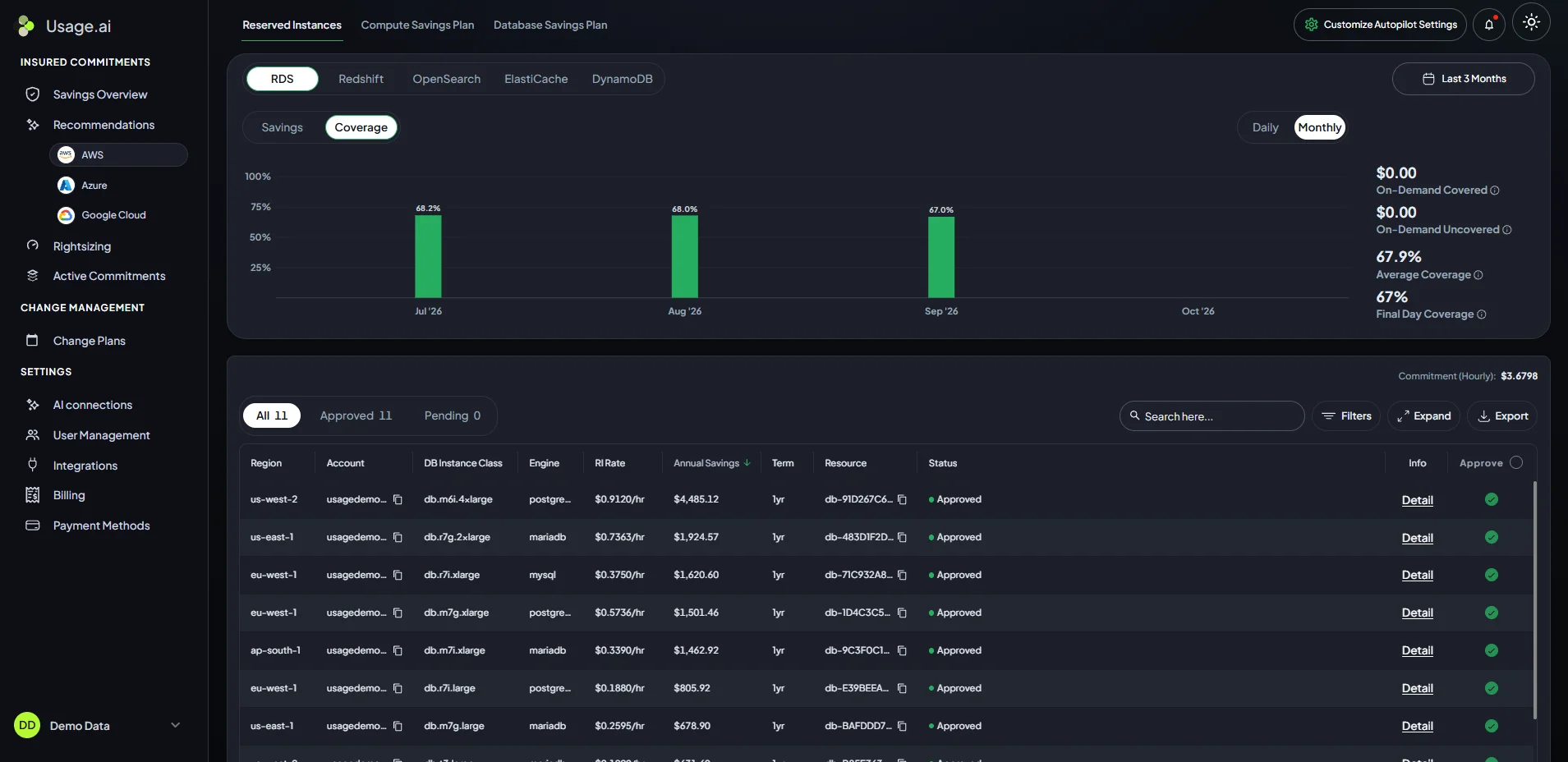
Our Flex Insured Commitments combine managed purchasing with protection against qualifying commitment losses. Teams can access up to 57% savings associated with a three-year AWS commitment.
If an eligible Flex Commitment costs more than equivalent On-Demand usage, we calculate the loss monthly and provide cashback for the qualifying difference 90 days after it accrues, subject to current program eligibility and terms.
See how we manage eligible AWS commitments and protect against qualifying losses through Cashback.
Frequently asked questions
Can Reserved Instances apply to existing instances?
Yes. AWS automatically applies the RI benefit to eligible existing or newly launched instances that meet the reservation’s requirements. Existing EC2 instances do not need to restart.
Does stopping an instance stop RI charges?
No. Stopping or terminating an instance does not end the reservation. Any recurring RI charges continue for the remaining term, and upfront payments are not refunded because usage stops.
Can an RI discount apply to a different instance size?
For EC2, qualifying Regional Linux/UNIX RIs with default tenancy support size flexibility within the same instance family, subject to AWS restrictions. Zonal RIs require the instance size to match. Other services have their own rules.
Can Reserved Instance discounts be shared across AWS accounts?
Yes. Within a consolidated billing organization, RI discounts can apply to eligible usage in other accounts when sharing settings allow it. A Zonal EC2 RI’s capacity reservation remains available only to the purchasing account.
What happens when a Reserved Instance expires?
The reservation’s billing benefit ends, but the underlying instance continues running. Usage is charged at On-Demand rates unless another applicable reservation or Savings Plan covers it.




