
 AWS
AWS Microsoft Azure
 Google Cloud

The surcharge is billed separately from normal RDS instance costs and increases based on the database version, lifecycle year, Region, and number of vCPUs running under Extended Support.
For teams with Multi-AZ deployments or read replicas, the cost can increase quickly because each affected running instance can be added to the Extended Support bill.
The most effective way to eliminate this surcharge is to upgrade to a major engine version that is still covered by RDS standard support.
Short answer
Amazon RDS Extended Support adds a separate lifecycle-support charge when eligible MySQL or PostgreSQL versions pass RDS standard support. In US East, AWS pricing starts at $0.100 per vCPU-hour for Years 1 and 2 and rises to $0.200 per vCPU-hour in Year 3.As of August 25, 2026, MySQL 5.7 and PostgreSQL 11 are in Year 3, while MySQL 8.0, PostgreSQL 12, and PostgreSQL 13 are also in paid Extended Support. This guide helps you identify affected databases, estimate the surcharge, and choose an upgrade path.
What is Amazon RDS Extended Support?
Amazon RDS Extended Support lets eligible RDS for MySQL and RDS for PostgreSQL databases continue running after RDS standard support ends.AWS continues providing critical and high-severity security fixes, critical bug fixes, and standard technical support while teams prepare a major-version upgrade. See AWS’s RDS Extended Support documentation.
Extended Support should generally be treated as migration runway rather than a long-term database cost strategy because its fee is added on top of normal RDS charges.
Which RDS versions are currently in Extended Support?
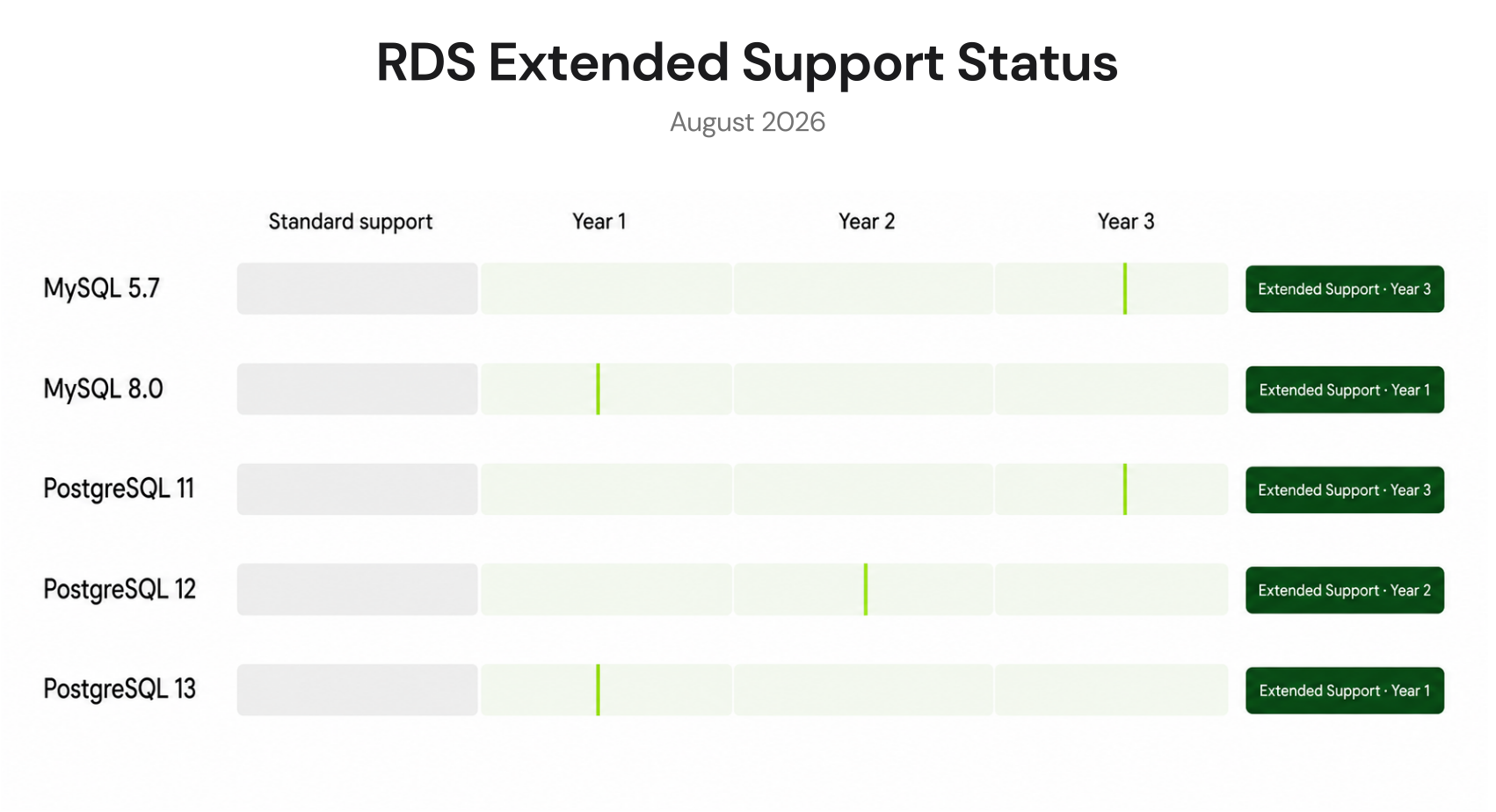
As of August 25, 2026, these major versions are in paid RDS Extended Support when the DB instance is running an AWS-supported Extended Support minor version:| Engine | Version | RDS standard support ended | Current pricing year | Next milestone |
|---|---|---|---|---|
| RDS MySQL | 5.7 | Feb. 29, 2024 | Year 3 | Year 3 pricing continues through June 30, 2029 |
| RDS MySQL | 8.0 | July 31, 2026 | Year 1 | Year 3 starts Aug. 1, 2028 |
| RDS PostgreSQL | 11 | Feb. 29, 2024 | Year 3 | Extended Support ends Mar. 31, 2027 |
| RDS PostgreSQL | 12 | Feb. 28, 2025 | Year 2 | Year 3 starts Mar. 1, 2027 |
| RDS PostgreSQL | 13 | Feb. 28, 2026 | Year 1 | Year 3 starts Mar. 1, 2028 |
How much does RDS Extended Support cost?
For provisioned RDS MySQL and PostgreSQL instances, a simple estimate is:
Using 730 hours per month:
| Topology | Total billed vCPUs | Years 1–2 estimate, US East | Year 3 estimate, US East |
|---|---|---|---|
| 4-vCPU Single-AZ | 4 | $292/month | $584/month |
| 4-vCPU Multi-AZ with one standby | 8 | $584/month | $1,168/month |
| 4-vCPU primary + standby + 2 replicas | 16 | $1,168/month | $2,336/month |
Extended Support is also separate from instance, storage, backup, and transfer charges. For total database modeling, use the RDS pricing calculator guide.
Why Multi-AZ and read replicas increase the charge
Extended Support applies to affected running database instances, not simply to the logical database workload.A traditional Multi-AZ DB instance deployment has a primary and synchronous standby, so an affected 4-vCPU deployment represents 8 billed vCPUs for Extended Support.
Read replicas running an affected engine version add their own surcharge. For replica-heavy MySQL environments, also review the RDS MySQL read replica RI guide.
Do RDS Reserved Instances reduce Extended Support charges?
No.AWS states that RDS Reserved Instance discounts do not apply to RDS Extended Support charges. An RI may reduce eligible base DB instance compute while the lifecycle-support surcharge continues separately at its applicable rate.
That distinction matters when evaluating an EOL database. Buying a deeper compute commitment does not solve the Extended Support problem.
Before buying a multi-year RDS commitment, compare the engine support calendar with the proposed commitment term. Stabilize the supported post-upgrade configuration first, then decide what usage is predictable enough to commit.
How to identify your RDS Extended Support exposure
Step 1: Review Extended Support billing
Open AWS Cost Explorer or your Cost and Usage Report and review Amazon RDS usage for Extended Support-related charges.AWS documents Extended Support as a separate billing component from normal DB instance, storage, backup, and data-transfer charges. Exact Cost Explorer usage-type strings can vary, so validate the billing labels visible in your own account rather than relying on a hard-coded filter name.
Step 2: Inventory engine versions and topology
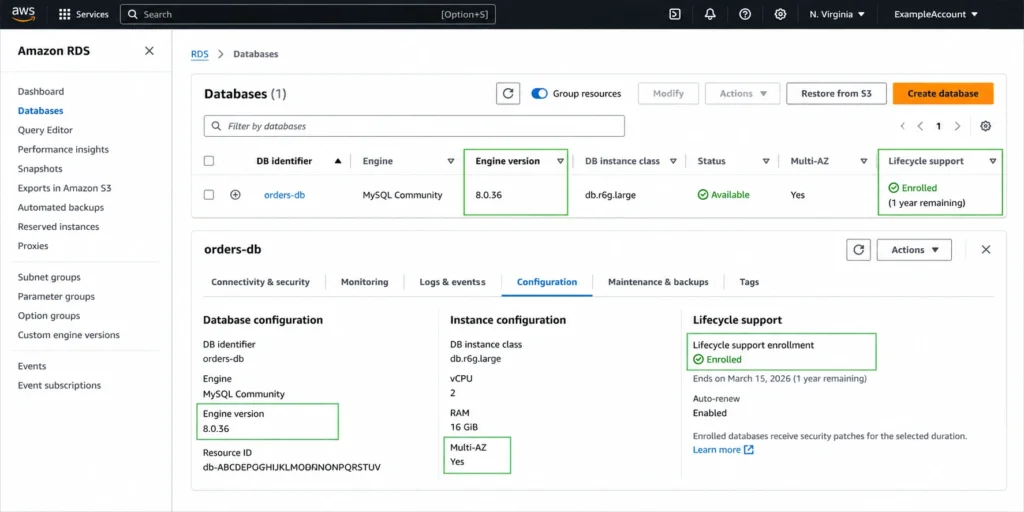
Use the AWS CLI to list database versions, classes, Multi-AZ status, replicas, and lifecycle-support settings:aws rds describe-db-instances \
--query "DBInstances[*].[DBInstanceIdentifier,Engine,EngineVersion,DBInstanceClass,MultiAZ,ReadReplicaDBInstanceIdentifiers,EngineLifecycleSupport]" \
--output table
For every affected database, record:
- DB instance class and vCPU count
- Region
- current engine minor version
- Multi-AZ configuration
- number of read replicas
- Extended Support lifecycle year
Step 3: Calculate monthly exposure
For each running affected DB instance:Also review disaster-recovery procedures. Snapshots themselves do not incur Extended Support charges, but restoring an old snapshot to an affected major version can create a running database that does.
How to stop RDS Extended Support charges
1. Upgrade to a supported major version
This is the primary remediation.Move the database to a major version that remains under RDS standard support. Before production migration, test drivers, extensions, parameter groups, application compatibility, replication, and rollback procedures.
For MySQL, AWS supports documented major-version upgrade paths. Review the current AWS upgrade requirements before selecting the target version.
2. Use Blue/Green Deployments where appropriate
RDS Blue/Green Deployments create a synchronized staging environment where teams can test database changes before switching production traffic.AWS states that switchover typically takes under one minute, although actual duration depends on workload conditions.
For the temporary cost implications of operating both environments, see the RDS Blue/Green deployment cost guide.
3. Use lifecycle settings as a deployment guardrail
For new DB instances, setting EngineLifecycleSupport to open-source-rds-extended-support-disabled prevents RDS Extended Support enrollment.AWS also permits enrollment changes on existing instances. If an existing database is already past standard support, disabling enrollment triggers an automatic major-version upgrade, so test carefully before treating the setting as a cost-control action.
RDS Extended Support action guide
Inventory RDS MySQL and PostgreSQL versions across accounts and Regions.
Verify both the major version and current eligible minor release.
Review billing data for Extended Support charges.
Include Multi-AZ standbys and read replicas in the cost estimate.
Review snapshot restore and disaster-recovery procedures for EOL versions.
Test a supported upgrade target and rollback process.
Upgrade or decommission affected databases.
Reassess RIs or Database Savings Plans only after the new baseline is stable.
How Usage.ai helps manage RDS Extended Support costs
We surface RDS Extended Support exposure separately from normal database compute, helping teams see the financial impact of delaying an engine upgrade. Because Reserved Instances do not reduce the Extended Support surcharge, the priority is to upgrade to a supported version and eliminate that cost.With Flex Insured Commitments, teams can get the up to 69% savings of a 3-year Amazon RDS Reserved Instance commitment with none of the commitment.
If an eligible Flex Commitment costs more than equivalent pay-as-you-go usage, we provide cashback protection to help cover the difference. See our cashback documentation for details.
The result is a managed commitment strategy that helps organizations pursue available AWS database discounts while reducing long-term commitment exposure.
For the eligible RDS compute that remains, Usage.ai Flex Reserved Instances can automate reservation purchasing and optimize the portion of spend that can be discounted. Our fee is a percentage of realized savings only.
Review your RDS savings
The first priority is to eliminate the non-discountable Extended Support surcharge. Once the upgraded environment is stable, the remaining RDS compute can be evaluated for commitment-based savings.Review Extended Support exposure, RDS usage, and commitment coverage before committing.
Frequently asked questions
What is RDS Extended Support pricing?
RDS Extended Support is an additional lifecycle-support charge for eligible MySQL and PostgreSQL versions after RDS standard support ends. Provisioned databases are billed per vCPU-hour based on lifecycle year and Region.
Which RDS versions are currently in Extended Support?
As of August 25, 2026, affected major versions include RDS MySQL 5.7 and 8.0 and RDS PostgreSQL 11, 12, and 13. Eligibility also depends on running an AWS-supported Extended Support minor release.
Does Multi-AZ double RDS Extended Support cost?
For a traditional Multi-AZ DB instance deployment with one standby, both affected instances incur Extended Support charges. Multi-AZ DB clusters and replica-heavy topologies can have more than two billed instances.
Do RDS Reserved Instances cover Extended Support?
No. RDS RI discounts apply to eligible database compute, not the separate RDS Extended Support surcharge.
How do I avoid RDS Extended Support charges?
Upgrade to a major engine version covered by RDS standard support or retire the affected running database when appropriate. Test production upgrades carefully and verify the target version against the current AWS lifecycle calendar.




