
 AWS
AWS Microsoft Azure
 Google Cloud

This guide explains who qualifies for the Amazon RDS Free Tier, what’s included, what isn’t, and how to avoid unexpected charges as your database usage grows.
Which AWS RDS Free Tier Applies to You?
| AWS account | Amazon RDS Free Tier |
|---|---|
| Created before July 15, 2025 | Traditional 12-month Free Tier with monthly usage allowances for eligible Amazon RDS resources. |
| Created on or after July 15, 2025 | Choose between a Free account plan and Paid account plan, both of which include promotional AWS credits for eligible AWS services, including Amazon RDS. |
For newer AWS accounts, eligible Amazon RDS charges consume promotional AWS credits instead of monthly resource allowances.
Before launching an Amazon RDS instance, verify which Free Tier model applies to your account and review the latest AWS Free Tier documentation. Review the latest AWS Free Tier page.
What Does the Amazon RDS Free Tier Include?
Regardless of the model, only eligible Amazon RDS resources qualify. Unsupported configurations or usage beyond the applicable limits are billed at standard Amazon RDS pricing.
For AWS accounts created before July 15, 2025, the traditional Amazon RDS Free Tier includes the following monthly benefits for the first 12 months after account creation:
| Resource | Free Tier allowance |
|---|---|
| DB instance usage | Up to 750 hours of eligible micro DB instance usage per month |
| Database storage | Up to 20 GB of General Purpose SSD (gp2) storage |
| Automated backup storage | Up to 20 GB of automated backup storage |
For AWS accounts created on or after July 15, 2025, eligible Amazon RDS usage consumes promotional AWS credits instead of monthly resource allowances. The amount of free usage depends on your database configuration, AWS Region, and remaining promotional credit balance.
Also read: RDS vs Self-Managed Database on EC2
Which Amazon RDS Database Engines Are Eligible?
- MySQL
- PostgreSQL
- MariaDB
- Microsoft SQL Server Express Edition
Always review the latest Amazon RDS pricing and AWS Free Tier documentation before launching a database, as supported engines and Free Tier benefits may change over time.
Does the Free Tier Cover Multiple Databases?
For example, under the traditional 12-month Free Tier, the 750 instance hours per month are shared across all eligible Amazon RDS instances.
- Running one eligible DB instance continuously for a month generally stays within the allowance.
- Running multiple eligible instances at the same time consumes the shared limit more quickly.
What Isn't Included in the Amazon RDS Free Tier?
Check the underlying RDS pricing before relying on a credit balance or promotional allowance. The guide and calculator show how instance compute, storage, backups and availability contribute to the bill when eligible credits do not cover them.
The traditional 12-month Amazon RDS Free Tier covers only eligible DB instances, storage, and automated backups within the monthly limits. Features outside these allowances are billed separately.
For accounts created on or after July 15, 2025, eligible charges for these features may be offset using promotional AWS credits while credits remain available, subject to AWS’s current Free Tier terms.
| Feature | Traditional 12-month Free Tier | Free account plan / Paid account plan |
|---|---|---|
| Multi-AZ deployments | Not included | Eligible charges may consume promotional AWS credits |
| Amazon Aurora | Not included | Eligible Aurora usage may consume promotional AWS credits |
| Read Replicas | Not included | Eligible charges may consume promotional AWS credits |
| Provisioned IOPS (io1/io2) storage | Not included | Eligible charges may consume promotional AWS credits |
| Storage beyond included limits | Not included | Eligible charges may consume promotional AWS credits |
| Backup storage beyond the no-charge allowance | Not included | Eligible charges may consume promotional AWS credits |
| RDS Proxy | Not included | Eligible charges may consume promotional AWS credits |
| Public IPv4 addresses | Not included | Standard public IPv4 charges apply where applicable |
| Cross-Region snapshot copies | Not included | Eligible charges may consume promotional AWS credits |
How Amazon RDS Free Tier Billing Works
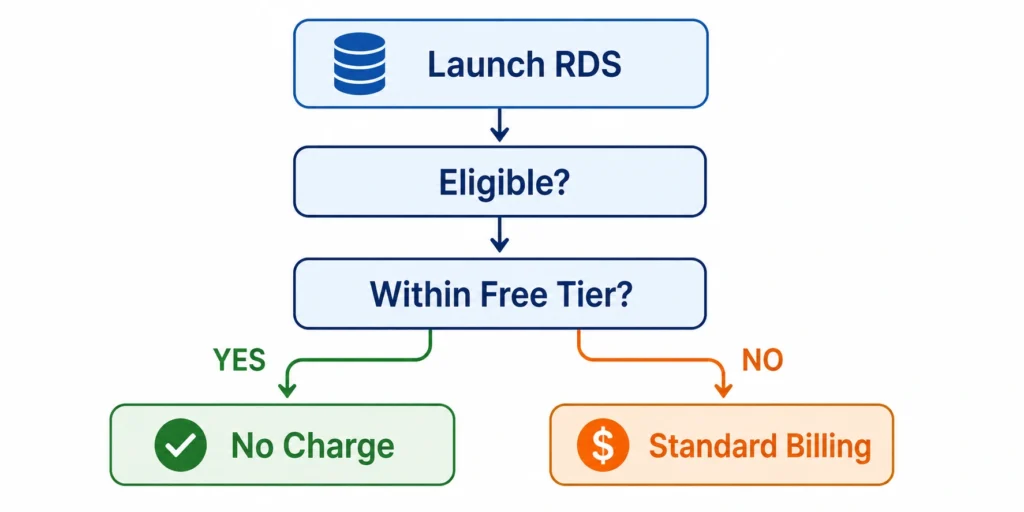
For AWS accounts created before July 15, 2025, AWS applies the traditional 12-month Free Tier by tracking eligible DB instance hours, storage, and automated backup usage against the monthly Free Tier limits. Usage beyond those limits is billed at the standard Amazon RDS rates.
For AWS accounts created on or after July 15, 2025, eligible Amazon RDS charges consume promotional AWS credits instead of fixed monthly resource allowances. Charges are billed at standard Amazon RDS rates only after promotional credits are no longer available or no longer apply.
Example: Shared Usage Under the Traditional Free Tier
| Resource | Usage | Free Tier status |
|---|---|---|
| DB Instance 1 | Runs continuously for the month | Covered within the 750-hour monthly allowance |
| DB Instance 2 | Runs continuously alongside DB Instance 1 | Combined usage exceeds 750 hours, resulting in billable compute |
| Database storage | 18 GB (gp2) | Covered under the 20 GB allowance |
| Automated backups | 12 GB | Covered under the applicable Free Tier allowance |
What Happens After the Amazon RDS Free Tier Ends?
- Traditional 12-month Free Tier: Eligible Amazon RDS resources continue running and are billed at the standard On-Demand rates unless you stop or delete them.
- Free account plan: The plan ends when six months have passed since account creation or your promotional credits are exhausted, whichever comes first. To continue using AWS services, you must upgrade to a Paid account plan. Any remaining eligible promotional credits may continue to apply until their stated expiration date.
Amazon RDS Free Tier Exit Checklist
| Review area | Why it matters |
|---|---|
| DB instance size | Ensure the selected instance class still matches your workload. |
| Storage utilization | Remove unused data and review storage growth before paying for additional capacity. |
| Deployment type | Confirm whether your workload really requires Multi-AZ or other production features. |
| Backup retention & snapshots | Retained backups and manual snapshots continue to consume storage and may incur charges. |
| Idle databases | Stop or delete databases that are no longer needed. Remember that stopped RDS instances automatically restart after 7 consecutive days, and storage, backup storage, and Provisioned IOPS charges continue while stopped. |
| Public IPv4 addresses | Publicly accessible RDS instances may incur standard public IPv4 charges. Verify that a public IP is required. |
| Monitoring features | Review optional services such as RDS Proxy, Enhanced Monitoring, and Performance Insights to ensure they still provide value. |
Should You Consider Reserved DB Instances or Database Savings Plans?
- Reserved DB Instances are suited to stable, predictable RDS deployments and apply to specific DB instance attributes.
- AWS Database Savings Plans provide a flexible, usage-based commitment that applies across eligible database services, including eligible Amazon RDS usage, without requiring you to reserve a specific DB instance configuration.
Before purchasing any commitment, review your database utilization and expected growth to ensure the commitment matches your long-term usage patterns.
Example: Estimating Amazon RDS Costs After the Free Tier
- One continuously running Single-AZ Amazon RDS MySQL DB instance
- 30 GB of General Purpose SSD (gp3) storage
- Automated backups within the no-charge backup storage allowance
- DB instance compute at the standard On-Demand rate
- Database storage
- Backup storage only if it exceeds the applicable no-charge allowance
- Any optional features enabled, such as Multi-AZ, RDS Proxy, or Provisioned IOPS storage
Unexpected costs usually result from infrastructure changes such as storage growth, production-grade configurations, or unused resources that remain running after development is complete.
Optimize Amazon RDS Costs with Usage.ai
Usage.ai continuously analyzes Amazon RDS usage alongside the rest of your AWS environment to identify commitment opportunities and optimize coverage as workloads evolve.
With Flex Insured Commitments, teams can capture up to 69% savings available through Amazon RDS Reserved DB Instances without taking on the full risk of long-term commitments.
If a commitment ever costs more than the equivalent on-demand usage, Cashback Protection covers the difference, helping organizations maximize savings while retaining the flexibility to adapt as infrastructure changes.
Get a free AWS Savings Analysis to optimize your commitments, maximize savings, and reduce commitment risk.
Frequently asked questions
Is Amazon RDS free forever?
No. Amazon RDS is not a permanently free service. Eligible AWS customers receive Free Tier benefits for a limited period or promotional AWS credits, depending on when their AWS account was created. Once your Free Tier benefits expire or your promotional credits are exhausted, Amazon RDS usage is billed at the standard on-demand rates.
Does the Amazon RDS Free Tier include Amazon Aurora?
No. Amazon Aurora has a separate pricing model and is not included in the traditional Amazon RDS Free Tier. If you deploy an Aurora cluster, you should expect charges based on Aurora compute, storage, and other applicable pricing components.
What database engines are supported under the Amazon RDS Free Tier?
The traditional Amazon RDS Free Tier supports eligible configurations for MySQL, PostgreSQL, MariaDB, and Microsoft SQL Server Express Edition. Eligibility depends on the database engine, edition, licensing model, and deployment configuration.
What happens if I exceed the Amazon RDS Free Tier limits?
If your database exceeds the applicable Free Tier limits, the additional usage is billed at the standard Amazon RDS on-demand rates.
Common reasons include running multiple database instances, exceeding the included storage or backup allocation, enabling Multi-AZ deployments, or using features that are not covered by the Free Tier.
How can I monitor my Amazon RDS costs?
AWS provides several tools to help monitor Amazon RDS spending, including AWS Cost Explorer, AWS Billing and Cost Management, and AWS Budgets. Reviewing these regularly allows you to track database usage, identify cost trends, and receive alerts before charges increase unexpectedly.
AWS Budgets and AWS Cost Anomaly Detection can also help notify you when Amazon RDS spending exceeds expected levels.




