
 AWS
AWS Microsoft Azure
 Google Cloud

This guide walks you through coverage, utilization, and commitment sizing, with a worked example to help you choose a baseline and check what happens to your savings if usage falls.
What are AWS Savings Plans?
AWS Savings Plans are a pricing model that gives you lower rates on eligible usage when you commit to spending a fixed dollar amount per hour for a set term. AWS automatically applies the discounted rates to matching usage, up to your hourly commitment.For example, a $5-per-hour commitment means you agree to spend $5 every hour, measured at Savings Plans rates. It does not mean you save $5 per hour or cover only $5 of usage at On-Demand prices.
You still pay the commitment when you use less. Any remaining eligible usage beyond what the plan covers is charged at On-Demand rates, assuming no other commitment applies. Unused commitment cannot carry forward to another hour.
Which AWS Savings Plans type fits your usage?
AWS offers four types of Savings Plans. The right choice depends on which services you use and how much flexibility you need as your workloads change| Plan type | Eligible usage | Flexibility | Maximum advertised discount |
|---|---|---|---|
| Compute Savings Plans | Eligible EC2, Fargate, and Lambda usage | Across EC2 families, sizes, Regions, operating systems, and tenancy | Up to 66% |
| EC2 Instance Savings Plans | Eligible EC2 usage within one selected instance family and Region | Across sizes, operating systems, and tenancy within that family and Region | Up to 72% |
| Database Savings Plans | Eligible usage across supported database services, including RDS, Aurora, and DynamoDB | Across supported services, engines, instance configurations, and Regions | Up to 35% |
| SageMaker AI Savings Plans | Eligible SageMaker AI instance usage | Across instance families, sizes, Regions, and components such as training and inference | Up to 64% |
Choose Compute Savings Plans when eligible workloads may move across EC2 families or Regions, or when you use Fargate or Lambda.
Choose EC2 Instance Savings Plans when stable EC2 usage is likely to remain in one instance family and Region.
Choose Database Savings Plans for sustained eligible database usage.
Choose SageMaker AI Savings Plans for sustained eligible SageMaker AI instance usage.
Compute, EC2 Instance, and SageMaker AI plans offer one-year or three-year terms, with No Upfront, Partial Upfront, or All Upfront payment options. Database Savings Plans have a one-year term with No Upfront payment only.
For compute workloads, the main tradeoff is flexibility. A Compute Savings Plan can continue applying when eligible usage moves between EC2 families or Regions. An EC2 Instance Savings Plan stays tied to the selected family and Region, so compare actual rates alongside your migration plans.
The percentages above are maximum advertised discounts, not guaranteed savings. Check the rates and eligibility for your specific workloads before sizing a purchase. For database workloads, see our Database Savings Plans guide.
How do AWS Savings Plans affect your hourly bill?
Your AWS Savings Plans bill includes the hourly commitment plus any usage left at On-Demand rates. A real pricing example makes this easier to follow.Let’s walk through an example using rates shown on the AWS Compute Savings Plans pricing page. The screenshot below records the prices and settings used in our calculations.
| Setting | Configuration |
|---|---|
| Instance |
a1.large, Linux, shared tenancy
|
| Region | US East (N. Virginia) |
| Plan | Compute Savings Plans |
| Term and payment | One year, No Upfront |
| On-Demand rate | $0.051 per instance-hour |
| Savings Plans rate | $0.0369 per instance-hour |
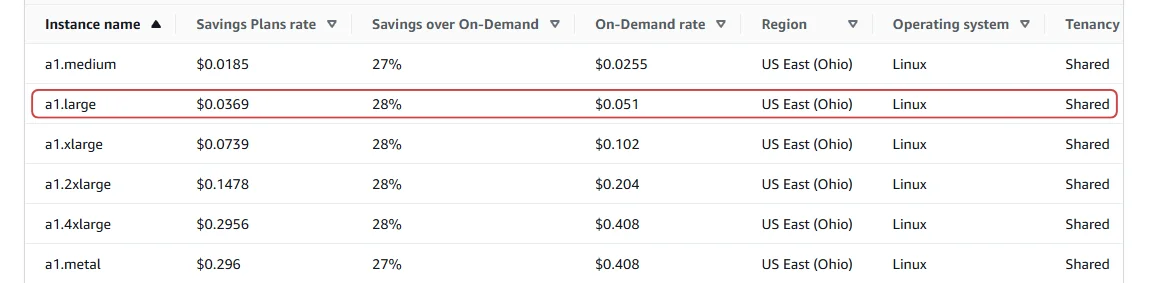
Suppose you run 10 identical instances for one full hour, with no existing commitments. You choose a commitment covering eight of them.
| Calculation | Hourly amount |
|---|---|
| All 10 instances at On-Demand prices | 10 × $0.051 = $0.5100 |
| Commitment covering eight instances | 8 × $0.0369 = $0.2952 |
| Two remaining instances at On-Demand prices | 2 × $0.051 = $0.1020 |
| Total with the Savings Plan | $0.2952 + $0.1020 = $0.3972 |
| Saving compared with On-Demand | $0.5100 − $0.3972 = $0.1128 |
Note: This hypothetical workload uses the rates documented above. Calculations include instance compute charges only; prices may change.
AWS Savings Plans coverage versus utilization
AWS Savings Plans coverage tells you how much eligible usage receives discounted pricing. Utilization tells you how much of your purchased commitment you use. Reading them together helps you see whether you have uncovered usage, unused commitment, or both.Let’s continue with our 10-instance example and the $0.2952 hourly commitment that covers eight instances.
Coverage uses On-Demand prices to measure the share covered. Eight instances have an On-Demand value of $0.408, while all 10 cost $0.510:
Utilization uses Savings Plans rates to measure commitment consumed. Those eight instances consume the full $0.2952:
Now see what happens when fewer instances run for a full hour:
| Instances running | Coverage | Utilization | What it means |
|---|---|---|---|
| 10 | 80% | 100% | Your commitment is fully used, with two instances billed On-Demand. |
| 8 | 100% | 100% | All eligible usage is covered, and the commitment is fully used. |
| 6 | 100% | 75% | All eligible usage is covered, but a quarter of the commitment goes unused. |
How to calculate a conservative AWS Savings Plans commitment baseline
Size AWS Savings Plans around eligible usage you expect to maintain throughout the term, after accounting for existing commitments and planned changes. The aim is to choose an amount your business can consistently use, including during quieter periods.1. Review usage during quieter hours
Look beyond monthly averages. Check nights, weekends, and seasonal patterns to understand how much eligible usage continues when demand drops.If 10 instances run during business hours but only six remain overnight, compare commitments covering six and eight to assess the savings and unused commitment.
2. Account for existing commitments
Before adding a purchase, review what your current AWS Savings Plans and Reserved Instances already cover and when they expire.AWS applies EC2 Reserved Instances first, followed by EC2 Instance Savings Plans and then Compute Savings Plans. Its discount application rules explain the order. Calculate the additional commitment against eligible usage that remains uncovered.
Also establish the account scope before sizing a purchase. Under AWS’s Purchase Analyzer calculation rules, management-account analyses consider usage across organization accounts with Savings Plans discount sharing enabled. Member-account analyses evaluate each account in isolation.
Review your organization’s discount-sharing settings, including any group restrictions. Do not assume a commitment benefits only the workload or account that prompted the purchase.
3. Check planned workload changes
Ask your engineering team about upcoming rightsizing, shutdowns, and migrations. Usage that runs consistently today may shrink or move outside the selected plan’s scope.Review opportunities for EC2 pricing and cost optimization before committing to resources your team expects to reduce.
4. Calculate the baseline at Savings Plans rates
Suppose your review identifies six a1.large instances as a conservative baseline, with no existing commitments covering them. Using the same configuration and $0.0369 Savings Plans rate documented in our pricing example:| Calculation | Hourly amount |
|---|---|
| Six instances at On-Demand prices | 6 × $0.051 = $0.3060 |
| Six instances at Savings Plans prices | 6 × $0.0369 = $0.2214 |
For mixed workloads, calculate each eligible usage component at its applicable Savings Plans rate. Different configurations can receive different discounts, so avoid applying one assumed percentage to the entire baseline.
Finally, test the amount using AWS Savings Plans Purchase Analyzer. Compare smaller and larger commitments, then review their estimated savings, coverage, and utilization.
What happens when AWS Savings Plans usage falls?
When usage falls, your AWS Savings Plans commitment remains payable. Unused commitment reduces your savings, and a large enough drop can make the plan cost more than paying On-Demand for the same usage.Let’s return to the original $0.2952 hourly commitment, which covers eight a1.large instances at the captured Savings Plans rate of $0.0369 each. This is the larger purchase we evaluated earlier, before considering a six-instance baseline.
| Instances running for the full hour | Cost entirely On-Demand | Cost with the commitment | Saving or additional cost |
|---|---|---|---|
| 10 | $0.5100 | $0.3972 | Save $0.1128 |
| 8 | $0.4080 | $0.2952 | Save $0.1128 |
| 6 | $0.3060 | $0.2952 | Save $0.0108 |
| 5 | $0.2550 | $0.2952 | Pay $0.0402 more |
For this uniform-rate example, break-even utilization is the Savings Plans rate divided by the On-Demand rate:
The timing matters too. Under AWS’s hourly commitment rules, unused amounts cannot carry forward. Higher usage tomorrow cannot recover unused commitment today.
Before buying, test what happens if resources are switched off, resized, or moved outside the plan’s scope. If demand has already dropped, reassess the remaining eligible usage before buying more Savings Plans when usage falls.
How to test your AWS Savings Plans baseline before buying
Use AWS Savings Plans Purchase Analyzer to compare your proposed commitment with alternatives before purchasing.It models an immediate purchase against a selected lookback period within the past 60 days and shows estimated cost, savings, coverage, and utilization; it does not forecast future usage.
In AWS Billing and Cost Management → Savings Plans → Purchase Analyzer, select the plan type, term, payment option, and historical period for your analysis. AWS’s purchase analysis guide explains the available settings.
For our example, compare these two amounts:
| Proposed commitment | What you are testing |
|---|---|
| $0.2214/hour | A smaller purchase sized around six consistently running instances |
| $0.2952/hour | A larger purchase sized around eight instances, with more exposure during quieter hours |
When reviewing the analysis results, look at estimated savings alongside coverage and utilization. Higher coverage alone does not establish that the larger purchase is better. Check whether its additional savings justify the unused commitment during lower-usage hours.
Calculate a conservative commitment baseline
Before purchasing, confirm these five things:
Your baseline reflects eligible usage you reasonably expect to maintain.
You have reviewed existing Savings Plans and Reserved Instances, their expiration dates, and any scheduled purchases.
Your analysis uses the intended AWS Organizations account scope and discount-sharing settings.
You have accounted for planned shutdowns, rightsizing, and migrations.
You understand the potential savings and unused commitment under a lower-usage scenario.
How Usage.ai helps manage AWS Savings Plans
We help teams evaluate and manage AWS Savings Plans and Reserved Instances as usage changes. Our platform brings commitment recommendations and savings reporting together so you can review proposed purchases and track their financial impact.Choose Copilot to review recommendations and approve purchases, or Autopilot to automate purchasing within your configured settings. We adjust future purchasing decisions as usage changes; an existing AWS commitment’s terms remain fixed.
With our Flex Insured Commitments, eligible teams can access up to 57% savings associated with three-year AWS commitments, with Cashback protection for qualifying underutilization.
If an eligible commitment costs more than the equivalent On-Demand usage, we provide Cashback to help cover the difference.
See how Usage.ai helps evaluate your AWS usage, existing commitments, and savings opportunities before purchasing.
Frequently asked questions
What is the current rate for AWS Savings Plans?
There is no single AWS Savings Plans rate. Your price depends on the plan type, eligible service, resource configuration, Region, term, and payment option.
Check the AWS Savings Plans pricing table using your workload’s settings. The advertised “up to” discount is a maximum, rather than the rate every workload receives.
What is the difference between Compute Savings Plans and EC2 Instance Savings Plans?
Compute Savings Plans apply to eligible EC2, Fargate, and Lambda usage, with flexibility across EC2 instance families and Regions.
EC2 Instance Savings Plans apply within one selected EC2 family and Region, while allowing changes to size, operating system, and tenancy. AWS advertises maximum discounts of 66% and 72%, respectively, in its Savings Plans type comparison.
What is the difference between Reserved Instances and Savings Plans in AWS?
For EC2, Savings Plans commit you to spending a dollar amount per hour, while Reserved Instances provide discounts on usage matching specified instance attributes.
Flexibility depends on the offering. Compute Savings Plans can follow eligible usage across families and Regions, while Standard and Convertible RIs have different modification and exchange rules.
Do AWS Savings Plans cover Amazon RDS?
Yes. Database Savings Plans cover eligible Amazon RDS usage; Compute and EC2 Instance Savings Plans do not cover RDS service charges.
Database Savings Plans have a one-year term with No Upfront payment and offer up to 35% off eligible usage.
How can I calculate potential AWS Savings Plans savings?
Use AWS Savings Plans Purchase Analyzer to model a recommended purchase, a custom hourly commitment, or a target coverage percentage. It estimates savings, coverage, and utilization using historical usage.
Compare alternative amounts through AWS Purchase Analyzer, then account for planned workload changes before deciding what to buy.




