
 AWS
AWS Microsoft Azure
 Google Cloud

Key Takeaways
|
EC2 Savings Plans require a payment option decision at purchase. Should you go All Upfront, Partial Upfront or No Upfront? This single choice affects your discount rate and cash flow structure for the entire 1–3 year term.
All Upfront delivers the highest discount but requires full payment immediately, for example, $100K, $500K, or more depending on commitment size. No Upfront preserves capital; its price premium depends on the workload and purchase terms. Partial Upfront sits in the middle with at least 50% upfront, monthly billing for the remainder, mid-tier discount.
The core question is on a $100K commitment, how much savings am I sacrificing for cash flow flexibility? And are there alternatives that deliver All Upfront-tier discounts without the upfront payment?
This post explains the trade-offs. You’ll see real discount rate comparisons, worked cash flow examples, a decision framework based on capital availability and workload stability, and why Usage.ai Flex Commitments deliver 40–60% EC2 savings with zero upfront payment.
What Are EC2 Savings Plan Payment Options?
EC2 Savings Plans lock you into a specific dollar-per-hour compute commitment for 1 or 3 years. You commit to spend a fixed amount per hour (e.g., $5/hour, $50/hour) on compute resources. AWS applies discounted rates to your EC2, Fargate, and Lambda usage up to that commitment amount. Usage beyond the commitment gets billed at On-Demand rates.
Choose the plan type and hourly commitment before comparing payment options. Our AWS Savings Plans guide explains those decisions.
So, at the time of purchase, you choose the payment structure and it locks in permanently.
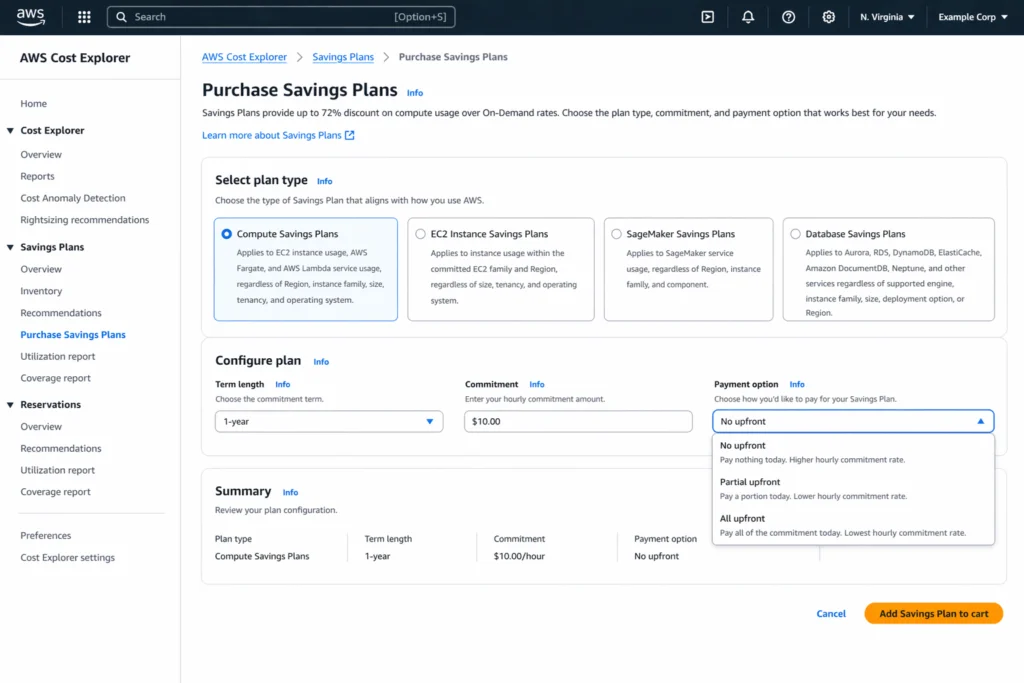
- All Upfront: Pay the entire commitment amount in a single upfront transaction. Zero monthly billing for the Savings Plan itself. Delivers the highest discount rate.
- Partial Upfront: Pay at least 50% of the commitment amount upfront. AWS bills the remaining hourly commitment monthly; invoice amounts vary with the hours in the billing month. Delivers a mid-tier discount rate.
- No Upfront: Pay nothing at purchase. AWS bills the hourly commitment monthly, so invoice amounts vary with month length. Delivers the lowest discount rate.
The payment option affects your discount rate and cash flow structure, but not your coverage scope. Both Compute Savings Plans and EC2 Instance Savings Plans support all three payment options. Once you click “Add to cart,” that structure applies for the full term. AWS does not normally allow payment-option changes mid-term. A limited return policy applies to eligible recent purchases; check AWS’s current conditions.
Which Savings Plans Cover EC2?
Two Savings Plans types cover EC2: Compute Savings Plans and EC2 Instance Savings Plans. Both support all three payment options, but differ in coverage scope and discount rates.
- Compute Savings Plans cover EC2, Fargate, and Lambda usage across all instance families, regions, and operating systems. You commit to a dollar-per-hour spend, and AWS applies discounted rates to any qualifying compute resource. It offers maximum flexibility. AWS advertises savings up to 66% versus On-Demand; actual rates vary.
- EC2 Instance Savings Plans cover EC2 usage for a specific instance family in a specific region. You commit to a dollar-per-hour spend on one instance family (e.g., m5 family in us-east-1), and AWS applies discounted rates to any size within that family. It offers higher discount rates in exchange for reduced flexibility. AWS advertises savings up to 72% versus On-Demand; actual rates vary.
However, both plan types support All Upfront, Partial Upfront, and No Upfront identically. EC2 Instance Savings Plans start with higher baseline discount rates, so an EC2 Instance plan with No Upfront may deliver similar savings to a Compute plan with All Upfront.
How Do EC2 Savings Plans Compare to Reserved Instances for Payment Options?
EC2 Savings Plans and Reserved Instances both offer All Upfront, Partial Upfront, and No Upfront payment options. The only key difference is Savings Plans provide more flexibility in how the commitment applies.
Coverage scope:
- Reserved Instances: Zonal RIs match the selected Availability Zone and instance attributes. Regional Linux/UNIX RIs with default tenancy can provide size flexibility within the family; RIs do not all require one size and AZ.
- EC2 Instance Savings Plans: Lock you into an instance family and region, but apply to any size. An m5 plan in us-east-1 covers m5.large, m5.xlarge, m5.2xlarge; any size, any AZ.
- Compute Savings Plans: Apply to any instance family, any region, plus Fargate and Lambda.
Discount rates:
- Standard RIs (3-year All Upfront) offer up to 72% discount.
- EC2 Instance Savings Plans offer up to 72%, depending on the workload and purchase terms.
- Compare matching AWS rate quotes; EC2 Instance Savings Plans and Standard RIs can offer equivalent savings.
If you’re confident in a specific instance type and AZ, RIs with All Upfront deliver maximum discount. If your workload may shift instance sizes, Savings Plans with All Upfront deliver nearly the same discount with more flexibility. For cash flow preservation, both offer No Upfront, but Savings Plans provide better value because flexibility offsets the slightly lower discount rate.
For complete comparison: Reserved Instances vs Savings Plans.
How Does All Upfront Work for EC2 Savings Plans?
All Upfront requires full payment at purchase. A $100,000 3-year EC2 Instance Savings Plan charges $100,000 immediately. You receive the highest available discount rate in exchange.
After purchase, your monthly AWS bill includes zero charges for the Savings Plan commitment itself. Your bill shows only On-Demand charges for usage exceeding the commitment and other AWS services.
Cash Flow Impact: All Upfront concentrates the entire multi-year payment into a single transaction. For a $500K 3-year plan, your bill shows a $500K charge immediately. This requires a pre-allocated CapEx budget or finance sign-off for large upfront infrastructure spending.
Best for: Organizations with dedicated cloud CapEx budgets, stable workloads with zero scale-down risk, FinOps teams confident in long-term utilization forecasts.
How Does Partial Upfront Work for EC2 Savings Plans?
Partial Upfront splits payment between an upfront charge and monthly billing. AWS requires at least 50% upfront, with the remainder billed monthly. The exact split varies by plan type, region, and term. The pricing calculator shows the specific split when you select Partial Upfront.
Example: $100,000 3-Year Partial Upfront (60/40 Split)
- Upfront charge: $60,000
- Remaining payment: $40,000 across the term; approximately $1,111.11/month on average, with actual invoices based on hours
- Total cost: $100,000
Monthly billing continues for the full term regardless of utilization. If your workload drops and you’re using only 50% of the commitment, you still owe the remaining hourly commitment, billed monthly.
Discount Rate: Partial Upfront delivers a mid-tier discount, typically 1–3 percentage points lower than All Upfront, and 1–2 percentage points higher than No Upfront.
Best for: Organizations with some upfront capital but not enough for 100%, finance policies requiring monthly OpEx treatment for a portion of spending.
How Does No Upfront Work for EC2 Savings Plans?
No Upfront requires zero payment at purchase. AWS bills the hourly commitment each month. A $100,000 total commitment averages about $2,777.78/month across 36 months; actual invoices depend on billing-period hours.
Cash Flow Impact: No Upfront preserves capital at purchase time. For the same workload, the applicable No Upfront rate differs from the All Upfront rate; payments are spread across monthly invoices. This is startup-friendly and finance-policy-friendly for organizations with strict CapEx vs OpEx policies.
Discount Rate: No Upfront delivers the lowest discount rate but still saves significantly compared to On-Demand. Use the applicable AWS quote to calculate the discount and the difference from All Upfront.
Verify at Amazon Savings Plans Pricing as rates change.
Best for: Startups and high-growth companies prioritizing cash runway, organizations with finance policies restricting upfront CapEx spending, teams testing Savings Plans for the first time.
EC2 Savings Plan Payment Options: Discount Rate Comparison Table
The table below compares payment structures and discount rate tiers. Exact discount percentages vary by Savings Plan type, region, instance family, and term length.
| Payment Option | Upfront Payment | Monthly Billing | Discount Rate Tier | Typical Discount Differential vs No Upfront |
| All Upfront | 100% of commitment | $0 for SP (overages still billed) | Highest | Varies by workload and term |
| Partial Upfront | at least 50% of commitment | Remaining hourly commitment × hours in month | Mid-tier | Varies by workload and term |
| No Upfront | $0 | Hourly commitment × hours in month | Lowest | Baseline (0%) |
All three payment options deliver the same coverage scope and commitment flexibility and all are locked for the full term. The difference is purely cash flow structure and discount rate.
Worked Example: The Same 20-Instance Fleet Across All Three Payment Options
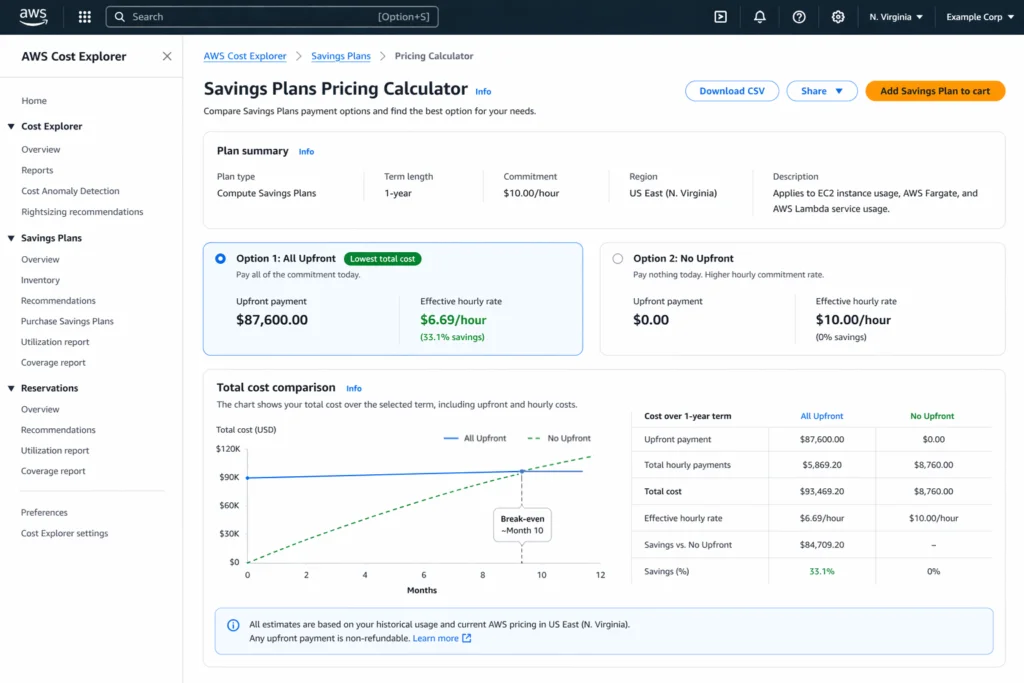
Verified October 15, 2026 against AWS’s public pricing catalog: 20 Linux, shared-tenancy m5.xlarge instances in US East (N. Virginia), continuously used for 26,280 hours over a three-year EC2 Instance Savings Plan. On-Demand is $0.192 per instance-hour, or $100,915.20 for the same compute. Storage, transfer, tax and financing costs are excluded.
| Payment option | Effective rate per instance-hour | Upfront payment | Average remaining monthly payment | Total three-year compute cost | Saving vs On-Demand |
|---|---|---|---|---|---|
| All Upfront | $0.072 | $37,843.20 | $0 | $37,843.20 | $63,072.00 (62.5%) |
| Partial Upfront (50% paid upfront) | $0.077 | $20,235.60 | $562.10 | $40,471.20 | $60,444.00 (59.9%) |
| No Upfront | $0.083 | $0 | $1,211.80 | $43,624.80 | $57,290.40 (56.8%) |
Monthly figures use 730 hours as an average; invoices vary with month length. Savings assume full use of the commitment throughout the term. Partial Upfront assumes the minimum 50% upfront payment.
All Upfront saves $5,781.60 more than No Upfront in this example, in exchange for paying $37,843.20 at purchase. Compare the value of retained cash and the risk of unused commitment before choosing. If two options had identical total cost for identical usage, they would have identical dollar savings; payment timing alone does not create extra savings.
Source: AWS Savings Plans pricing, checked against the AWS public price list published October 13, 2026. Calculate discounts from the same On-Demand baseline.
Should I Choose All Upfront, Partial Upfront, or No Upfront for EC2 Savings Plans?
The decision depends on three factors: capital availability, workload stability, and organizational finance policies.
Choose All Upfront When:
- You have allocated CapEx budget for multi-year cloud commitments
- Workload is stable and predictable with minimal underutilization risk
- Maximizing absolute discount dollars is the primary goal
- You operate at scale with dedicated FinOps teams monitoring utilization daily
Choose Partial Upfront When:
- You want better-than-No-Upfront discount rates but lack full upfront capital
- Finance policy requires monthly OpEx distribution for a portion of the commitment
- You’re balancing discount maximization with cash flow constraints
Choose No Upfront When:
- Cash flow preservation is the top priority (startups, high-growth companies)
- Finance policy classifies cloud spend as OpEx and restricts CapEx
- Workload predictability is uncertain; spreading payment reduces commitment regret risk
- You’re testing Savings Plans for the first time with minimal upfront exposure
| THE HIDDEN TRADE-OFF
All three payment options carry the same commitment inflexibility risk. If your workload drops 40% mid-term, you’re locked into the same dollar-per-hour commitment regardless of payment option. All Upfront concentrates this risk into a large upfront payment. No Upfront distributes the same risk across monthly billing. Neither payment option protects against underutilization. |
Can You Change Payment Options After Purchase?
No. Payment option is locked at purchase and cannot be modified. AWS does not support switching from No Upfront to All Upfront mid-term, converting Partial Upfront monthly charges to a lump-sum payment, or canceling a Savings Plan to repurchase with a different payment option.
Once you click “Add to cart” with a specific payment option selected, that structure applies for the full 1-year or 3-year term. The only way to change payment options is to wait for the current term to expire and purchase a new Savings Plan with the desired option.
How Does Recommendation Timing Affect Savings?
Check the recommendation timestamp and refresh it after a material workload change. Payment timing does not remove the need to forecast eligible hourly usage or account for existing commitments.
Uncovered On-Demand spend is not the same as avoidable cost. For an illustrative $6,000–$12,000 per day of fully eligible, uncovered usage and a 30% discount, two additional days of coverage save $3,600–$7,200 before fees or unused commitment. The saving is eligible On-Demand spend × discount × days covered. A 72-hour interval versus a 24-hour interval differs by 48 hours (two days), not three.
How Do Usage.ai Flex Commitments Eliminate the Payment Option Trade-Off?
Usage.ai Flex Commitments can provide managed commitment discounts, with payment and protection terms defined by the applicable agreement. Actual savings depend on eligible usage, utilization, fees and the selected offer.
How It Works
- Usage.ai purchases and manages the Savings Plan commitment on your behalf
- You pay nothing upfront. Usage.ai owns the commitment and absorbs any upfront cost
- You receive SP-equivalent discounted rates on covered compute immediately
- Usage.ai’s fee is a percentage of realized savings only. If Usage.ai saves you nothing, you pay nothing
- Eligible commitments may receive cashback when commitment cost exceeds equivalent On-Demand cost for the same usage, under the agreement. Published payout timing is 90 days after accrual.
- The underlying provider commitment remains in force; Flex protection and any exit rights depend on eligibility and the agreement.
The Discount Equivalence
- AWS All Upfront EC2 Instance Savings Plan: Workload-specific discount (up to 72%), full upfront payment, locked for 1–3 years, zero underutilization protection
- AWS No Upfront EC2 Instance Savings Plan: Workload-specific discount, $0 upfront, locked for 1–3 years, zero underutilization protection
- Usage.ai Flex EC2 Savings Plan: Offer-specific discounts and payment terms, with conditional cashback for eligible commitments
When Should I Choose All Upfront vs Managed Commitments?
All Upfront EC2 Savings Plans make sense when:
- You have multi-year cloud CapEx budget already allocated and approved
- Workload is a stable, mission-critical production environment running 24/7/365 with zero scale-down risk
- You operate at scale (>$5M annual AWS spend) with dedicated FinOps teams monitoring utilization daily
- Finance policy requires you to own commitments directly rather than use third-party managed services
Managed commitments (Usage.ai Flex) make more sense when:
- Cash flow preservation is critical (startups, hypergrowth orgs, PE-backed companies)
- Workload has seasonal or unpredictable variation and you want commitment coverage with defined protection against eligible commitment losses
- You lack FinOps headcount to monitor utilization daily and adjust coverage manually
- You want faster recommendation refresh
- You want downside protection on underutilized commitments instead of sunk cost exposure
Compare the provider commitment and managed offer on total cost, cash flow, fees and contractual protection. Flex cashback is not a refund of every unused dollar and does not cancel the underlying AWS commitment.
Book a 15-minute savings assessment with a Usage.ai AWS expert to see exactly how much you’ll save.
Usage.ai manages over $91M in verified cloud savings for customers including Motive, EVGo (NASDAQ: EVGO), Blank Street Coffee, and Secureframe.
Frequently Asked Questions
1. Can I split one Savings Plan across multiple payment options?
No. Each Savings Plan purchase is a single commitment with one payment option. If you want $50K All Upfront coverage and $50K No Upfront coverage, you must purchase two separate Savings Plans with different payment options selected at purchase time.
2. Does the payment option affect which EC2 instances the Savings Plan covers?
No. Payment option affects only the billing structure and discount rate. The coverage scope is independent of the payment option. All Upfront, Partial Upfront, and No Upfront plans with identical hourly commitment amounts and coverage settings apply to the same instances.
3. What happens to my upfront payment if I underutilize an All Upfront Savings Plan?
AWS does not refund upfront payments for underutilized Savings Plans. If you purchase a $100K All Upfront plan and use only 60% of the commitment, the $100K upfront payment is sunk cost.
4. Can I get a refund on a Partial Upfront Savings Plan if I cancel early?
Normally, the remaining commitment is still due. AWS currently permits returns of eligible plans with an hourly commitment of $100 or less, purchased within the past seven days and the same calendar month. Outside that limited policy, underutilization does not release the commitment. See AWS Savings Plans FAQs.
5. Do All Upfront Savings Plans apply to Spot Instances?
No. Savings Plans apply only to On-Demand instances, Fargate tasks, and Lambda invocations. Spot Instances use separate Spot pricing and are not eligible for Savings Plan discounts. If your Spot Instance is interrupted and replaced by On-Demand capacity, the On-Demand portion is Savings Plan-eligible.
6. Is the discount rate differential between All Upfront and No Upfront the same across all regions?
No. The discount rate differential varies by region, instance family, Savings Plan type, and term length. Compare the published rates for the same workload, region, term and plan type; no fixed regional differential applies to every instance.
7. Can I use AWS credits to pay for an All Upfront Savings Plan?
Generally, no. AWS Promotional Credit Terms exclude upfront fees for Savings Plans and Reserved Instances unless AWS authorizes an exception. Do not budget promotional credits against an upfront purchase without confirming the specific credit terms. Eligibility for recurring charges also depends on those terms.
8. How do I see my current Savings Plans and their payment options in the AWS Console?
Go to AWS Cost Management → Savings Plans → Inventory. Each active Savings Plan displays its payment option (All Upfront, Partial Upfront, No Upfront), purchase date, expiration date, hourly commitment amount, and current utilization rate. You cannot change the payment option from this interface.




